Working with Email and Letter Templates
In CMP Converged Monetisation Platform. The MDS Global product that supports customer care and billing for digital service providers., external templates determine the format and style of customer In the context of the Cloud Monetisation Platform, an individual or organisation who has signed an agreement to take goods and services from a service provider. A customer receives a bill associated with one or more subscriptions, and can be a single end user or a large company with many subscriptions assigned to one agreement. correspondence.
In CMP 8, the template solution is based on Apache Velocity 1.7. Templates are created using Velocity Templating Language (VTL). Velocity supports creating correspondence templates in HTML, PDF, RTF and TXT format. Prince is the application used to convert the merged templates into PDF format.
Templates can contain static text, dynamic content (merge fields), images, logos, a header, and a footer.
Templates are stored in a default location so that CMP can access the templates:/var/mdsglobal/sabre-server/templates . If customers want to store templates in another location, CMP must be configured with the new location by setting the comms.document.monitor.templates.location property for the sabre-comms module in the Administration Console An operations web console that allows batch jobs to be scheduled, run manually and monitored. The console also provides for viewing and modification of business and user applicable system configuration.. See the online help for the console for instructions on how to edit module properties.
Once correspondence is processed, a dedicated daemon A computer program that runs as a background process, rather than being under the control of an interactive user. stores the generated letters and emails in long-term storage so that they can be viewed in AgentView The graphical user interface of the CMP that is typically used by Customer Service Agents to access CMP customer and billing data. In versions prior to CMP 8.0, this was called the CMP GUI..
Template User A person with the capability to log in to the CMP GUI software, such as a customer service advisor or agent. Guides
The Velocity user guide is available here: http://velocity.apache.org/engine/devel/user-guide.html
Documentation for Prince is available here: https://www.princexml.com/doc/
Naming Convention for Templates
Templates must be named according to the naming convention <COMMSCODE>-<LANGUAGE>-<DELIVERYMETHOD>-<Format>.vm for example LETT1-EN-LETTER-pdf.vm or MAIL1-EN-EMAIL-html.vm.
Language Codes:
EN= EnglishSP= Spanish
Adding Default Fields and Objects to Templates
Adding Default Fields
To add customer data from a default field to a template, add a leading dollar symbol ($) to the fieldDataMap reference, then in square brackets - [ ] - supply the default field name, enclosed in single quotes:
For example, the following adds account In the Cloud Monetisation Platform, a billing entity that can be used to manage payments on one or more subscriptions or payments for services. An account can hold details such as payments or invoices. balance information to a communication:
For a full list of CMP default fields, see the topic CMP Default Fields.
Adding Objects
Objects such as images, logos, headers, and footers must be stored within the same file-sharing system as the template. Templates reference these objects in order to include them in emails and letters.
Reference an image using imageStoreMap by providing the filename of the referenced image enclosed in single quotes in square brackets as follows:
<img alt="mds_logo.png" src="data:image/png;base64,$imageStoreMap['mds_logo.png']" style="width:304px;height:228px;"/>
Adding External References
You can use externally available objects by referring to a standard URL, for example:
<img src="http://www.mdscem.com/sites/default/files/2016-06/Retail-VNO
Virtual Network Operator. See MVNO or Mobile Virtual Network Operator.-Image-Banner.png">
For a full example of a template, see the section, Example Template Code and Example Email Template.
<body style="font-family: LiberationSans">
<img alt="mds_logo.png" src="data:image/png;base64,$imageStoreMap['mds_logo.png']" style="width:304px;height:228px;"/><BR>
<BR/>
$fieldDataMap['ADDRESS1']<BR/>
$fieldDataMap['ADDRESS2']<BR/>
$fieldDataMap['ADDRESS3']<BR/>
$fieldDataMap['ADDRESS4']<BR/>
$fieldDataMap['ADDRESS5']<BR/>
$fieldDataMap['POSTCODE']<BR/>
$fieldDataMap['FIRSTNAME']<BR/>
$fieldDataMap['SHORTDELIVERYADDRESSNAME']<BR/>
Subscription Number: $fieldDataMap['SUBSCRIPTIONNUMBER']<br/>
Subscription Connected Date: $fieldDataMap['SUBSCONNECTEDDATE']<br/>
Subscription Disconnected Date: $fieldDataMap['SUBSDISCONNECTEDDATE']<br/>
Subscription Termination Date: $fieldDataMap['SUBSTERMINATIONDATE']<br/>
Password: $fieldDataMap['SUBPASSWORD']<br/>
Subscription Contract Start Date: $fieldDataMap['SUBCONTRACTSTARTDATE']<br/>
Subscription Contract End Date: $fieldDataMap['SUBCONTRACTENDDATE']<br/>
<br/>
<br/>
Subscription Properties Bean<br/>
Subscription Serial Number 1 (Current): $fieldDataMap['SUBSERIALNUMBER1']<br/>
Subscription Serial Number 1 (Changing): $fieldDataMap['CHANGINGSUBSERIALNUMBER1']<br/>
Subscription Serial Number 2: $fieldDataMap['SUBSERIALNUMBER2']<br/>
Subscription Serial Number 3: $fieldDataMap['SUBSERIALNUMBER3']<br/>
Subscription Serial Number 4: $fieldDataMap['SUBSERIALNUMBER4']<br/>
Non-Managed Serial Number 2: $fieldDataMap['NONMANSERIALNUMBER2']<br/>
Network In the context of CMP, the infrastructure on which usage of registered customers will be measured – this could be a mobile phone network, broadband network or other non-telecommunications network. Sub-Code 2: $fieldDataMap['NETWORKSUBCODE1']<br/>
Subscription Attribute 1: $fieldDataMap['SUBSCRIPTIONATTRIBUTE1']<br/>
<br/>
<br/>
Account Bean<br/>
Mobile Longest Sub on Account: $fieldDataMap['MOBILELONGESTSUBONACCOUNT']<br/>
Account Number: $fieldDataMap['ACCOUNTNUMBER']<br/>
<br/>
<br/>
Account Serial Number 1: $fieldDataMap['ACCOUNTSERIALNUMBER1']<br/>
Account Attribute 1: $fieldDataMap['ACCOUNTATTRIBUTE1']<br/>
<br/>
<br/>
Account Balance Bean<br/>
Total Balance: $fieldDataMap['ACCOUNTBALANCE']<br/>
Total Amount Due: $fieldDataMap['ACCOUNTAMOUNTDUE']<br/>
Total Amount In Query: $fieldDataMap['ACCOUNTAMOUNTINQUERY']<br/>
Total Amount In Arrears: $fieldDataMap['ACCOUNTAMOUNTINARREARS']<br/>
<br/>
<br/>
Corporate Balance Bean<br/>
Corporate Total Balance: $fieldDataMap['CORPORATETOTALBALANCE']<br/>
Corporate Total Amount Due: $fieldDataMap['CORPORATETOTALAMOUNTDUE']<br/>
<br/>
<br/>
Group Balance Bean<br/>
Group Total Balance: $fieldDataMap['GROUPTOTALBALANCE']<br/>
Group Total Amount Due: $fieldDataMap['GROUPTOTALAMOUNTDUE']<br/>
<br/>
<br/>
Workflow Bean<br/>
Event Number: $fieldDataMap['EVENTNUMBER']<br/>
Resolution Required By Date: $fieldDataMap['RESOLUTIONREQUIREDBYDATE']<br/>
Total Sales Ledger Adjustments: $fieldDataMap['TOTALSALESLEDGERADJUSTMENTS']<br/>
Resolved Date: $fieldDataMap['TOTALSALESLEDGERADJUSTMENTS']<br/>
<br/>
<br/>
Static Text Bean<br/>
$fieldDataMap['DEARSIRMADAM']<br/>
We are writing to inform you that we have not yet received payment for your account. If full payment has been made<br/>
within the last 7 days, please accept our thanks and ignore this letter.<br>
<br>
For us to continue providing your service without interruption, we must receive outstanding payment of the full amount within 5 days<br>
of the date of this letter. Failure to do this will result in your service being restricted to incoming calls only until the full amount is settled,<br/>
or until the service is fully disconnected. Payment details are listed below.<br/>
<br>
1. Pay online using the website or via the app<br>
2. Automated Telephone Payment: Call 0111 0222 0333<br/>
3. Speak to an advisor: Call 0111 0222 0000. Calls to both these numbers are free from your mobile. From other phones they cost the same as the standard<br/>
landline and will come from any inclusive minutes.<br/>
<br>
Please note, failure to pay your bills when due may affect your credit rating In telecommunications, determining the cost of a particular call. Involving converting call-related data into an equivalent monetary value. and could possibly hinder future<br/>
applications for credit, including mortgages.<br/>
<br/>
Paying by Direct Debit means you never have to miss a payment, you can set up up a direct debit using the website or app.<br/>
<br/>
If you have any queries regarding payment of this balance please contact us on 0111 0222 0000.<br/>
<br/>
The Globotel team
</body>
</html>
The following is the code for template of an email sent about an overdue bill:
$fieldDataMap['ADDRESS1']
$fieldDataMap['ADDRESS2']
$fieldDataMap['ADDRESS3']
$fieldDataMap['ADDRESS4']
$fieldDataMap['ADDRESS5']
$fieldDataMap['POSTCODE']
$fieldDataMap['FIRSTNAME']
$fieldDataMap['SHORTDELIVERYADDRESSNAME']
Account Number $fieldDataMap['ACCOUNTNUMBER']
Account Balance $fieldDataMap['ACCOUNTBALANCE']
Total Amount Due $fieldDataMap['ACCOUNTAMOUNTDUE']
$fieldDataMap['DEARSIRMADAM']
We are writing to inform you that we have not yet received payment for your account. If full payment has been made
within the last 7 days, please accept our thanks and ignore this letter.
For us to continue providing your service without interruption, we must receive outstanding payment of the full amount within 5 days
of the date of this letter. Failure to do this will result in your service being restricted to incoming calls only until the full amount is settled,
or until the service is fully disconnected. Payment details are listed below.
1. Pay online using the website or via the app
2. Automated Telephone Payment: Call 0111 0222 0333
3. Speak to an advisor: Call 0111 0222 0000. Calls to both these numbers are free from your mobile. From other phones they cost the same as the standard
landline and will come from any inclusive minutes.
Please note, failure to pay your bills when due may affect your credit rating and could possibly hinder future
applications for credit, including mortgages.
Paying by Direct Debit means you never have to miss a payment, you can set up a direct debit using the website or app.
If you have any queries regarding payment of this balance please contact us on 0111 0222 0000.
The Globotel team
The following is the email produced by the template:
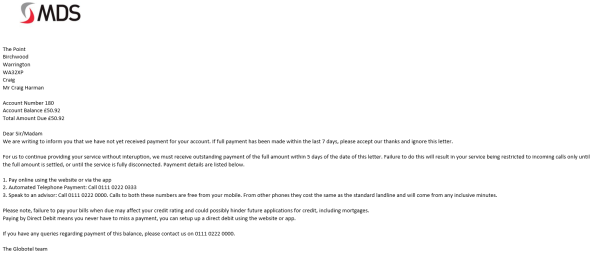
The email produced by the HTML example