Comms Process Flow: Create and Send Letters and Emails
Email and letter communications require additional processing to merge data from default fields gathered from with document templates to generate the required document type. The Comms Monitor job gathers the data; the Comms Email Monitor and the Comms Letter Monitor jobs merge the data.
The Comms Email Monitor and Comms Letter Monitor jobs are triggered automatically when the Comms Monitor job has finished gathering data for comms requests relating to emails or letters.
These jobs use external frameworks - for example, Velocity and Prince HTML - to generate documents. Generated documents are subsequently detected by the following downstream daemons for transmission to the :
- Transmission Comms to Email (Email )
- Transmission Comms to Print Bureau (Letter daemon)
For more information, see About Email and Letter Templates
Copies of the generated documents are created and placed in long-term storage by the Transmission Comms to Document Storage daemon. These documents can be viewed in . For more information, see Comms Process Flow: Store Letters and Emails.

At this point in the communication process, the Comms Monitor job has:
- Established the delivery method and target for an email communication.
- Gathered details such as the values of default fields and the email subject.
- Applied any time exclusion logic so that emails are not sent during a time period when the customer doesn't want to receive them.
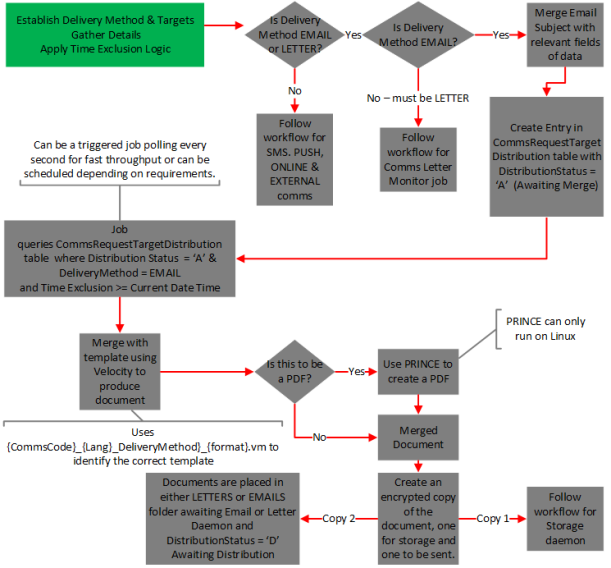
For email communications, the job merges the email subject with the data field values and creates an entry in the Comms RequestTargetDistribution table with a DistributionStatus of A (Awaiting Merge). The Comms Email Monitor job now takes over processing the email communication.
The job can be configured as a triggered job or a scheduled job in the , according to requirements. Whether the job is triggered depends on the value for the comms.email.monitor.trigger.enabled property for the job.
For more information on job properties, see Comms Email Monitor in the Communications Jobs and Daemons section.
Whether triggered or scheduled, the job picks with entries in the CommsRequestTargetDistribution table for entries where:
- DistributionStatus = A (Awaiting Merge), and
- DeliveryMethod = EMAIL, and
- TimeExclusion >= Current Date/Time
For each entry that meets these criteria, the job produces a document that consists of the details gathered by the Comms Monitor job (default field values) merged with an HTML template that determines the format, style and layout of the correspondence. For CMP 8.0, these are Velocity templates.
For more information on templates, see Communication Email and Letter Templates.
Velocity templates are named according to the format: <COMMSCODE>-<LANGUAGE>-<DELIVERYMETHOD>-<Format>.vm, where <LANGUAGE> can be EN for English or SP for Spanish, for example LETT1-EN-LETTER-pdf.vm or MAIL1-EN-EMAIL-html.vm.
The Comms Email Monitor job looks in the location where Velocity templates are stored to match a template with the CommsCode and Delivery Method that match those for the email communication that it is processing.
The storage location for the templates is set by the value for the comms.document.monitor.templates.location property for the Comms Email Monitor job.
Once the final document is ready, the Comms Email Monitor job names the document according to the format {commsRequestId}.XXX where XXX is the file format e.g. html, pdf and stores the job in the location set in the comms.document.monitor.templates.location property for the job.
The job then updates the FileLocation field on the CommsRequestTargetDistribution table.
The job then creates two encrypted copies of the document :
- One copy is for long-term storage in CMP, which will allow communications to be viewed using AgentView. This task is handled by the Transmission Comms to Document Storage daemon. For more information, see Comms Process Flow: Store Letters and Emails.
- The other copy is stored in an EMAILs folder, from which it will be collected for distribution by the Transmission Comms to Email daemon. The location of the folder is set by the value for the
comms.document.monitor.output.file.location
The job updates the DistributionStatus in CommsRequestTargetDistribution table to D (Awaiting Distribution).
The following diagram illustrates the workflow for the Comms Email Monitor job:
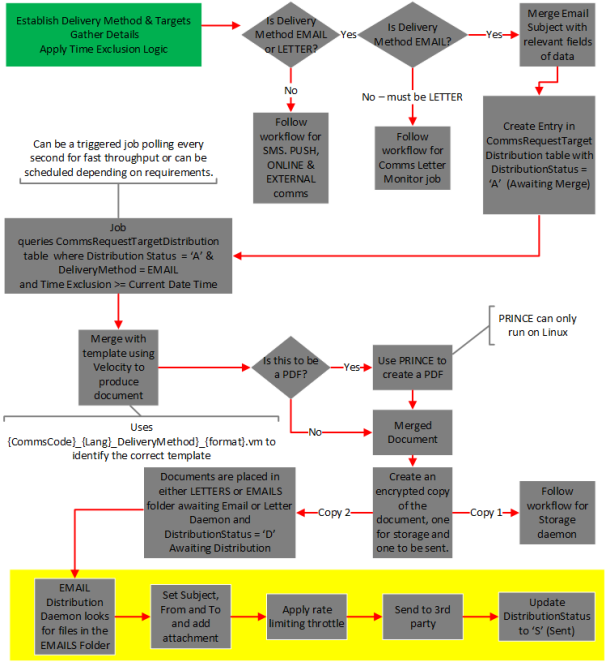
The Transmission Comms to Email daemon polls the local emails folder for merged documents to be sent. The location is set in the comms.email.monitor.transmission.from.properties.dirname property for the daemon.
The files are named according to the format {commsRequestId}.XXX where XXX is the file format. For each CommsRequestId found, the daemon constructs and sends an email.
If the format is HTML or TXT, the daemon embeds the file into the main body of the email itself.
Any image files such as JPG or PNG are also added as attachments. These images are stored in the location set by the comms.email.monitor.transmission.image-folder property for the daemon.
The daemon then sets the following:
- Email Subject - from the EmailSubject field on the CommsRequestTargetDistribution table.
- From - from the AliasValue field on the CommsRequestTargetDistribution table.
- To - from the ToEmail field on the CommsRequestTargetDistribution table.
The daemon then updates the following:
- The DistributionStatus field on the CommsRequestTargetDistribution table to S (Sent).
- The SentDateTime record in the CommsRequestTargetDetail table to the current date and time.
The highlighted portion of the following diagram shows the workflow for distributing email communications:
At this point in the communication process, the Comms Monitor job has:
For letter communications, the job creates an entry in the Comms RequestTargetDistribution table with a DistributionStatus of A (Awaiting Merge). The Comms Letter Monitor job now takes over processing the letter communication.
The job can be configured as a triggered job or a scheduled job in the Administration Console, according to requirements. Whether the job is triggered depends on the value for the comms.letter.monitor.trigger.enabled property for the job.
For more information on job properties, see Comms Letter Monitor in the Communications Jobs and Daemons section.
Whether triggered or scheduled, the job picks with entries in the CommsRequestTargetDistribution table for entries where:
- DistributionStatus = A (Awaiting Merge), and
- DeliveryMethod = LETTER, and
- TimeExclusion >= Current Date/Time
For each entry that meets these criteria, the job produces a document that consists of the details gathered by the Comms Monitor job (default field values) merged with an HTML template that determines the format, style and layout of the correspondence. For CMP 8.0, these are Velocity templates.
For more information on templates, see Communication Email and Letter Templates.
Velocity templates are named according to the format: <COMMSCODE>-<LANGUAGE>-<DELIVERYMETHOD>-<Format>.vm, where <LANGUAGE> can be EN for English or SP for Spanish, for example LETT1-EN-LETTER-pdf.vm or MAIL1-EN-EMAIL-html.vm.
The Comms Letter Monitor job looks in the location where Velocity templates are stored to match a template with the CommsCode and Delivery Method that match those for the email communication that it is processing.
The storage location for the templates is the same one as set by the value for the comms.document.monitor.templates.location property for the sabre-comms module.
If the communication output format is PDF, the job performs some extra steps. It uses Prince to generate the PDF from the merged document. Prince is a product that produces PDF files from HTML input. It only runs on . If the Velocity template specifies a PDF format, the velocity template must be configured in a way that enables an HTML file to be created from it. The job first creates a merged HTML file from the template and stores it temporarily. The storage location is set in the comms.document.monitor.output.file.tempstorage property of the Comms Letter Monitor job. Prince creates the PDF.
The location of Prince is set by the value for the comms.document.monitor.pdf.generator.executable.location property for the sabre-comms module.
Once the final document is ready, the Comms Letter Monitor job names the document according to the format {commsRequestId}.XXX where XXX is the file format e.g. html, pdf etc.and stores the job in the location set in the comms.document.monitor.templates.location property for the job.
The job then updates the FileLocation field on the CommsRequestTargetDistribution table.
The job creates two encrypted copies of the document:
- One copy is for long-term storage in CMP, which will allow communications to be viewed using AgentView. This task is handled by the Transmission Comms to Document Storage daemon. For more information, see Comms Process Flow: Store Letters and Emails.
- The other copy is stored in a LETTERS folder, from which it will be collected for distribution by the Transmission Comms to Print Bureau daemon. The location of the folder is set by the value for the
comms.document.monitor.output.file.location property for the job. For more information, see Transmission Comms to Print Bureau in the Communications Jobs and Daemons section.
The job updates the DistributionStatus in CommsRequestTargetDistribution table to D (Awaiting Distribution).
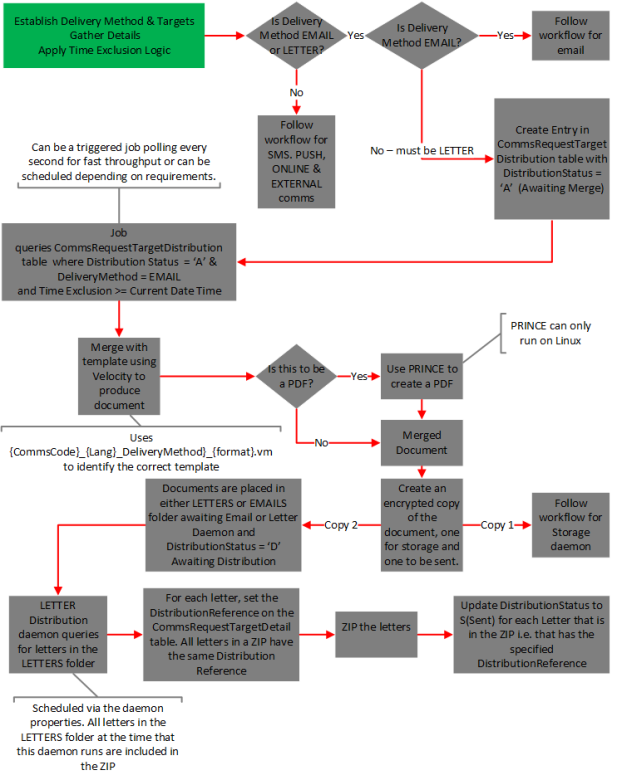
Once the Comms Letter Monitor has created the merged letter communications and stored them in a LETTERS folder, this daemon takes the contents of that directory and creates a ZIP file of letter communications. It sends the file to a print bureau, where the letters can be printed and mailed to recipients.
The location of the folder with the letter communications is set in the comms.letter.monitor.transmission.from.properties.dirname property for the daemon.
The daemon is a scheduled daemon - not triggered. The schedule is typically once per day and is configured as a value of the daemon property: comms.letter.monitor.transmission.from.options.[scheduler.cron]. The value is a chron expression. For more information on writing chron expressions, click here.
The daemon generates a unique name for the ZIP file following this convention:
<prefix>_<sequence>_<date/time>.zip, where:
prefix = The prefix that is configurable in the comms.letter.monitor.transmission.filename-prefix property of the daemon, for example Comms_Lettersequence = A number that indicates the ZIP's position in the sequence of ZIPs produced by the daemon that day: 1 = first today, 2 = second today etc.date/time = the date and time the daemon produced the file.
The following screenshot shows an example of the ZIP file produced:

The name of the ZIP file is the value of the DistributionReference.
For each letter in the ZIP file, the daemon updates the DistributionReference field on the CommsRequestTargetDistribution table with the name of the ZIP file. So all letters in the same ZIP file have the same DistributionReference value.
The daemon sends the ZIP file to the print bureau. The file is transferred by . The IP address of the recipient, the hostname of the SFTP server and the username to be used are all configurable in the daemon properties.
Once the file is sent, the daemon updates the DistributionStatus of each individual letter communication to S (Sent) on the CommsRequestTargetDistribution table.
Letter communications that have been successfully zipped and sent are then transferred to a done folder, the location of which is set in the comms.letter.monitor.transmission.from.options.move property of the daemon.
Letter communications that failed to send due to errors are moved to a location specified in the comms.letter.monitor.transmission.from.options.moveFailed property.
The following diagram illustrates the workfow for creation and distribution of letter communications:
 Converged Monetisation Platform. The MDS Global product that supports customer care and billing for digital service providers. with document templates to generate the required document type. The Comms Monitor job gathers the data; the Comms Email Monitor and the Comms Letter Monitor jobs merge the data.