Determine Delivery Method
To determine the delivery method, the Comms Monitor job:
- Determines if there is a override delivery method.
- Checks if the customer
 In the context of the Cloud Monetisation Platform, an individual or organisation who has signed an agreement to take goods and services from a service provider. A customer receives a bill associated with one or more subscriptions, and can be a single end user or a large company with many subscriptions assigned to one agreement. has opted in or out of comms.
 - Applies the customers Comms Preferences, if any.
Determine if Delivery Method is Overridden
First, the job checks whether the OverrideDeliveryMethodCode field in the CommsHeaderRequest table is populated. If so, it uses that delivery method. This happens, for example, with one-off comms added to workflow events.
For more information see Process Flow when a Comm is Manually Added via AgentView .
Check if Customer has opted into Comms
Now the jobs checks if the customer has opted in to the Comms. To do this, it checks whether the CommsCode field is populated in the CommsRequestHeader table and then cross-checks the tables:
- CommsCodeCommsDeliveryMethodCode
- CustomerCommsPreference
- CommsPreference
The result is also affected by the level at which the comms is raised - account In the Cloud Monetisation Platform, a billing entity that can be used to manage payments on one or more subscriptions or payments for services. An account can hold details such as payments or invoices., agreement In the Cloud Monetisation Platform, the entity that holds the instructions for generating the bills for one or more subscriptions. including the addresses and how often the bill is generated. or subscription A billing entity that incurs a charge. Examples include a network attached device whose usage you want to measure and charge for, or a monthly software subscription. Corporate and group In the Customer Manager Platform hierarchy, the highest level of the structure. The group level can be used to group corporates. Groups can hold financial information. levels do not have comms preferences associated with them.
If the comms is raised at account level
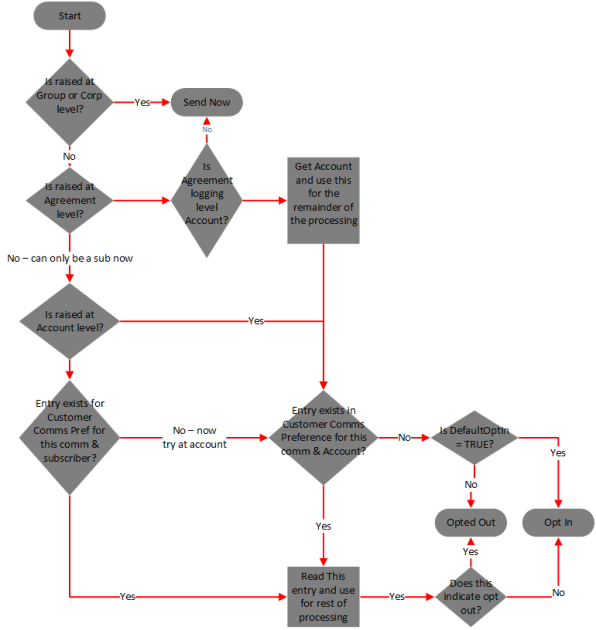
For comms raised at account level, the job looks for an IsOptIn entry in the CustomerCommsPreference table for this account and Comms PreferenceCode (that is associated with the comms code).
-
If there is no entry, the job cross-references the CommsPreferenceCode in the CommsPreference table to check the value for isDefaultOptedIn, that is, whether the default preference for this comms is for the customer to be opted in or out of receiving it.
-
If DefaultOptedIn = FALSE then the job updates the RequestStatus on the CommsRequestHeader table to indicate O (Opted Out) and processing of this comms request stops.
-
isDefaultOptedIn = TRUE then normal processing continues.
-
-
If there is an IsOptIn value in the CustomerCommsPreference table:
-
If IsOptIn = TRUE, normal processing continues.
-
If IsOptIn = FALSE, the job updates the RequestStatus on the CommsRequestHeader table to O (Opted Out) and the processing of this comms request stops.
-
If the comms is raised at subscription level
For comms raised at subscription level, the job looks for an entry in the CustomerCommsPreference table at subscription level first and if it finds one, bases the Opt In logic on that.
If it does not find an entry at subscription level, the job looks for a CustomerCommsPreference entry at account level. If there is, it uses that.
Otherwise, the proceeds is for a comms raised at account level.
If the comms is raised at agreement level
When the comms is raised at agreement level, the job looks up the comms preference based on the agreement logging level. When the agreement logging level is account, the job uses this account number to perform the Opt In logic as for a comms raised at account level. If the logging level is corporate or group, the job skips the Opt In logic and the comms is sent.
This flowchart describes the logic for determining the Opt In status:
Example - Opt in/Opt Out at Different Logging Levels
Comms are raised at agreement-level for the following:
- Agreement 1 - logged at account level. Account 1 has no customer comms preferences set in the CustomerCommsPreference table. The comms has a comms preference configured so that customers are opted in to receive the comms by default. This means that for this comms, a record is written to the CommsPreference table with IsDefaultedOptedIn value set to 1 (TRUE).
- Agreement 2 - logged at account level. Account 2 which has no customer comms preferences set in the CustomerCommsPreference table. The comms has a comms preference configured so that customers are opted out of receiving the comms by default. This means that for this comms, a record is written to the CommsPreference table with IsDefaultedOptedIn value set to 0 (FALSE).
- Agreement 3 - logged at account level. The comms raised against Account 3. In the CustomerCommsPreference table entry for this account, IsOptedIn = 1 (TRUE), so this account as opted in to receive the comms.
- Agreement 4 - logged at account level. The comms raised against Account 4. In the CustomerCommsPreference table entry for this account, IsOptedIn = 0 (FALSE), so this account as opted in to receive the comms
- Agreement 5 - logged at corporate level.
- Agreement 6 - logged at group level.
Results:
Agreements 1 and 3: CMP
Agreements 2 and 4: Based on the account preferences, CMP should not send the comms. Therefore, the RequestStatus is updated on the CommsRequestHeader table to O (Opted Out) and the processing of this comms request stops.
For Agreements 5 and 6: No comms preferences can be set at corporate or group level. Therefore, the comms request will be sent as normal.
Get the Delivery Method
Once the Comms Monitor job has determined whether there is an override delivery method and worked out the Opt In status, it gets a list of delivery methods associated with the comm and identifies out the highest priority method to populate the CommsRequestTargetDetail table. To do this, CMP needs to take into account:
Customer preferences for delivery methods
The preference for a particular delivery method is specified in the CommsDeliveryMethodCode in the CustomerCommsProfile table. Currently, CMP supports customer preferences for delivery methods at subscription and account levels. The preference is just that - a preference - and does not guarantee that the customer will get the comms delivered to them via the preferred mechanism. A comms can often have a delivery method that is not the customers preferred delivery method. For example credit control comms are usually sent as letters or SMS Short Message Service.
A text messaging service component of most mobile telephone systems. SMS uses standardized communication protocols to enable mobile phone devices to exchange short text messages. for legal reasons. However a customer may have PUSH as their preferred delivery method. In this case, CMP will decide based on a pre-configured global priority to send via either SMS or LETTER.
Delivery methods configured against a comms
The Comms Monitor job checks the CommsCodeCommsDeliveryMethodCode table to get the list of supported comms delivery methods for the particular comm.
Preconfigured priority of the delivery methods
The list of supported comms delivery methods for a particular comm are processed in order of priority as specified on the CommsDeliveryMethod table. The highest priority deliveryMethodCode is stored in the CommsRequestTargetDetail table.
The Comms Monitor job works out the order in which delivery methods are returned as follows:
If the comm is raised at account level
The job determines whether account-level preferences are present. If so, it gets the account customer comms preference. Then the job checks whether the method is supported for the comm. If so, it uses that delivery method. If not, it uses the delivery method with the highest priority for that comm. If there is a customer comms preference set for the account, the job also checks if there is a language set in CustomerCommsProfile. If there is, the job populates the language fields on the CommsRequestTargetDetail table. Otherwise, the job leaves the fields empty. They will be populated later in the process using the default language.
If the comm is raised at subscription level
The Comms Monitor job determines whether subscription-level preferences are present. If so, it gets the subscription customer comms preference, and if that method is supported for the comms, uses it. If it is not supported, the job uses the delivery method with the highest priority for that comm. If the comm is raised at subscription level and there is not a subscription-level preference, the job looks for an account-level preference. If one exists and it is supported by the comm, the job uses the account-level delivery method. If there isn't an account-level comms preference, the job uses the highest priority delivery method for the comm. If the language is set at subscription level, the job populates the language fields on the CommsRequestTargetDetail table with that language. Otherwise, the job uses the language set at account level. If no language is set at either account or subscription level, the job leaves the language fields empty at this point.
If the comms is raised at agreement level
CMP does not have the ability to store comms preference at the agreement level. So if the comms is raised at agreement level, the job determines whether the agreement is logged at the account level. If it is, the job proceeds as if for a comm raised at account level. Otherwise, the job returns the supported delivery method with the highest priority. If a preferred delivery method is set against the account, the job also checks if there is a language set in CustomerCommsProfile. If there is, the job populates the language fields on the CommsRequestTargetDetail table. Otherwise, the job leaves the fields empty. They will be populated later in the process using the default language.
When writing to the CommsRequestTargetDetail table, later on, the job populates the CustomerLevel and CustomerReference with either A (Account) or S (Subscription) and Account Number or Subscription Number respectively, depending on whether it used the CustomerCommsProfile table at subscription or account level.
Error Handling
If CMP is unable to send a comm because no suitable target/delivery method was identifiable, then CMP looks to see if a NotSent Event Type and Code are configured against the job as a property. If it is, then CMP raises that event against the customer level at which the comms or notification trigger was raised.
It is common practice that these events are assigned to a group or a particular CSA Customer Service Agent, Advisor, or Assistant.
A (usually) customer-facing role in telecommunications, such as an agent in a call centre. Variations include CSR (Customer Service Representative) or CEA (Customer Experience Agent) in the call centre that handles such scenarios.