Working with Email and Letter Templates
In , external templates determine the format and style of correspondence.
 Software
The template solution is based on Apache Velocity 2.2. Templates are created using Velocity Templating Language (VTL). Velocity supports creating correspondence templates in HTML, RTF and TXT format. Prince is the application used to convert the merged templates into PDF format.
Templates can contain static text, dynamic content (merge fields), images, logos, a header, and a footer.
Storage
Templates are stored in a default location so that CMP can access the templates: /var/mdsglobal/sabre-server/templates. The default location for images to be included in the templates is /var/mdsglobal/sabre-server/templates/img.
If customers want to store templates in another location, CMP must be configured with the new location. Once correspondence is processed, a dedicated stores the generated letters and emails in long-term storage so that they can be viewed in . For more information, see Comms Process Flow: Store Letters and Emails.
Template Guides
Naming Convention for Templates
Templates must be named according to the naming convention <COMMSCODE>-<LANGUAGE>-<DELIVERYMETHOD>-<Format>.vm for example LETT1-EN-LETTER-pdf.vm or MAIL1-EN-EMAIL-html.vm., where <LANGUAGE> can be:
EN = EnglishSP = Spanish
Adding Default Fields and Objects to Templates
Adding Default Fields
To add customer data from a default field to a template, add a leading dollar symbol ($) to the fieldDataMap reference, then in square brackets - [ ] - supply the default field name, enclosed in single quotes:
$fieldDataMap['<default field>']
For example, the following adds balance information to a communication:
<br/>
Total Balance: $fieldDataMap['ACCOUNTBALANCE']<br/>
Total Amount Due: $fieldDataMap['ACCOUNTAMOUNTDUE']<br/>
Total Amount In Query: $fieldDataMap['ACCOUNTAMOUNTINQUERY']<br/>
Total Amount In Arrears: $fieldDataMap['ACCOUNTAMOUNTINARREARS']<br/>
<br/>
For a full list of CMP default fields, see the Appendix A: CMP Default Fields and Beans.
Adding Objects
Objects such as images, logos, headers, and footers must be stored within the same file-sharing system as the template. Templates reference these objects in order to include them in emails and letters.
Reference an image using imageStoreMap by providing the filename of the referenced image enclosed in single quotes in square brackets as follows:
<img alt="mds_logo.png" src="data:image/png;base64,$imageStoreMap['mds_logo.png']" style="width:304px;height:228px;"/>
Adding External References
You can use externally available objects by referring to a standard URL, for example:
<img src="http://www.mdscem.com/sites/default/files/2016-06/Retail--Image-Banner.png">
Formatting Dates for Emails and Letters
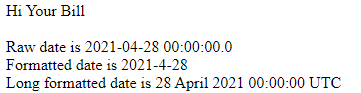
You can specify the format for dates in emails and letters by using Velocity's RESOLUTIONREQUIREDBYDATE default field and uses date.format to specify how the date data stored in that default field should display:
Hi $fieldDataMap['YOURBILL'] <BR>
<br>
Raw date is $fieldDataMap['RESOLUTIONREQUIREDBYDATE']
Formatted date is ${date.format('yyyy-M-d', $fieldDataMap['RESOLUTIONREQUIREDBYDATE'])} <br>
Long formatted date is ${date.format('long', $fieldDataMap['RESOLUTIONREQUIREDBYDATE'])} <br>
This is the result:
For possible formatting options, click here.