Changing Payment Methods
The default payment method in AgentView The graphical user interface of the CMP that is typically used by Customer Service Agents to access CMP customer and billing data. In versions prior to CMP 8.0, this was called the CMP GUI. is Manual Payment, such as a cheque. If any other payment method is cancelled, the method reverts to Manual Payment.
CSAs can change a customer In the context of the Cloud Monetisation Platform, an individual or organisation who has signed an agreement to take goods and services from a service provider. A customer receives a bill associated with one or more subscriptions, and can be a single end user or a large company with many subscriptions assigned to one agreement.'s payment method in the Account In the Cloud Monetisation Platform, a billing entity that can be used to manage payments on one or more subscriptions or payments for services. An account can hold details such as payments or invoices. Summary screen via the Payment Method hyperlink:
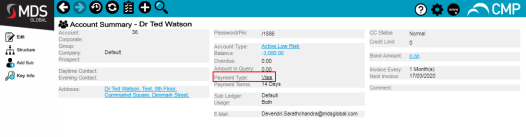
From here the CSA Customer Service Agent, Advisor, or Assistant.
A (usually) customer-facing role in telecommunications, such as an agent in a call centre. Variations include CSR (Customer Service Representative) or CEA (Customer Experience Agent) can access the Change Payment Type wizard and can set up one of the following payment methods:
- Direct Debit
- American Express*
- Visa*
- Mastercard*
-
Maestro*
* Depending on the configuration of your CMP
Converged Monetisation Platform. The MDS Global product that supports customer care and billing for digital service providers. deployment, these payment methods may not be available.
For customers with direct debits or credit/debit card payments set up:
- First the CSA must cancel the existing payment method.
- The payment method reverts to the default Manual Payment.
- The CSA sets up the new payment method.