Contracts in AgentView

In AgentViewClosed The graphical user interface of the CMP that is typically used by Customer Service Agents to access CMP customer and billing data. In versions prior to CMP 8.0, this was called the CMP GUI. you can:

ClosedView Contract Details

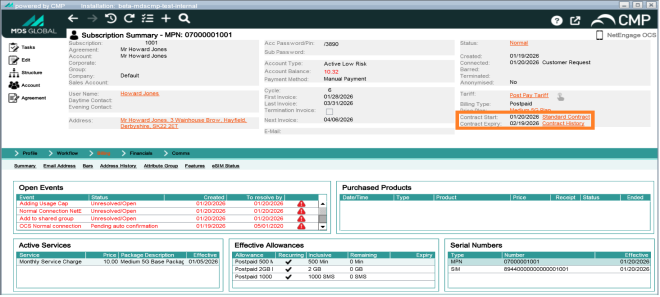
Contract details are available in the upper panel of the SubscriptionClosed A billing entity that incurs a charge. Examples include a network attached device whose usage you want to measure and charge for, or a monthly software subscription Summary screen, which displays:

  • The contract start date

  • The contract expiry date

  • A link to the contract history

View contract details in the upper panel of the Subscription Summary screen

ClosedAdd or Change a Contract

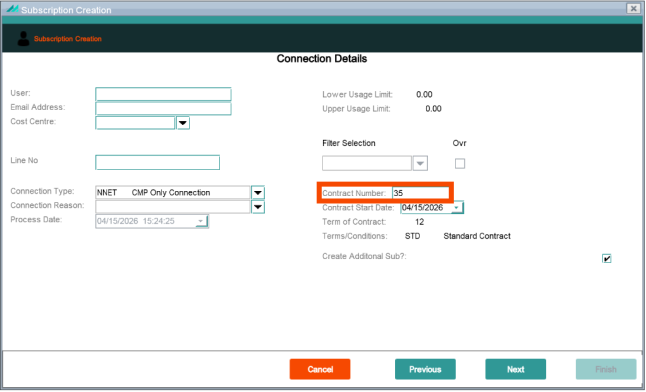
In general, contracts are assigned to price plans and default from the price plan when it is selected for a subscriberClosed The end user of a network. and cannot be altered. However, if your deployment of CMPClosed Converged Monetisation Platform. The MDS Global product that supports customer care and billing for digital service providers. is configured to do so, it is possible to change or enter a contract number when setting up a new subscription. You do this in the Contract field when entering the Connection Details in the Subscription Creation wizard:

Alter or enter a contract number when setting up a new subscription

This option may not be available in your deployment of CMP.