Password Reset Templates
The email templates used for the password reset or change are deployed to the directory /etc/mdsglobal/wso2is-login/templates on the JBoss An open-source, cross-platform Java application server developed by JBoss, a division of Red Hat Inc. JBoss AS is an open-source implementation of Java 2 Enterprise Edition (J2EE) that is used for implementing Java applications and other web-based applications and software. JBoss is an open source alternative to commercial offerings from IBM WebSphere and SAP NetWeaver. Web Server host.
For more information on hosts and deployment, see the CMP Converged Monetisation Platform. The MDS Global product that supports customer care and billing for digital service providers. Technical Architecture Overview and CMP Installation Guide documents.
The email templates are standard HTML and can contain a number of parameter placeholders that will be populated at runtime.
The following templates are available:

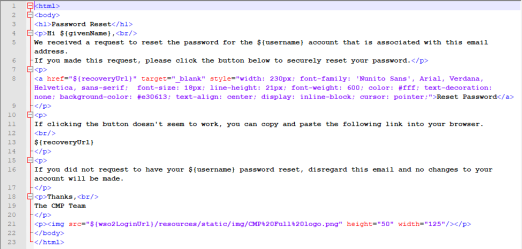

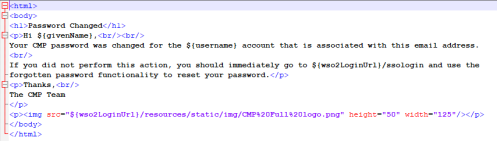
The placeholders include the following:
${givenName}– First name of user A person with the capability to log in to the CMP GUI software, such as a customer service advisor or agent.${lastName}– Last name of user${username}– Username of user${wso2LoginUrl}- Base URL of the WSO2-login application that initiated the password change, for example AgentView The graphical user interface of the CMP that is typically used by Customer Service Agents to access CMP customer and billing data. In versions prior to CMP 8.0, this was called the CMP GUI., Administration Console An operations web console that allows batch jobs to be scheduled, run manually and monitored. The console also provides for viewing and modification of business and user applicable system configuration., Business Configuration A module in the CMP Administation console that provides for viewing and modification of business and user applicable system configuration. ${recoveryUrl}– URL of link to change password (reset email only).
The email server settings are defined in the properties file: /etc/mdsglobal/wso2is-login/application.properties.
These are populated based on values defined in the inventory file:
spring.mail.host={{ mail_server.smtp_host | default('false') }}
spring.mail.port={{ mail_server.smtp_port | default('25') }}
spring.mail.username={{ mail_server.smtp_username | default('') }}
spring.mail.password={{ mail_server.smtp_password | default('') }}
spring.mail.properties.mail.smtp.auth={{ mail_server.smtp_auth | default('false') }}
spring.mail.properties.mail.smtp.starttls.enable={{ mail_server.smtp_starttls | default('false') }}
wso2is.mail.from={{ mail_server.smtp_from | default('') }}
If the spring.mail.host property is set to false, the Forgot Password link will not display in the login box.
A new panel has been added to the Global tab of the Installation Configuration Tool to support this:
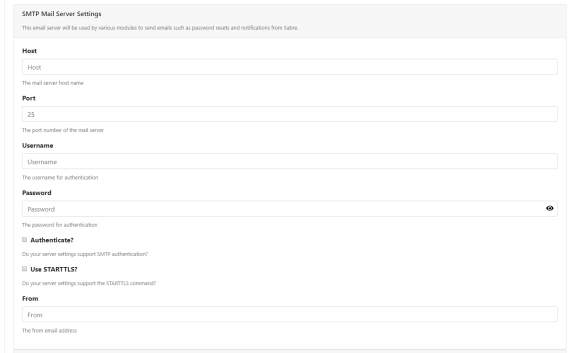
For more information on the inventory file and the Installation Configuration Tool, see the CMP Installation Guide.
The application.properties file also specifies the location of the template files, as follows:
This location can be changed if necessary.