1. Introduction Last updated: March 28th 2025

1.1. Scope

This document provides an overview of the CMP 8.18 release with specific focus on the additional functional and non-functional enhancements with respect to CMP 8.17.

1.2. Audience

This document is aimed at internal and external audiences familiar with CMP, to explain the key features of the release including any changes in how existing functions or processes are working.

2. Overview of Changes

With respect to CMP 8.17, CMP 8.18 introduces new functionality as well as changes to existing functionality and non-functional improvements. These changes can be summarised as follows:

2.1. New Functionality

The following new functionality has been added as part of the CMP 8.18 release:

2.1.1. Shared Groups

A new Shared Group function has been added in 8.18 that allows subscriptions with the same price plan and tariff to share a single allowance.

To support this a new bottom panel has been added to the Billing menu option in AgentView that shows all subscriptions under the agreement and whether they are part of a shared group or not. The following right-click options are available from the bottom panel:

  • Update Shared Limits - this option allows agents to adjust the shared limit values associated with a subscription within a shared group
  • Add To Shared Group - to add a subscription to a shared group with the same price plan and tariff
  • Purchase Bolt-on - purchase a package with shared allowances that will be consumed by the shared group.


2.1.2. Add Agreement Administrators

A new feature has been added to create administrators to whom comms can be sent. A new right-click option has been added to the Profile > Administrator sub-menu panel that opens the Add Administrator pop-up panel from where you can add the new administrator details.


2.1.3. Partition Properties

The new Partition Properties feature allows you to override the retention period for the monthly partitions on the Comms and Network Request tables.


2.1.4. Rating Zone

A new option has been added to Rating Zones option within Priceing Configuration to add and maintain the countries associated with an international band or a roaming zone.


2.1.5. Teams

A new Teams function has been added to allow team profiles to be configured and for events to be passed to those profiles.

2.2. Changed Functionality

The following functionality has been enhanced within the CMP 8.18 release:

2.2.1. Purchase Bolt-On function

The Purchase Bolt-On function appears on the Financials > Purchases sub-menu, and is no longer available from the Active Services panel on the Profile > Summary sub-menu.


2.2.2. Prepaid Filter

A filter has been added to assist with the performance of the loading of all prepaid subscriptions.


2.2.3. My Worklist

The WorkList Filter screen that allows you to filter the display of events has been updated. The changes include the renaming of the Person field, and the removal of the Company field.


2.2.4. Web Services Changes

2.2.4.1. RESTful Web Services

The following web services have been introduced in CMP 8.18:

  • the Revert Last Plan Change web service request reverts a postpaid subscription back to the price plan it was on previously, if within the cooling off period.
  • the Get Shared Group web service request returns all shared groups.
  • the Update Shared Limits web service request has been created to maintain the limits set against a subscription. This replaces the existing Set Allowance Limit web service.
  • the Create Administrator web service enables an administrator to be defined against the agreement to enable notifications to be sent based on shared allowance usage.
  • the Add To Shared Group web service enables a subscription to be added to a shared group.

The following web services have been modified in CMP 8.18:

  • the Create Account and Create Subscription web service requests have been modified to include an optional existingAddress element, allowing the external system to specify existing address details
  • a sharedGroupId element has been added to the Create Purchase web service request when a shared package is purchased
  • the GET Purchase list web service request has been updated to include a sharedGroupId element in the hierarchyEntity response
  • the GET Usage Summary web service request has been modified to return billed usage for a given invoice or invoice-subscription combination
  • the Allowances List and Allowances Summary web services have been updated to add an extra agreementNumber filter to allow allowance details to be returned for shared allowances.

3. Impacts on CMP

The functional and non-functional changes highlighted in section 2 above have had an impact CMP in the following areas:

3.1. AgentView

3.1.1. New Screens

3.1.1.1. Shared Allowances & Purchases

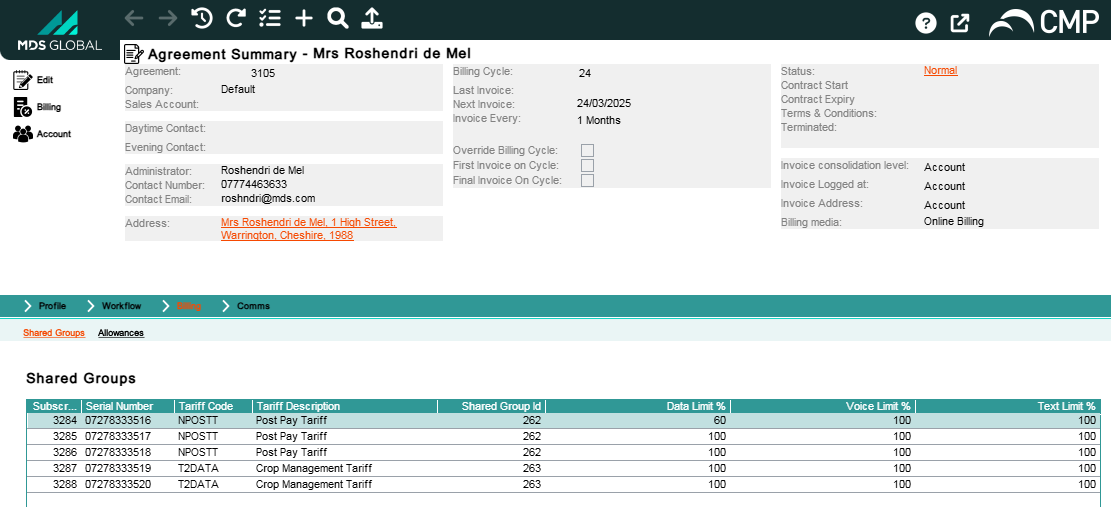
CMP release 8.18 builds on the Shared Allowances functionality that was delivered in release 8.17 by providing a new Shared Groups bottom panel available from the Agreement Summary -> Billing menu option. The panel provides the following capabilities:

  • Provides a list of subscriptions on an agreement, including which Shared Groups they belong to and what their Shared Allowance Limits are
  • Percentage limits for subscriptions can be changed, i.e. users can now update what percentage of a Shared Allowance subscriptions are allowed to consume
  • The ability to add a subscription to, and remove a subscription from, a Shared Allowance
  • The ability to purchase a Shared Bolt-On (this option was previously available on the Purchases mini-panel in the main Agreement Summary). Note that Shared Purchases can still be ended via the Purchases mini-panel in the main Agreement Summary.
Shared Groups Bottom Panel

3.1.2. Changed Screens

3.1.2.1. Subscription Creation Wizard

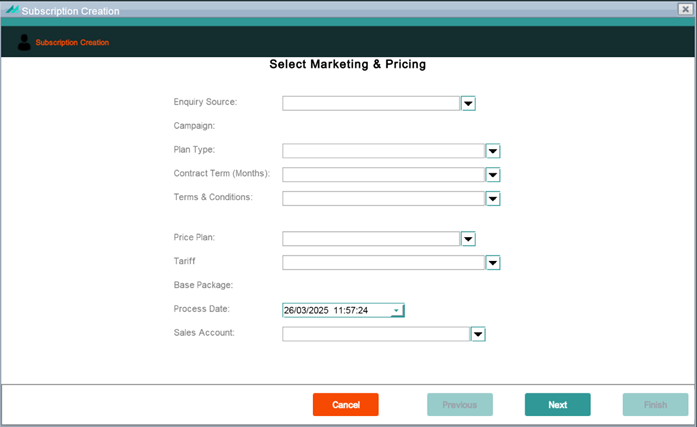
Price Plan filters have been added to the Subscription Creation Wizard that enable the user to filter the price plans available in the Price Plan dropdown. The filters are for Plan Type, Contract Term and Terms & Conditions. Selecting values for any or all of these restricts what price plans are available to choose from in the Price Plan dropdown. By default, the view will be of all price plans but the user can then apply filters to restrict the plans available. It should be noted that price plan types are defined through the System -> Descriptive Titles menu option in Business Configuration with a Title Group of PRICEPLANTYPE.

Subscription Creation Wizard Panel

3.1.2.2. Worklist Filter

The Worklist panel allows a user to view either their own open Workflow events or the Workflow events assigned to a team profile based on certain filter criteria such as event status, event type/code, date, etc. The following changes have been made to the Worklist Filter panel:

  • Person has been renamed to Profile as the events for either an individual user or a team can be viewed.
  • The options in the Show dropdown have been changed to All Profile Events, Events Created by Profile, Events Passed to Profile.
  • The Company dropdown has been removed as it is redundant.

Note

A user can only view the Workflow Events that are associated with a team profile if they are assigned as a member of that team (see section 3.3.5.1 for further information).

3.1.2.3. Agreement Administrators

CMP allows for the update of an Agreement Administrator; comms can then be configured to be sent to the Administrator instead of directly to a subscription. This is especially useful for distributing notifications relating to shared allowance thresholds as it might be more appropriate for notifications to be sent to an administrator of the agreement (and shared allowances), rather than to an individual subscription that is part of that group.

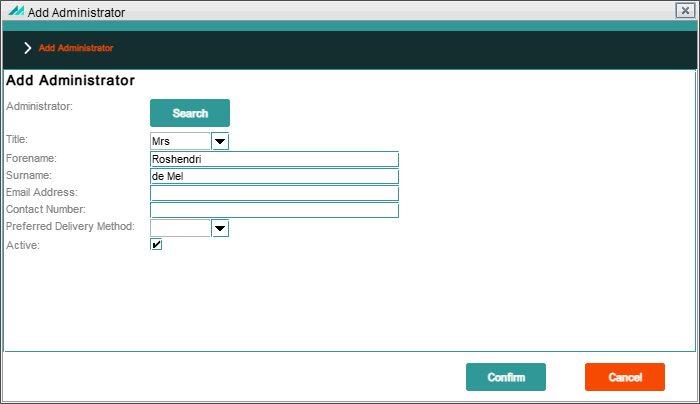
Using the Agreement Summary -> Administrator option, the user can see a panel that displays the Agreement Administrators, including the currently active Administrator. From here it is possible to filter by all/active Administrators, add an Administrator (either by creating a new one or by searching for and selecting an existing one), and update details of the Agreement Administrator using the Change option.

Add Administrator Popup Panel

Note

Only one Agreement Administrator can be active at any one time.

3.1.2.4. View Recent Usage – Postpaid Subscriptions

The filter option to switch the view between rated (postpaid) usage and prepaid usage has been removed from this panel – all records displayed in the Recent Usage panel for postpaid subscriptions are retrieved from the rated usage table, no prepaid records are available for display.

3.1.2.5. View Recent Usage – Prepaid Subscriptions

A new filter option has been added to this panel. Available on the top right-hand side of the panel the user can switch between viewing all usage or just the usage from the last 30 days. The default view upon initial entry to the panel is Last 30 Days.

3.2. Bulk Actions

3.2.1. New Bulk Actions

No new bulk actions have been introduced as part of CMP 8.18.


3.2.2. Changed Bulk Actions

No bulk actions have been changed as part of CMP 8.18.

3.3. Admin Console

3.3.1. Daily Operations

3.3.1.1. New Jobs and Daemons

No new jobs and daemons have been introduced as part of the CMP 8.18 release.

3.3.1.2. Changed Jobs and Daemons

No jobs or daemons have been changed as part of the CMP 8.18 release.

3.3.1.3. Deprecated Jobs and Daemons

From this release forward, partitions that were previously managed by the interface purge and comms purge jobs will be dropped by pg_partman, therefore these jobs are now redundant and the corresponding modules have been removed:

  • sabre-interface-purge
  • sabre-comms-purge.

3.3.2. System Management

No changes have been made to any of the options within the System Management menu option in CMP 8.18.


3.3.3. System Monitoring

3.3.3.1. Logs

For most of the CMP areas where logs are kept, a single file is created per day – the remaining log files that did not follow this pattern have been refactored to do so, namely the logs for the following areas now produce a single file per day:

  • Webswing
  • AgentView Servlet
  • WSO2.

3.3.4. System Configuration

No changes have been made to any of the options within the System Configuration menu option in CMP 8.18.


3.3.5. System Administration

3.3.5.1. Teams

A new Teams option has been added to the System Administration section that allows for the creation and maintenance of team profiles. Individual users can be assigned to these teams that allows the user to view workflow events that are assigned to those teams via AgentView (also see section 3.1.2.2 Worklist Filter). A user can only see workflows assigned to other individual users or assigned to team profiles that they are part of.

Selecting the new Teams option displays a list of the Team profiles that are already configured. From this panel new teams can be created and existing teams can be viewed. By selecting a team from the list and clicking View Team Users, the existing members of the team are displayed, and new individual users can be added to the team, profiles can also be removed from teams via this panel.

3.3.5.2. Users

In AgentView, agents are restricted to what data they can see based on a security level. There are 9 security levels from 1 being the highest, to 9 being the lowest. The secruity level determines what screens and functions can be accessed by the user as well as what configuration data can be seen by the user e.g. workflow events or service codes.

In CMP 8.18, a security level is no longer associated directly with users, instead the security level is associated with the an AgentView role that is defined in CMP. See section 6.5.1 for the default security level assigned to each default AgentView role.

3.4. Business Configuration

3.4.1. New Business Configuration Screens

3.4.1.1. Partition Properties

A new option has been added to System Configuration that allows the retention period for Comms and Network Request partitions to be overridden. From the System Configuration menu, select Partition Properties and in the following panel a number of months can be set for Comms and Network Requests.

Note that the values entered here represent the number of months that data is retained for on the following partitions:

  • The Comms property option allows a retention period to be set for the following tables:
    • commsRequestError
    • commsRequestFieldDetails
    • commsRequestHeader
    • commsRequestNotSent
    • commsRequestTargetDetail
    • commsRequestTargetDistribution.

    A default value of 6 months is pre-populated for Comms partitions.

  • The Network Requests property option allows a retention period to be set for the following tables:
    • alertHistory
    • alertHistoryRecipient
    • probeHistory
    • probeNote
    • networkActivityLog
    • networkRequestLog
    • networkRequestLogHistory.

    A default value of 3 months is pre-populated for Network Request partitions.


3.4.2. Changed Business Configuration Screens

3.4.2.1. Landing Page

Minor changes have been made to the header panel on the Business Configuration landing page to make it more consistent with other areas of the system, i.e. the date & time are now displayed in the full format, the environment name is displayed, and the company number has been removed.

3.4.2.2. Copy Price Plan

CMP 8.18 introduces an option to copy a Price Plan. This option can be accessed from the Price Plan List panel by selecting an existing Price Plan and clicking the Copy button. This will display a panel containing the details of the selected price plan except for the Price Plan Code and Description which are both blank. Populating the fields and saving creates the new price plan based on the existing one (the price plan code used for the new price plan must be unique).

3.4.2.3 Edit Service Properties

Under the System Configuration menu option there is an option to edit the service code associated with a service property. This panel no longer contains Company Number as an editable field as there is only one company number associated with an environment.

3.5. Pricing Configuration

3.5.1. New Pricing Configuration Screens

3.5.1.1. View Rating Zone

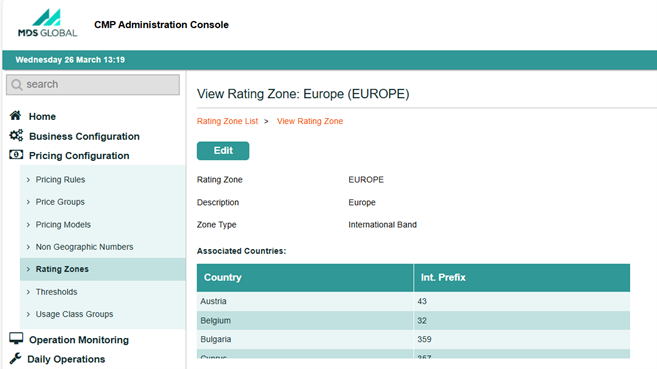
A new panel has been introduced in CMP 8.18 that displays the details of a rating zone and the countries that are associated with that zone. Clicking any rating zone from the Rating Zone List view will open the new panel which shows details of the rating zone (zone name, description, and type) plus a table containing the list of countries that are already associated with that rating zone.

View Rating Zone Panel

3.5.1.2. Associate Countries with a Rating Zone

CMP 8.18 allows the association of countries to a rating zone as the rating zone is being created.

  • When configuring an international band, the only countries in the available countries list will be those that are not already associated with an international band or designated as the home country
  • When configuring a roaming band, the only countries in the available countries list will be those that are not already associated with a roaming band or designated as the home country
  • The Associate Countries button is not available when configuring the Home Zone.

Note

The Associate Countries button is currently available when adding a new rating zone, the option to update and add countries to rating zones will be added with the Edit functionality in a later release.


3.5.2. Changed Pricing Configuration Screens

3.5.2.1. Landing Page

The landing page initially presented after selecting the Pricing Configuration option has been updated – the changes are limited to the wording of each option to update the description of each section.

3.5.2.2. Pricing Rule List

The Price Rule List panel has been updated as follows:

  • The column widths have been adjusted for easier readability
  • The description of the column previously titled MO/MT has been updated so that the column now has the title Usage Direction
  • The Delete button is not selectable until a row has been selected to make it consistent with other list panels that have a delete option.

3.5.2.3. Add and Edit Pricing Rule

The Add Pricing Rule and Edit Pricing Rule panels have both been enhanced as follows:

  • The options in Price Group during Add Pricing Rule are sorted correctly, i.e. by name in ascending alphabetical order
  • Origin Zone now has only two options available to select from – Home Zone and Roaming Zone
  • Destination Zone has three options available to select from – Home Zone, International Band, Roaming Zone, Non-Geographic Number, Roam in Country
  • When destination zone Non-Geographic Number is selected, the related list to the right is populated with appropriate options, i.e. records from the Rating Non-Geographic Number table
  • When destination zone Roam in Country is selected, the related list to the right is disabled and cannot be selected from (the record is automatically saved with a value of ROAMINCOUNTRY
  • When the usage direction radio button is MT (mobile terminated), the originating zone dropdown is disabled as an originating zone is not required for a pricing rule for mobile terminated usage.

3.5.2.4. Add Pricing Group

When adding a Pricing Group, the Price Group field is now restricted to 20 alphanumeric characters.

3.6. SOAP Web Services

3.6.1. New Web Services

No new SOAP web services have been introduced as part of the CMP 8.18 release.


3.6.2. Changed Web Services

The existing RevertLastUpgrade web service has been deprecated as it has been replaced by an equivalent REST API (see section 3.7.1.1. below).

3.7. RESTful Web services

3.7.1. New CMP Web Services

3.7.1.1. Revert Last Plan Change Web Service

This new REST API allows a postpaid subscription to revert to their previous price plan, if they are still within the cooling off period.

The cooling off period is defined against the contract that the price plan is configured with and if the subscription is still within the cooling off period, this new REST API will action a plan change to change the subscription back to the price plan they were on previously without any penalty being incurred.

When the revert is done, any required actions relating to contract terms and early upgrade fees that were applied during the previous plan change are carried out automatically, e.g. apply the original contract terms again if the subscription was in contract, delete the early upgrade fee if it hasn't been billed already or apply an adjustment to refund it if it has been billed already.

3.7.1.2. Add To Shared Group Web Service

This web service enables a subscription to be added to a shared group where they are not already part of a shared group. If the tariff associated with their Price Plan is not part of an existing shared group under the same agreement then a new shared group will be automatically created.

3.7.1.3. Get Shared Groups Web Service

This web service provides a list of the connected and not-yet connected subscribers under an agreement and, if applicable, associated shared group and shared allowance limits.

3.7.1.4. Create Administrator Web Service

The web service enables an administrator to be defined against the agreement to enable notifications to be sent based on shared allowance usage.


3.7.2. Changed CMP Web Services

The following web services have been enhanced for CMP 8.18:

3.7.2.1. Get Usage Summary Web Service

The Get Usage Summary web service now returns a summary of billed usage if billingStatus.exact is set to BILLED in the request. On requests for billed usage, the invoiceId query parameter is mandatory and the subscriptionId query parameter becomes optional – only usage that relates to the invoiceId and subscriptionId (if included) is included in the response.

3.7.2.2. Create Account Web Service

Instead of having to specify a new address with every Create Account web service request, it is now possible to specify an existing address. The Create Account web service request now includes a new element for existingAddress that can be used to specify an existing delivery address – this should be included in the request instead of personalAddress and an error will be returned if both are specified, or if the existing address number does not exist.

3.7.2.3. Create Subscription Web Service

The Create Subscription web service request now includes an optional field, existingAddress, that if included in a request, contains an existing delivery address number that will then be used when creating the new subscription. If existingAddress is left empty, or omitted from a request, the subscription will be created with the account address as per existing behaviour.

3.7.2.4. Set Allowance Limit Web Service

The existing Set Allowance Limit web service has been updated to Update Shared Limits and allows the consumption limits on a shared allowance to be set as a percentage of the overall total allowance amount.

3.7.2.5. Create Purchase Web Service

The Create Purchase web service has been updated to add the sharedGroupId to the hierarchy entity in both the request and response. A shared group identifier is used for purchasing a shared package.

3.7.2.6. Allowances Web Services

The Allowances List and Allowances Summary web services have been updated to add an extra agreementNumber filter to allow allowance details to be returned for shared allowances.


3.7.3. New Business Configuration Web Services

The following Business Configuration RESTful web services have been introduced in CMP 8.18:

  • the Create Resource Attributes web service request allows a new resource attribute to be created for a product item.
  • the Get Resource Attributes web service request returns a list of all resource attributes for a product item.
  • the Update Resource Attributes web service request enables existing resource attribute values to be updated.
  • the Delete Resource Attributes web service request enables an existing resource attribute to be deleted.
  • the Create Resource Attribute Template web service request allows a new resource attribute template to be created.
  • the Get Resource Attribute Template web service request returns a list of all resource attribute templates.
  • the Update Resource Attribute Template web service request enables existing resource attribute template values to be updated.
  • the Delete Resource Attribute Template web service request enables an existing resource attribute template to be deleted if it's not currently being used. Deleting a resource attribute template also deletes all the associated template attributes.

3.7.4. Changed Business Configuration Web Services

No RESTful web services have been updated as part of the CMP 8.18 release.


3.7.5. New TM Forum Open APIs

The CMP 8.18 release supports the TM Forum API set around Product Catalogue Management conformance. This has been certified by the TM Forum against the TMF620 API specification.

3.8. Integration Adapters

No changes have been made to integration adapters in CMP 8.18.

3.9. NetEngage Adapters

The NetEngage-specific adapters are optional components of the CMP deployment that are based on the licence agreement with MDS Global.

3.9.1. NetEngage Provisioning Adapter

There has been an enhancement to the Change MSISDN logic in the NetEngage Provisioning Adapter meaning that the Subscription Pre-Activation and Account Activation steps are no longer performed before executing the actual MSISDN Change.

Important

NetEngage must be informed when this version is going to be installed so that they can make sure the compatible version is installed on their side.


3.9.2. NetEngage Notifications Adapter

Threshold notifications received from NetEngage in relation to Shared Allowances specify the group rather than the subscription. Accordingly, the NetEngage Notifications Adapter has been updated to extract the Shared Group Identifier extracted from the NetEngage EDR and then included in the Notification message that added to the CMP queue ready for processing by the Notification Monitor job.

3.10. Openet Adapters

The Openet-specific adapters are optional components of the CMP deployment that are based on the licence agreement with MDS Global.

No changes have been made to the Openet adapter as part of CMP 8.18.

3.11. Lifecycle Adapters

The Lifecycle-specific adapters are optional components of the CMP deployment that are based on the licence agreement with MDS Global.

No changes have been made to the Lifecycle adapter as part of CMP 8.18.

3.12. UK-specific Adapters

No changes have been made to UK-specific adapters in CMP 8.18.

4. Product Fixes

In addition to functional and non-functional changes and improvements, the CMP 8.18 product version also addresses a number of application support issues. This section provides a summary of the issues fixed in this release.

The following issues have been addressed within this release:

Reference Area Description
CMPIS-3342FrameworkAn issue was observed during load test of subscription creations.
CMPIS-3315Business ConfigurationErrors were being thrown when trying to edit an existing comm record.
CMPIS-3312CommsThe OCS Allowance Threshold Value was being displayed incorrectly in comms.
CMPIS-3304Sabre ServerUser was unable to access CMP using Microsoft Account.
CMPIS-3300Business ConfigurationFixed an issue in Add Package Service that was causing an error when trying to view the package later.
CMPIS-3283Business ConfigurationConfig Centre – Resolved minor issues in the package services and package allowances panels.
CMPIS-3267AgentViewOverlapping Account Services could be added – validation has been added to ensure that a service cannot be added to an account if the same service is already active on that account.
CMPIS-3263Invoice PrintBill Print extract was previous performed one file at a time – to improve performance files can now be created in parallel for large bill runs.
CMPIS-3251Bulk ActionBulk Action – Plan Change – Search option was not returning expected results.
CMPIS-3074RESTful Web ServicesREST - Set Features - Enabled flag was being updated during the initial call, now only the activity pending flag is updated.
CMPIS-3035Sabre ServerResolved an issue with the Sabre Server restarting after an upgrade that was being caused by overridden property files.
CMPIS-3003Offline Bundling and CappingAllocation Monitor job will now auto-trigger if a shared allowance is purchased or expired for a subscription or an agreement.
CMPIS-2967Bulk ActionIn Application Properties for Bulk Action Console, the value for the property containing the email domains that reports can be sent to is now fully configurable during install.
CMPIS-2898RESTful Web ServicesREST - Get Subscription – Resolved issues whereby incorrect responses were being returned for a subscriber’s upgrade Eligibility.
CMPIS-2864Bulk ActionBulk Action Console - Event Type & Code fields now allow upper case values only.
CMPIS-2858AgentViewWhen a plan change is attempted before the early upgrade term defined on the contract has been reached, a validation error is now returned by AgentView, making it consistent with REST and SOAP Webservices.
CMPIS-2728RESTful Web ServicesUnbilled Usage Shared Service – ensure that only unbilled usage is returned by the shared service, i.e. usage records with status ‘3’ (Awaiting Invoice).
CMPIS-2629Sabre ServerConsole – Schedule – Advanced Cron expressions were not being saved.
CMPIS-2523RESTful Web ServicesREST – Disconnect Subscription – resolved minor issues with error handling and REST responses.
CMPIS-2020Bulk ActionUser Profiles created with access only to applications other than Bulk Console should not have access to the Bulk Console.
CMPIS-314Sabre ServerConsole - Job Executions - Paging Performance improvements when scrolling down to view more records.

5. Documentation

5.1. Product Documentation

The product documentation is available online on the documentation portal. This online portal requires authorised access, which can be obtained by contacting MDS Global support. The documentation is also available as downloadable PDFs as follows:

  • AgentView Function Security Guide
  • Batch Jobs and JSON Schemas Guide
  • Billing Functionality Guide
  • Business Configuration Overview
  • Business Configuration RESTful Web Services API Guide
  • CMP Overview
  • Communications Functionality and Configuration Guide
  • Documentation Overview
  • Extracts Guide
  • Glossary.
  • Installation Guide
  • Operational Overview
  • Payments Functionality Guide
  • Propositions Functionality and Configuration Guide
  • Purge Guide
  • RESTful Web Services API Guide
  • Security Guide
  • SOAP Web Services Semantics Guide
  • Standard Reporting
  • System Administration Guide
  • Technical Architecture
Document Version Document Changes
AgentView Function Security Guide 1.1 The following updates in the AgentView Function Security Guide for CMP 8.18 include:
  • An Add Administrator function has been added to the Agreement Administrator Panel. This includes an Administrator Search function within the Add Administrator screen.
  • The Update Shared Limits function has been added to the Shared Groups Panel, allowing the allowance limits for a shared group to be amended.
Batch Jobs and JSON Schemas Guide 1.1 The Batch Jobs and JSON Schemas Guide has been updated to include the changes to the jobs and daemons highlighted above.
Billing Functionality Guide 1.0 There are no updates to the Billing Functionality Guide as part of CMP 8.18.
Business Configuration Overview 1.0 Added the partition properties to the System topic.
Business Configuration RESTful Web Services API Guide 1.0 There are no updates to the Business Configuration RESTful web services guide as part of CMP 8.18.
CMP Overview 1.0 Changed the C in CMP to Converged.
Communications Functionality and Configuration Guide 1.0 There are no updates to the Communications Functionality and Configuration Guide as part of CMP 8.18.
Documentation Overview 1.0 The CMP documentation set has been updated to reflect the renaming of Cloud Monetisation Platform to Converged Monetisation Platform, along with the addition of the new MDS logo and branding colours.
Extracts Guide 1.0 Changed the C in CMP to Converged.
Glossary 1.0 Updated the CMP glossary item to Converged Monetisation Platform.
Installation Guide 1.0 Updated the Setting Up Identity Provider in WSO 2 section of the Configure Azure Active Directory topic, updated the Ansible shared installer locations, and updated the steps in the Inventory Configuration Tool.
Operational Overview 1.0 There are no updates to the Operational Overview as part of CMP 8.17.
Payments Functionality Guide 1.0 There are no updates to the Payments Functionality Guide as part of CMP 8.17.
Propositions Functionality and Configuration Guide 1.0 There are no updates to the Propositions Functionality and Configuration Guide as part of CMP 8.17.
Purge Guide 1.0 There are no updates to the Purge Guide as part of CMP 8.18.
RESTful Web Services API Guide 1.1 The REST web services guide has been updated based on the changes highlighted in section 3.7.1 above.
Security Guide 1.0 There are no updates to the Security Guide as part of CMP 8.18.
SOAP Web Services Semantics Guide 1.0 Marked the RevertLastUpgrade web service as deprecated, and changed the C in CMP to Converged.
Standard Reporting 1.0 There are no updates to the Standard Reporting Guide as part of CMP 8.18.
System Administration Guide 1.0 Changed the C in CMP to Converged.
Technical Architecture 1.0 Changed the C in CMP to Converged.

5.2. Online Documentation

Online help is available in AgentView, Business Configuration, the Administration Console and the Bulk Actions console. The following table summarises the current versions of the online help and the changes since CMP 8.17:

Online Help Version Document Changes
AgentView 1.9 The following topics have been added or updated as a result of changes made to AgentView in CMP 8.18:
  • A new Add Administrator topic has been added that covers the new right-click option to add a new Agreement Administrator.
  • A note has been added in the Recent Usage and Unbilled Units topic regarding the filter that is applicable to prepaid usage only.
  • Added the new Shared Groups right-click option that allows agents to update shared limits, add a subscription to a shared group, and purchase a bolt-on, to the Billing Agreement Summary sub-menu topic
  • Updated the steps to view and purchase a shared bolt-on in the Purchase a Shared Bolt-on (Agreement) topic.
  • Updated the Shared Allowances topic to cater for the changes made to shared groups.
  • Updated the Worklist Filter Screen topic with the screen changes, including changing Person to Profile, and removing the Company field.
Business Configuration 1.23 A Partition Properties topic has been added to the Business Configuration online help for CMP 8.18 to explain how the Comms and Network Requests retention periods can be overridden.
Administration Console 1.20 A Teams topic has been added to the Administration Console as part of CMP 8.18 to cater for the new Teams functionality. Users and Workflows can now be assigned to general teams, enabling agents to be a part of a team from where they can manage any events assigned to the team.
Pricing Configuration Console 1.8 The following topics have been added or updated as a result of changes made to Pricing Configuration in CMP 8.18:
  • A topic has been created for the new Associate Countries panel that allows countries associated with an international band or a roaming zone to be maintained.
  • Updated the Add Rating Zone, Edit Rating Zone, and View Rating Zone topics with the new Associate Countries function.
  • Updated the changes made to the usage Direction radio buttons, added the new Roam in Country option in the Origin Zone drop-down list, and replaced the Domestic Numbers option with Non Geographic Numbers in the Add Pricing Rule and Edit Pricing Rule topics.
  • Updated the destination zone bullet points in the Pricing Rules topic.
Bulk Action Console 1.12 No new topics have been added in the Bulk Action Console help in CMP 8.18.

6. Release Upgrade

The CMP 8.18 installer includes the capability to upgrade a CMP 8.17 installation without the loss of configuration or customer data provided that the software, file system and database structure of the installation in question are at no point manually modified.

Important

The CMP 8.18 Installation Guide, and the details below, should be read before attempting the upgrade to CMP 8.18.

It is important that the following sections are read prior to performing the upgrade, specifically the Configuration Changes section, as it may be advisable to backup relevant configuration prior to performing the upgrade to ensure the configuration can be replicated, if necessary, post upgrade.

6.1. Upgrade Notes

Important

The version of Ansible Core on the control node should be upgraded to version 2.16.x prior to starting the upgrade.

It is important that the latest CMP 8.17.0.x patch is applied prior to commencing the upgrade to CMP 8.18. This is to ensure that any database patches that haven't been applied to the current installed version already are applied prior to upgrading. If the patch is not applied first, then the upgrade may fail.

It is important that the existing installation is left running before starting the upgrade. There is no reason to shut down any components however service may be affected whilst performing the upgrade.

Important

CMP 8.18 and future versions of CMP will allow any version from CMP 8.16.1 to be upgraded to the latest version of CMP in a single upgrade. This will be automatically handled by the installer based on the current version of CMP already installed.

6.2. Installation Configuration Tool Changes

The Global Properties section of the Installation Configuration Tool has been updated to enable the CMP branding to be fully controlled from the tool. Rebranding of CMP now includes the rebranding of other applications outside of the CMP GUI, AgentView, such as the Administration Console.

In addition, two new sections have been added to support the deployment of the new monitoring dashboard, Prometheus and Grafana.

6.3. Third party libraries

The version of both Ansible and Ansible Core have been updated for CMP 8.18 to version 9.2.x and version 2.16.x respectively. It is important that the version of Ansible on the control node is upgraded accordingly prior to the upgrade to CMP 8.18.

6.4. Database Changes

6.4.1. New Tables and Views

The following table has been added in CMP 8.18:

  • ratingNonGeographicNumber - This is a table that will store non-geographic numbers for roaming zones or specific countries.
  • resourceAttributeMap - holds information on how resource attributes are populated.
  • productOffering - This table holds the product catalogue offering for a specific sales channel.
  • teamUser - This table holds all the users that are assigned to a specific team.

6.4.2. New Attributes

The following table attributes have been added in CMP 8.18:

  • Table COCIREP (view name diseuser), attribute isTeamProfile
  • Table applicationGroup, attribute SecurityLevel

6.4.3. Dropped Tables and Views

The following tables or views have been dropped in CMP 8.18:

  • Table C2B3CPP (Dise User Max Number of Sessions).

6.4.4. Dropped Attributes

The following attributes have been dropped in CMP 8.18:

  • Table COCIREP (diseUser), attribute CIHINB (securityLevel)
  • Table CKAWREP (resourceAttribute), attribute AWCICD (companyNumber)
  • Table CKA1REP (resourceAttributeList), attribute A1CICD (companyNumber)

6.4.5. Modified Attributes

As part of CMP 8.18, the following table attributes have been modified in CMP 8.18:

  • Table usageBatchDetail, attribute usageClassificationKey has been changed to VARCHAR(200)
  • Table deviceEnrolmentDeviceResourceBatchDetail, attribute deviceId has been changed to VARCHAR(100)
  • Table deviceEnrolmentDeviceResourceBatchDetail, attribute assetTag has been changed to VARCHAR(100)
  • Table deviceEnrolmentResponseBatchDetail, attribute deviceId has been changed to VARCHAR(100)
  • Table deviceEnrolmentReturn, attribute resourceAttributeValue has been changed to CHAR(120)
  • Table administrator, attribute externalUserId has been changed to nullable
  • Table threshold, attribute eventCode has been changed to nullable
  • Table threshold, attribute eventType has been changed to nullable.

6.5. Configuration Changes

6.5.1. Automatic Updates

As part of the upgrade to CMP 8.18 the following configuration changes have been automatically applied:

6.5.1.1. Function Security

The following function security has been added to the roleDiseFunctionName table:

Function NameRoleAgentView Accessibility
VIEWBILALWview-customersBilling -> Allowances
VIEWBILSHRview-shared-groupBilling -> Shared Services
VIEWADMINview-agreement-administratorProfile -> Administrator
CHGADMINmaintain-agreement-administratorProfile -> Administrator -> Change

In addition the groupRoles table has been updated to add new roles to the following AgentView profiles:

  • agent-view-enterprise-admin
  • agent-view-backoffice
  • agent-view-consumer-csa
  • agent-view-consumer-user
  • agent-view-enterprise-csa
  • agent-view-enterprise-user
  • agent-view-manager

6.5.1.2. Security Levels

As a result of linking a security level to each AgentView roles (see section 3.3.5.2 above), the following will be set by default as part of the upgrade:

AgentView RoleSecurity Level
agent-view-enterprise-admin1
agent-view-backoffice1
agent-view-consumer-csa9
agent-view-consumer-user9
agent-view-enterprise-csa9
agent-view-enterprise-user9
agent-view-manager4

Important

For any AgentView roles outside of the list above, a security level of 9 will be automatically assigned. It is important to take a copy of the diseUser table prior to the upgrade to CMP 8.18 to ensure any specific security levels that have been set to a value other than 9 can be re-applied after the system has been successfully upgraded to CMP 8.18.

6.5.1.3. Bulk Action Application Access

The following application groups have been added to the applicationGroup table to allow access to specific bulk actions:

  • bulk-apply-cpi
  • bulk-create-subscription
  • bulk-update-attributes

Important

To enable a user to have access to the Apply CPI, Create Subscriptions and Update Subscription Attributes bulk actions, access to these options will need to be enabled through the System Administration->User option within the Administration Console.