Price Plans
A price plan combines a tariff, connection type, contract and a package under a single price plan code.
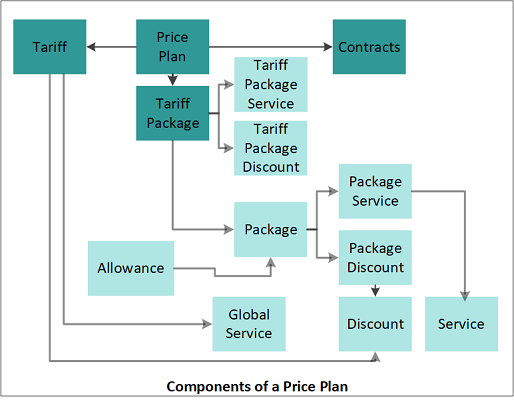
A price plan combines a tariff, a package and a connection type
A price plan can be applied directly to an individual subscription A billing entity that incurs a charge. Examples include a network attached device whose usage you want to measure and charge for, or a monthly software subscription or an agreement In the Cloud Monetisation Platform, the entity that holds the instructions for generating the bills for one or more subscriptions. including the addresses and how often the bill is generated.. Price plans can also be attached to a Corporate or Group entity, allowing the list of available price plans to be restricted for a given customer In the context of the Cloud Monetisation Platform, an individual or organisation who has signed an agreement to take goods and services from a service provider. A customer receives a bill associated with one or more subscriptions, and can be a single end user or a large company with many subscriptions assigned to one agreement. structure. Service providers can use price plans to offer customers specific discounts/offers when they connect to a particular tariff.
A price plan can be linked to a price plan group In the Customer Manager Platform hierarchy, the highest level of the structure. The group level can be used to group corporates. Groups can hold financial information., which allows price plans to be categorised.
When you configure a price plan you can:
- Specify the price plan code and description.
- Set the time period during which the price plan is effective.
- Choose a billing type for price plan - prepaid or postpaid.
- Select the price plan type to indicate what the price plan is used for.
- Select the tariff that applies to the price plan.
- If applicable, select a default package for the price plan.
- Specify the price plan group that the price plan belongs to.
- Select terms and conditions for the price plan.
- Choose a contract for the price plan. The contract term, notice period and early upgrade term will be devolved to the price plan from the contract details.
For more information, see Contracts.
-
Select the connection workflow event that will connect a subscriber The end user of a network. to this price plan to the relevant network In the context of CMP, the infrastructure on which usage of registered customers will be measured – this could be a mobile phone network, broadband network or other non-telecommunications network..
The workflow event code is always CONNECTION. This is hard-coded. The Connection Type (CONN) uses the workflow event code as part of a Connection workflow event.
- If required, configure explanatory and tooltip text to help Business Configuration A module in the CMP Administation console that provides for viewing and modification of business and user applicable system configuration. or CMP Converged Monetisation Platform. The MDS Global product that supports customer care and billing for digital service providers. users to understand the price plan.
You can optionally associate a Product Template and a subscription attribute group with the Price Plan. The Product Template extends the basic Price Plan configuration with additional static attributes to further describe it. The subscription attribute group allows dynamic Price Plan attributes to be captured during the installation process.