Usage Interface
The CMP Converged Monetisation Platform. The MDS Global product that supports customer care and billing for digital service providers. Usage Interface handles and processes externally priced usage The consumption of services, for example a subscriber using call minutes. event records (calls messages and data) and non-usage items (line rental, connection fees and insurance).
Rated Usage Loader
Every time a subscriber The end user of a network. uses their handset A mobile phone to make a call, send a text, browse the web or carry out any other activity, the network In the context of CMP, the infrastructure on which usage of registered customers will be measured – this could be a mobile phone network, broadband network or other non-telecommunications network. records this activity and makes the information available for collection in event files. The Rated Usage Loader job is responsible for processing rated usage records into
CMP so that usage data can be included in a subscriber's detailed bill, available to Call Centre Staff via AgentView The graphical user interface of the CMP that is typically used by Customer Service Agents to access CMP customer and billing data. In versions prior to CMP 8.0, this was called the CMP GUI. or via a self-care application.
The CMP Rated Usage Loader is for use in a deployment in which an Online Charging System (OCS) is used to rate all usage. CMP automatically loads files of rated usage records and allocates them to the subscriber. The rated usage will then be available in the system for inclusion on the next detailed bill in the case of post-paid accounts.
Online rating In telecommunications, determining the cost of a particular call. Involving converting call-related data into an equivalent monetary value. involves the following:
-
External Data Representation (xDR) Collection
Retrieval of usage records from the network or mediation platform:
- CMP xDR External Data Representation. A standard data serialisation format that allows data to be transferred between different computer systems. Collection periodically retrieves xDR files from a configurable source location, either directly from the network or from a secure target location.
- A separate job is submitted for each xDR file collected. New files are collected and transferred for xDR Transformation (if required) and processing. Previously collected files are ignored.
- CMP xDR
-
xDR Transformation
Transforms incoming xDR files into the correct format for the usage interface:
- xDR Transformation is an optional component of the usage interface. If configured, CMP transforms the collected file to the required comma separated values (CSV Comma Separated Values. A simple file format used to store tabular data, such as a spreadsheet or database. CSV files can collect the data from tables so that it can be input to another table-oriented application such as a relational database application.) format.
- xDR Transformation is an optional component of the usage interface. If configured, CMP transforms the collected file to the required comma separated values (CSV
-
xDR Interface
Validates xDR files and usage records, and applies a call classification code:
- File-level validation is performed on new xDR files to check the following if:
- the file name has the same filename as an xDR file that has already been retrieved
- the file is empty
- the file is incomplete
- the trailer count is correct
- the file is not locked by another process
- Unlocked files that fail validation are moved to an area for manual checking and the Network Batch Log record is updated. Successfully validated files are processed.
- Standard CMP field-level validation is performed to check if:
- field values are the correct format and length
- the usage record is a duplicate
- the usage record is over a pre-defined age
- the Duration and No. of Units fields are populated
- Usage records failing field validation are written to the Usage Errors file for manual investigation.
- Successfully validated usage records are classified and written to the Usage Detail files to be priced and allocated to a Subscriber.
- A usage record is typically provided with a classification code by the network. This classification code is configured in CMP as a Call Class Code.
- Each Call Class is linked to a Pricing Table which controls how that usage record will be priced.
- If no classification code is provided, CMP can derive a Class Class Code from a number of fields provided in the xDR.
- File-level validation is performed on new xDR files to check the following if:
Online Rating
CMP is integrated with an Online Charging System (OCS) for real-time rating, and balance management.
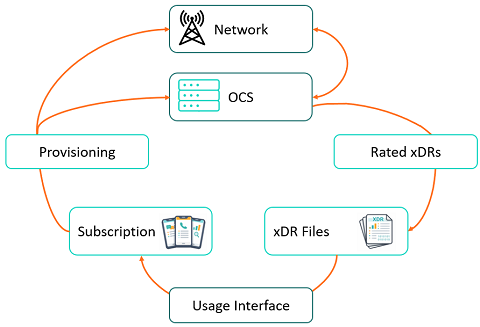
Online Charging Overview
In an online charging implementation, rating, and usage-based discounting are handled by the Online Charging System (OCS) in real-time as the service is consumed. The xDRs produced by the OCS to reflect the rated usage are processed into CMP via the usage interface. CMP performs supplementary classification to support the bill presentation and any reporting requirements of the service provider The owner of the infrastructure in which accounts will be created. The Service Provider can host and operate the instance of CMP, or CMP can be provided as a Managed Service..
OCS Interaction with the network
When a customer In the context of the Cloud Monetisation Platform, an individual or organisation who has signed an agreement to take goods and services from a service provider. A customer receives a bill associated with one or more subscriptions, and can be a single end user or a large company with many subscriptions assigned to one agreement. initiates a form of usage, a credit control request is made to the OCS. A credit control requests asks the OCS for a number of seconds for voice, a volume of data or a Y/N for an event.
The OCS issues the quota to the network and the call/session is connected. The quota amount is configurable in the OCS.
Once the quota is consumed, the network requests for more. As each quota is requested, the OCS Balance is updated immediately.
When the call/sessions ends, the network sends a final request/message to the OCS containing the amount of the last quota allocation used. The OCS Balance is updated immediately to reflect the final total amount of usage consumed.
CMP Interaction with the OCS
xDR files are received from the OCS, transformed and individual usage records are given a Call Class Code by CMP Calls Interface functionality.
Once classified, the processing function of the Calls Interface allocates classified usage to the required subscription and the usage records are written to the Unbilled Call Detail file in preparation for invoicing.
All rating and discounting is performed in the OCS in real time, not CMP.
Key features of Online Rating
Real Time Visibility
CMP web services are used to query the OCS to identify remaining allowances and spend providing a real time view of usage, spend, Meters and Features - presented in AgentView for CMP users, and in selfcare application for customers.
Proposition Configurationn
- A CMP Service is used to provision and purchase an Offer in the OCS. Each CMP Service - for example 100 Inclusive Minutes, 5000 Inclusive Text Messages, 2 GB Inclusive Data, and 1GB Data Add-on - is mapped to a unique OCS Offer.
- An OCS Offer is associated to an OCS Balance. A Balance is the allowance or monetary amount available as part of the Offer. For example 100 for the 100 Inclusive Minutes Offer.
- An OCS Offer is mapped back to CMP as a Basket. Baskets can be viewed in real time in AgentView and in self-care portals via the CMP web services.
- CMP users and customers can view Basket information to identify the Starting Balance, Remaining Balance, Amount Used So Far, and so on.
Meters
Track Subscription usage and spending of an Offer/Balance, triggering alerts when usage or spend exceeds configured thresholds.
- Meters must be configured in the OCS if required and linked to an Offer/Balance in the OCS. When an Offer is purchased, the configured Meters are added automatically.
- When the final threshold is reached, the Offer can no longer be used. For example when 100% of a 100 minute allocation of inclusive minutes is consumed, the customer will no longer be able to make calls unless a further one-off Offer for extra minutes has been purchased. The Meter, along with the Balance, will be reset on the customer's bill cycle.
Features
Features can be configured to enable/disable a Feature or bar/unbar a Feature.
- Features reduce the amount of provisioning In telecommunications, the setup of equipment, wiring and transmission to deliver services to a customer. required to the network from CMP by simply selecting to enable/disable a Feature, Data Rollover or Adult Content Filter; or bar/unbar a Feature, International Roaming, Premium Rate Bar or Fraud Bar.
- Features allow CMP users to easily view and enable/disable or bar/unbar a Feature at the request of the customer in AgentView. The customer themselves can also control their Features via self-care applications using the CMP web services.