Communication Email and Letter Templates
CMP Converged Monetisation Platform. The MDS Global product that supports customer care and billing for digital service providers. Supports outbound communications to customers using a number of delivery methods, including email and letter. The Communications process merges templates and default field values together to produce letters and emails that are personalised for customers by including customer-specific attributes from the CMP database.
See the Communications Process Flow topic for more information.
To achieve this, letter and email communications must be associated with an additional external template that determines the format, style and layout of the communication. HTML templates are created using external frameworks such as Velocity produce output such as PDF, HTML and RTF.
In CMP 8.x, templates are created manually using Velocity Template Language. Velocity uses templates to produce the output (HTML for example) and Prince to convert HTML output from Velocity templates to PDF:
Templates contain elements such as static text, images, headers and footers, and dynamic text or merge fields. The merge fields are populated with the values from the CMP default fields.
Default fields contain customer-specific information from the CMP database that can be included in communications with end users. The graphic below shows a section of a template that includes style settings such as the text font, a logo image and default fields that contain address and subscription A billing entity that incurs a charge. Examples include a network attached device whose usage you want to measure and charge for, or a monthly software subscription information:
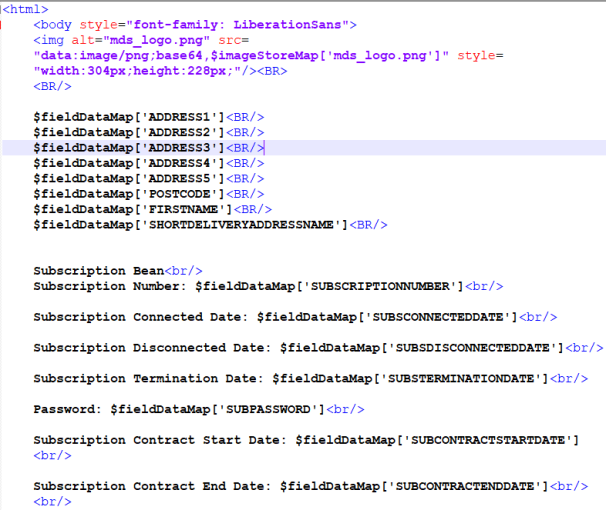
Default fields are associated with beans, which are the software objects that retrieve the data from CMP. When CMP processes a communication, it checks which fields needs to be populated for that particular communication and then invokes the associated beans, which fetch the data from the CMP database according to the configured parameters. This is explained in detail in Comms Process Flow: Gather Details and Comms Process Flow: Create and Send Letters and Emails.
For more information see Communications Default Fields and the online help for the Business Configuration A module in the CMP Administation console that provides for viewing and modification of business and user applicable system configuration. module of the CMP Administration Console An operations web console that allows batch jobs to be scheduled, run manually and monitored. The console also provides for viewing and modification of business and user applicable system configuration..
Examples of Velocity templates and lists of default fields are available in the Appendix.