Merge Fields and Templates
EXTERNAL, SMS, PUSH or ONLINE Comms
Once the Comms Monitor job has derived the values for the default fields associated with the comm, it merges the field values and the comms template to create the message.
For SMS Short Message Service.
A text messaging service component of most mobile telephone systems. SMS uses standardized communication protocols to enable mobile phone devices to exchange short text messages., PUSH or ONLINE comms, the message template is created in the Business Configuration A module in the CMP Administation console that provides for viewing and modification of business and user applicable system configuration. console and may have a number of default fields embedded in it, for example:
Short Message Service.
A text messaging service component of most mobile telephone systems. SMS uses standardized communication protocols to enable mobile phone devices to exchange short text messages., PUSH or ONLINE comms, the message template is created in the Business Configuration A module in the CMP Administation console that provides for viewing and modification of business and user applicable system configuration. console and may have a number of default fields embedded in it, for example:
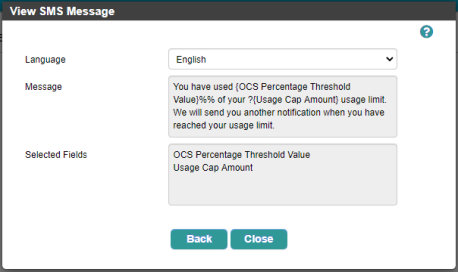
An SMS message configured with multiple default fields
The message template is held in the Message field in the CommsCodeLanguage table and can be identified by the presence of ${commsFieldCode} where commsFieldCode is the identifier of the CommsRequestFieldDetail entry for the default field value. The Comms Monitor job merges values of the default fields with the message template as follows:
- The job checks the CommsFieldCode in the CommsField table, which relates to a default field record and its parameter held in the CommsFieldDefinition table.
- When a CommsFieldCode is used in the Message value held in the CommsCodeLanguage table, the job merges the default field value into the message.
- The job stores the merged message in the CommsRequestTargetDistribution table.
- For EXTERNAL, SMS and PUSH comms, the job updates the DistributionStatus on the CommsRequestTargetDistribution table to D (Awaiting Distribution).
- For ONLINE comms, once the merged message is stored, it is ready and waiting for the user A person with the capability to log in to the CMP GUI software, such as a customer service advisor or agent. to view it, so no further distribution is necessary and the job updates the DistributionStatus to P (Published).
EMAIL and LETTER Comms
The template for the body of an email is an HTML template created in a third party Of software; a reusable component developed to be either freely distributed or sold by an entity other than the original vendor of the development platform. application such as Velocity, which is used in CMP Converged Monetisation Platform. The MDS Global product that supports customer care and billing for digital service providers. 8. The email subject heading is configured in Business Configuration console and can include default field values:
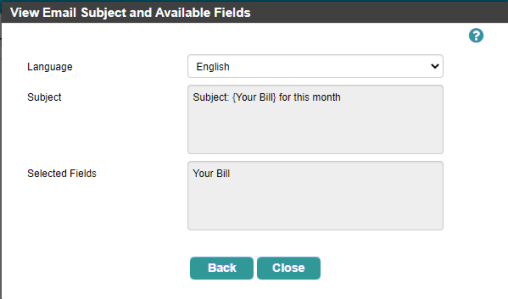
Configuring an email Subject that includes a default field
For emails, the Comms Monitor job follows the process above to merge Email Subject with relevant default field values. After the job has invoked the Java A widely used object-oriented programming language that is designed for use in the distributed environment of the internet. It is the most popular programming language for Android smartphone applications beans, retrieved the default field values and stored them in the CommsRequestFieldDetail table, it merges the EmailSubject held in the CommsCodeLanguage table with the values stored in the CommsRequestFieldDetail table by replacing an instances of ${fieldCode} with the derived data.
Once the merged subject has been created, the job stores it in the CommsRequestTargetDistribution table and sets the DistributionStatus field on the table to A (Awaiting Merge). Creating and distributing the email is handled by the Email Monitor job; see Comms Process Flow: Create and Send Letters and Emails.
Letter
For letters , the Comms Monitor job creates an entry in the CommsRequestTargetDistribution table and sets the DistributionStatus field on the table to A (Awaiting Merge). Creating and distributing the letter is handled by the Letter Monitor job; see Comms Process Flow: Create and Send Letters and Emails.