View Communication Details
The communications related to an account In the Cloud Monetisation Platform, a billing entity that can be used to manage payments on one or more subscriptions or payments for services. An account can hold details such as payments or invoices. or subscription A billing entity that incurs a charge. Examples include a network attached device whose usage you want to measure and charge for, or a monthly software subscription can be viewed in the following areas in AgentView The graphical user interface of the CMP that is typically used by Customer Service Agents to access CMP customer and billing data. In versions prior to CMP 8.0, this was called the CMP GUI.:
-
The Comms pane in the Event Summary lower panel for the relevant workflow event.
-
The Comms > Comms lower panel in the relevant Summary , Account, or Agreement
In the Cloud Monetisation Platform, the entity that holds the instructions for generating the bills for one or more subscriptions. including the addresses and how often the bill is generated. screen.
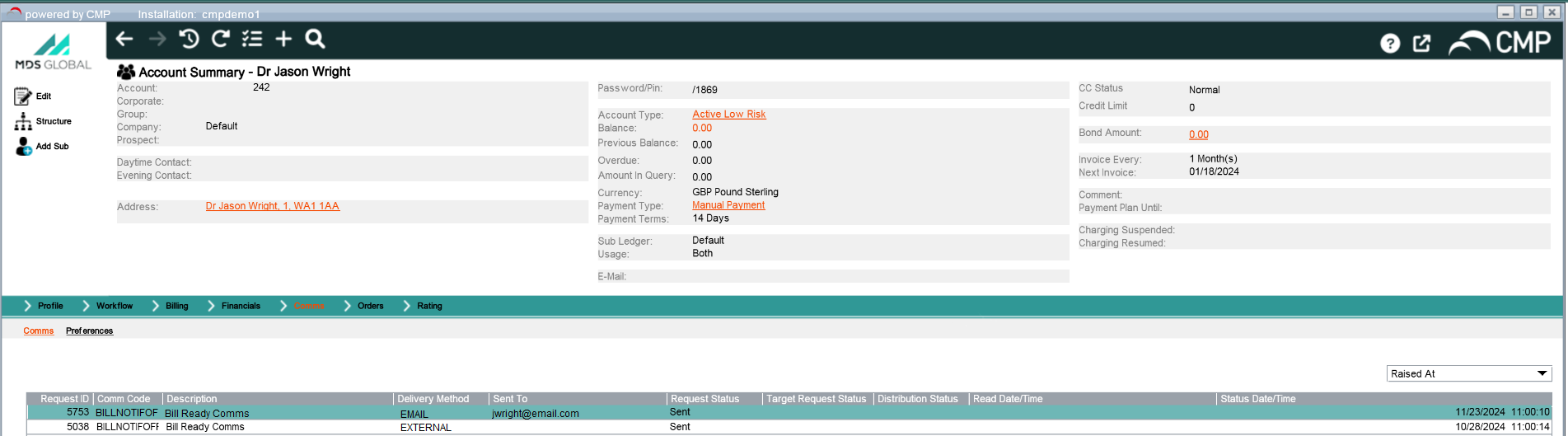
Account Summary screen showing the Comms lower panel with communication details
The communications for the subscription or account are listed with the following column headings:
| Field | Description |
|---|---|
| Request ID | The ID of the request that raised the communication |
| Comms Code | The alphanumeric code for the communication |
| Description | The brief description name of the communication, for e.g. Bill Notification, Card Payment SMS |
| Delivery Method | How the communication was delivered, e.g. email, letter, SMS, online, external system or push notification |
| Request Status |
The status of the communication request, e.g. Awaiting Processing, Processed, Cancelled, Not Sent, Opted Out, Error etc. |
| Target Request Status | The status of the target of the communication, e.g. Normal, Error |
| Distribution Status | The status of the communication distribution e.g. Published, Sent, Error etc. |
| Read Date/Time | The date and time that the communication was read |
| Status Date/Time | The date and time for the most recent status for the communication |
You can filter the list of communications using the list on the right to view communication by when they were Raised At (Default) or who they were Sent To.
In either the Comms pane or Comms lower panel, to view the message content for an individual SMS Short Message Service.
A text messaging service component of most mobile telephone systems. SMS uses standardized communication protocols to enable mobile phone devices to exchange short text messages., push or external comms, you can use the View Details shortcut menu option to access the Comms Details pop-up.
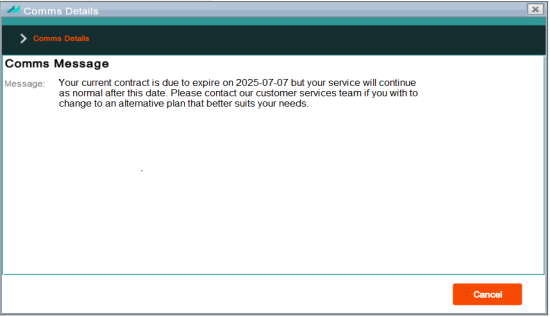
Comms Details pop-up showing the message content for a push notification