Data Warehouse Output Files
Format
Files are comma delimited csv files. Character fields will be enclosed with quotation marks, for example"text".
If the extract is related to customer In the context of the Cloud Monetisation Platform, an individual or organisation who has signed an agreement to take goods and services from a service provider. A customer receives a bill associated with one or more subscriptions, and can be a single end user or a large company with many subscriptions assigned to one agreement. structure, for example Subscription A billing entity that incurs a charge. Examples include a network attached device whose usage you want to measure and charge for, or a monthly software subscription, Account In the Cloud Monetisation Platform, a billing entity that can be used to manage payments on one or more subscriptions or payments for services. An account can hold details such as payments or invoices. or Agreement In the Cloud Monetisation Platform, the entity that holds the instructions for generating the bills for one or more subscriptions. including the addresses and how often the bill is generated., a file will always be produced, even if it consists of just two lines: the version number and a list of fields. This applies when extracts are run in both FULL or PARTIAL mode.
Version Number
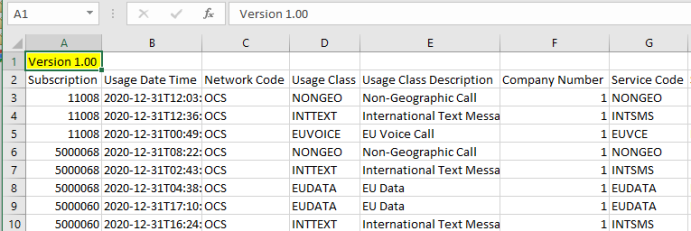
Output files always include a version number as the first line of the output. All output formats start at Version 1.0. Each time an extract batch job is updated and this affects the output format, the version number is incremented: Version 1.1, Version 1,2 and so on. This enables customers to determine whether they are looking at the latest extracts:
Collection
Extract files are placed in a predefined location on the file system of the CMP Converged Monetisation Platform. The MDS Global product that supports customer care and billing for digital service providers. server. The consumer of the files needs to pull files via File Transfer Protocol (FTP File Transfer Protocol.
A standard network protocol used for the transfer of files between a client and server on a computer network.), or where required, Secure File Transfer Protocol (SFTP Secure File Transfer Protocol. A network protocol used for secure file transfer between remote systems over a secure shell.).
A user A person with the capability to log in to the CMP GUI software, such as a customer service advisor or agent. profile is needed to access the file system.
File Naming
The configurable file naming convention is as follows:
<fileNamePrefix> - extract ID - partition ID - <fileNameSuffix>.csv, where:
- <fileNamePrefix> =
DWHExtract - <fileNameSuffix> = a descriptive name of the extract
Example: DWHExtract-55141-1-Unbilled_Usage_Analytics.csv
Housekeeping
The extract process does not perform housekeeping of the output directory on the CMP file system. An operational process needs to define what happens to files once they are collected.
Files can be deleted, renamed or moved to an archive folder.
Systems Monitoring
Monitoring should be put in place to raise alerts if errors are found and/or if the success message is not output by a given time of day. The CMP Administration probes and alerts functions can be used to monitor quality and alert users.