Interfaces
The Interfaces screen provides execution and status information on batch activity, including inbound, outbound and internal, such as Statement Production.
Interfaces are described using a category, type and direction, for example Payments Mandate Inbound:
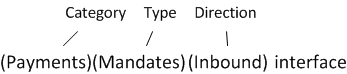
The category of an interface is the business module or process with which it is associated, for example Billing, Payments, Purge, Credit Management, Usage Processing, Number Management and so on.
The type of the interface is the particular job within the category with which it is associated, such as Invoice Production, Mandates, Account In the Cloud Monetisation Platform, a billing entity that can be used to manage payments on one or more subscriptions or payments for services. An account can hold details such as payments or invoices. Purge, Credit Control, Rated Usage, or Managed Numbers.
An interface can have the following directions:
- Inbound
- Outbound
- None. The batch job acts internally on CMP Converged Monetisation Platform. The MDS Global product that supports customer care and billing for digital service providers. tables only. No external systems are involved.
The batch count for an interface is the number of times the relevant batch job has been run. The Interfaces screen allows you to drill down into the iterations of a job and examine an individual execution, right down to the details of single interface items, which include:
- A sequence number
- A customer In the context of the Cloud Monetisation Platform, an individual or organisation who has signed an agreement to take goods and services from a service provider. A customer receives a bill associated with one or more subscriptions, and can be a single end user or a large company with many subscriptions assigned to one agreement. reference
- A transaction description
- Errors (if applicable)
Information about the stage of an interface includes the last stage it reached when the batch job was last run. Possible stages are:
- Batch - A batch job acts only on CMP tables.
- Extract/Load - Data is extracted from CMP tables to create outbound files, for example during the Invoice Analytics, Credit Reference or Bill Print jobs. Or data from inbound files is loaded into CMP tables, for example during the Recurring Payment Rejections, Managed Numbers or SIM Subscriber Identity Module. A smart card (electronic chip) inside a mobile phone that communicates with the network and carries an identification number unique to the owner. The SIM can also store personal data. Profiles jobs.
- Transform - Data is transformed to and from JSON JavaScript Object Notation. JSON is a lightweight format for storing and transporting data, often used when data is sent from a server to a web page. files, according to the CMP JSON schema A specification for JSON based format for defining the structure of JSON data., for example during the Rated Usage and Ledger jobs.
- Transmission - Files are sent to third parties, such as during the Communications process.
- Verification - Confirmation that files were sent or received.
- Acknowledgement - This includes outbound acknowledgement of an inbound file, confirming CMP has processed a file from a third party Of software; a reusable component developed to be either freely distributed or sold by an entity other than the original vendor of the development platform. or inbound acknowledgement of an outbound file, for example a third party or adaptor informing CMP whether it was able to transform and transmit a file.
A batch interface can have the following statuses:
- Complete
- In progress
- Error