Recurring Prepayments
CMP Converged Monetisation Platform. The MDS Global product that supports customer care and billing for digital service providers. customers can purchase pre-paid bolt-on An addition to a subscriber's main plan or product; also sometimes called an add-on. packages that are paid for on a recurring basis, for example every 30 days. Payments can be done by credit/debit card or from the customer In the context of the Cloud Monetisation Platform, an individual or organisation who has signed an agreement to take goods and services from a service provider. A customer receives a bill associated with one or more subscriptions, and can be a single end user or a large company with many subscriptions assigned to one agreement.'s pre-paid cash balance.
Recurring Card Prepayment Setup
Recurring prepayments are set up during account In the Cloud Monetisation Platform, a billing entity that can be used to manage payments on one or more subscriptions or payments for services. An account can hold details such as payments or invoices. and subscription A billing entity that incurs a charge. Examples include a network attached device whose usage you want to measure and charge for, or a monthly software subscription creation. The details for the customer's debit or credit card are entered as for Recurring Card Payments (Postpaid).
Then a recurring and prepaid base package must be selected for the subscription. This will be billed for in advance every billing cycle, for example every month. A prepaid subscription can also have recurring prepaid bolt-on packages. A prepaid subscription can have recurring bolt-on packages; they do not have to run concurrently. Payment is taken when the bolt-on is due for renewal.
Recurring Balance Prepayment Setup
To set up a pre-paid cash balance, a customer must purchase a top-up package with a cash value either using web services, for example via a selfcare app, or via an CSA Customer Service Agent, Advisor, or Assistant.
A (usually) customer-facing role in telecommunications, such as an agent in a call centre. Variations include CSR (Customer Service Representative) or CEA (Customer Experience Agent) using AgentView The graphical user interface of the CMP that is typically used by Customer Service Agents to access CMP customer and billing data. In versions prior to CMP 8.0, this was called the CMP GUI., using the Financials > Purchases pane in the Subscription Summary.
Once the customer has a prepaid balance, recurring prepaid bolt-on packages can be selected to purchase. The selected Payment Type must be Balance. Payment is taken when the bolt-on is due for renewal.
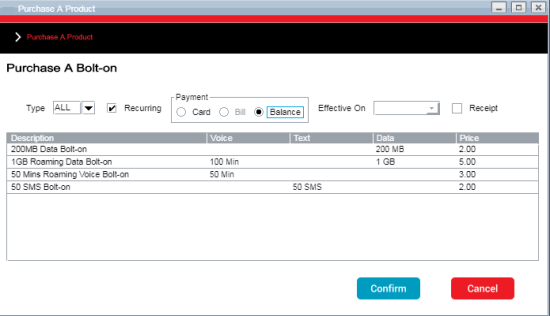
Purchases Window in AgentView Showing a Balance Payment Type
Recurring Prepayments Processing
Recurring prepayments are taken by the recurring prepayment job.
This job creates a batch of payments that are due for settlement. Once this batch has been created, it is detected by dedicated daemons that format the batch and transmit it to the appropriate external payments system. This job runs in two modes to distinguish between balance transactions and credit/debit card transactions:
- Card Mode - processes recurring card prepayments only
- Balance Mode - processes recurring balance prepayments only.
For more information, see the Recurring Prepayments section in the CMP Batch Jobs and JSON JavaScript Object Notation. JSON is a lightweight format for storing and transporting data, often used when data is sent from a server to a web page. Schemas Guide.
Handling Recurring Prepayments Rejections
Prepayments may fail for a number of reasons, for example lost or stolen cards or insufficient funds in the customer's cash balance. In CMP, recurring prepayment rejections are handled by the Recurring Prepayments Rejections job.
Dedicated daemons detect files containing details of rejected payments and load those details into CMP. This job detects batches of rejected payments and for each rejected payment, the status of the payment is updated, the associated package allowances are expired and a communication is generated to inform the customer of the rejected payment.
For more information, see the Recurring Prepayments Rejections section in the CMP Batch Jobs and JSON Schemas Guide.