Discounts
Discount schemes reduce the price of services by a percentage of the original amount or by a fixed value.
Discounts schemes do not alter the price of services, instead a credit is added for the discounted amount.
A negative discount can also be configured – a debit figure is invoiced rather than a credit, which adds a surcharge to the subscriber The end user of a network.. This allows a subscriber to be charged extra for a particular service or unit. Negative discounts can be used to encourage additional usage The consumption of services, for example a subscriber using call minutes. in order to reach a band threshold, which produces a credit amount.
Discounts are typically raised at subscription A billing entity that incurs a charge. Examples include a network attached device whose usage you want to measure and charge for, or a monthly software subscription or account In the Cloud Monetisation Platform, a billing entity that can be used to manage payments on one or more subscriptions or payments for services. An account can hold details such as payments or invoices. level. When a discount is raised at account level, all the subscriptions linked to the account benefit from the discount, regardless of their tariff. The discount scheme is applied to each attached subscription during invoice production. Setting account-level discounts minimise how many discount schemes need to be created.
Discounts are processed in the order subscription, then account. The Stop? flag (applied in AgentView The graphical user interface of the CMP that is typically used by Customer Service Agents to access CMP customer and billing data. In versions prior to CMP 8.0, this was called the CMP GUI.) prevents any further processing of discounts at the current level.
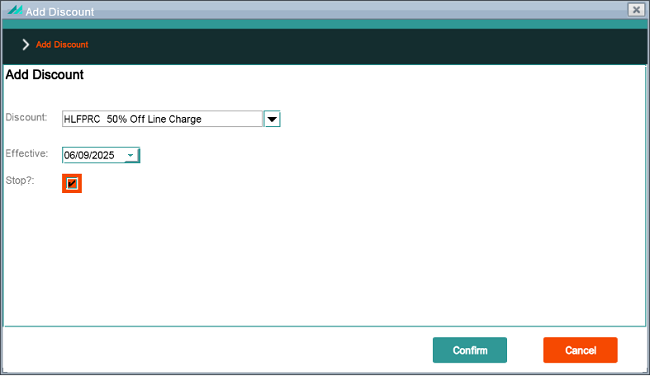
Accessed via the Billing >Discounts lower panel, the Add Discount popup has a Stop flag that indicates no more discounts further down the sequence after this one will be used.
Sequence numbers for discounts are also configured in AgentView and along with the Stop flag, determine how many discount schemes are checked and processed during invoice production.
A discount can be raised at subscription level only if the subscription is on an appropriate tariff. Only that specific subscription will benefit from that discount. The discount at subscription level can default from the package selected for the subscriber.
Discounts are created with an effective date and an optional expiry date that are used to validate if the discount can be applied. For example, a discount against a monthly-billed service is only given if the discount became effective on or before the beginning of the service’s monthly charge.
CMP Converged Monetisation Platform. The MDS Global product that supports customer care and billing for digital service providers. supports the Normal type discount scheme, which allows a flat percentage or fixed value to be applied to the invoice. Discount schemes are linked to services and can also be linked to usage class groups.
Normal discounts are only available at subscription and account level, they cannot be added at corporate or group In the Customer Manager Platform hierarchy, the highest level of the structure. The group level can be used to group corporates. Groups can hold financial information. level. They can only be added to a subscription that has been configured against the relevant tariff. Normal discounts only apply to services whose category is subscription service. They cannot be configured for account type services.
Normal discounts may be applied automatically through tariff set up, either at initial connection or as part of a tariff transfer.
Discount services are used to reduce the cost of a service. Services include all the non-usage items that customers can be charged for, such as connection fees, line rental, insurance and itemised billing. A discount service can be added to normal discount schemes.