This document provides an overview of the CMP 8.5 release with specific focus on the additional functional and non-functional enhancements with respect to CMP 8.4.
1.2 Audience
This document is aimed at internal and external audiences familiar with CMP, to explain the key features of the release including any changes in how existing functions or processes are working.
2 - Overview of Changes
With respect to CMP 8.4, CMP 8.5 introduces new functionality as well as changes to existing functionality and non-functional improvements. These changes can be summarised as follows:
2.1 - New Functionality
2.1.1 - Agreement Administrator
CMP 8.5 introduces the concept of the Agreement Administrator. A feature primarily for enterprise customers, an agreement administrator is responsible for maintaining all subscriptions within a specific organisation or department.
The Agreement Administrator is preconfigured in CMP against a specific agreement within a corporate or group hierarachy and can receive in-service notifications for subscriptions under the agreement.
In CMP 8.5 the Agreement Summary screen has been modified to show the administrator contact details associated with an agreement. Multiple administrators can be associated with an agreement but only one can be active at any time. Subscriber notifications can now be configured to be sent to any active administrator, in addition to the target subscription, using the preferred contact delivery method.
2.1.2 - Wholesale Reconciliation
CMP 8.5 introduces a new Wholesale Reconciliation extract that can be used to compare the wholesale charges received from the enabling network operator against the
usage charges received from the online charging system.
The extract takes wholesale and retail usage records and aggregates them by usage type, broken down by origin and destination, and by volume per day. For each usage type,
the wholesale units and number of events are compared against the retail units and events to determine variances.
External wholesale usage records are received from the network operator, converted into a generic CSV format and loaded into CMP by daemons. The Usage Aggregation job then
aggregates both rated and wholesale usage records. It groups usage records by usage date, type, origin and destination and calculates totals for usage charges and usage units for each of these groups.
The Usage Reconciliation job then reconciles retail and wholesale usage records between the dates specified in the job parameters. The job then compares the records against each other and
calculates variances between usage volumes and number of events. It exports the results of the reconciliation as a CSV file, which is automatically transferred to storage.
2.1.3 - Bulk Subscription Service
CMP 8.5 introduces a new bulk action, 'Maintain Subscription Service', to enable a subscription service to be added, ended or edited for multiple subscriptions.
As with other bulk actions, the Maintain Subscription Service bulk action is wizard-driven using a driver file to control what subscriptions are affected by the required change.
The wizard enables the type of change to be specified (Add or Change), along with the affected service and the effective date of the change.
If the action is a service addition, then a sales person can be added.
If the action is a service change, then it is possible to additionally specify an expiry date (service expiry) and a price (service price change).
2.1.4 - Data Warehouse Extracts
CMP 8.5 builds on the existing data warehouse extracts with the introduction of a Statement Detail extract to be used alongside the Invoice Detail extract to provide the breakdown of the associated statement including the opening and closing balances at the time of billing.
2.2 - Changed Functionality
2.2.1 - Revert Price Plan Change
In some countries, consumers have the right to 'change their mind' after purchasing a product or service from a supplier. In CMP, this would apply when a customer changes their Price Plan.
CMP 8.5 introduces the ability to revert a price plan change within a configurable period. A revert Price Plan change action changes the subscriber's Price Plan back to their previous Price Plan at the end of the day (in line with the current Price Plan change scheduling).
It is not possible to revert a previously reverted Price Plan change nor to perform a revert if there is no previous Price Plan to revert to.
The Price Plan revert is driven from the Tariff/Price Plan History popup on the Subscription Summary screen.
2.2.2 - Payments and Purchase
In CMP 8.4 it was not possible to make a purchase or a payment through AgentView using a one-off card already registered in the system. It was only possible to use an existing registered card.
CMP 8.5 now allows both a one-off payment or a purchase to be made using either the registered card or any of the one-off cards held against the account.
Cards registered against a specific subscription can not be used for account payments but can only be used by that subscription for making a card purchase.
In addition it is now possible to view a payment receipt if one has been requested for the corresponding payment.
2.2.3 - Recurring Card Purchase Details
In CMP 8.4, the purchase of a recurring bolt-on using a card required that the card be already registered in CMP before it could be linked to the purchase for subsequent recurring payments.
If the card became invalid during the lifetime of the purchase there was no way to change the card associated with the recurring payment and therefore the recurring bolt-on needed to be cancelled and re-purchased with a different card.
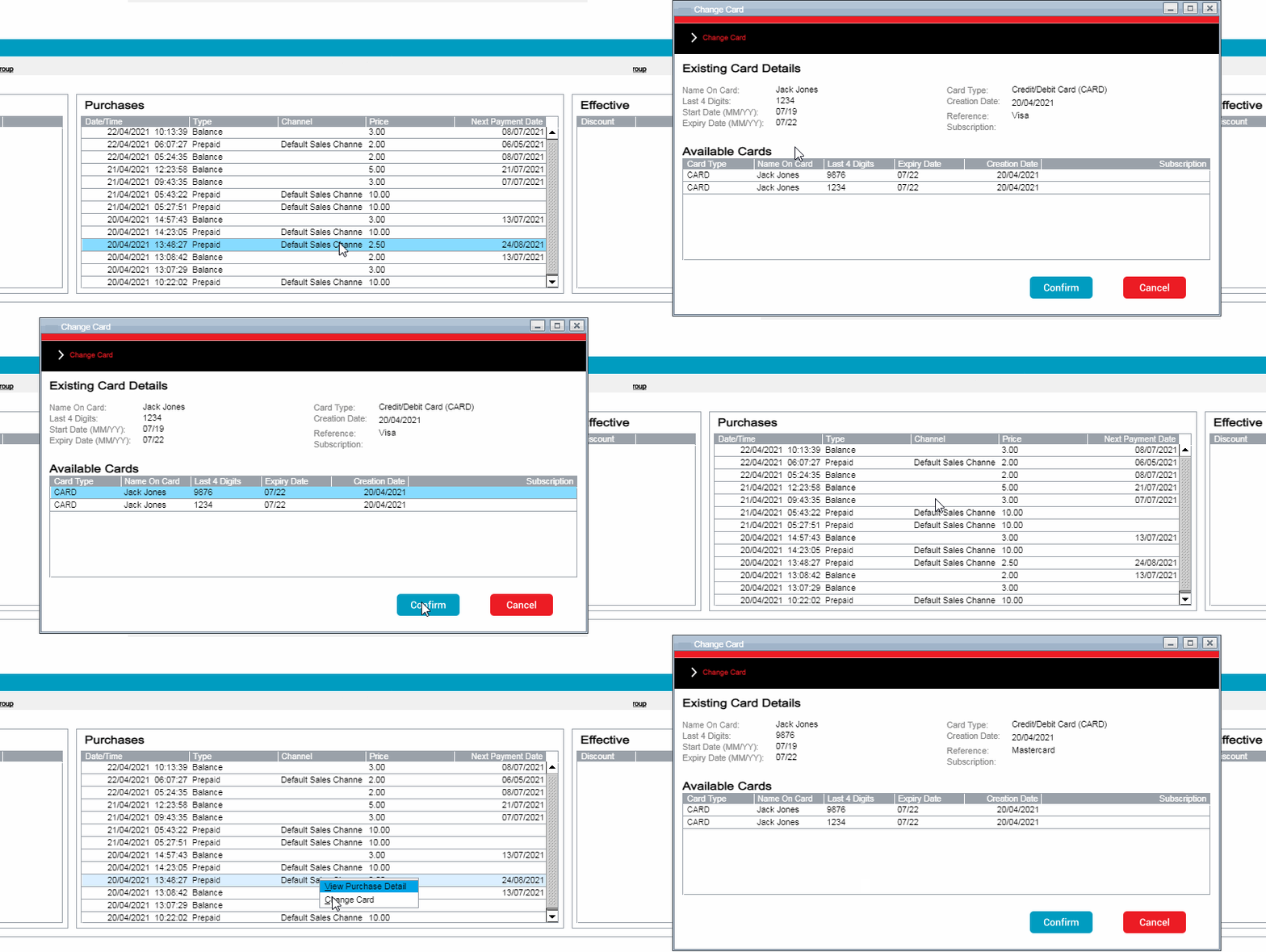
CMP 8.5 has improved this process by introducing the ability to change the card associated with a purchase with another card held on the account. The detail of the process is described and illustrated further below.
2.2.4 - End User Notifications
End user notifications, or comms, take the form of either event-based notifications or advance notifications.
Event-based notifications advise the end user of a specific event that has taken place on the account or subscription due to user, call centre agent or system activity. This could be a low balance notification or a purchase confirmation notification, for example.
Advance notifications advise the end user that something will happen on the account or subscription in the near future, such as a registered card expiry or a direct debit payment is due to be taken.
CMP 8.5 has brought enhancements to both event-based and advance notifications.
The Advance Notification job has been enhanced to provide greater flexibility for the introduction of new advanced notifications and to provide more out-of-the box dynamic fields that can be used to provide a more personalised end user experience.
The additional notification attributes are defined below.
The event-based notifications have been improved to additionally support notifications for one-off successful and failed payments.
2.2.5 - Administration Console Changes
Servers
CMP 8.4 extended the server display within the System Configuration menu option of the Administration Console to provide a list of the applications that were installed on each host.
CMP 8.5 has extended this functionality to also show the status of each application to alert the end user to any application that may be unavailable.
Users
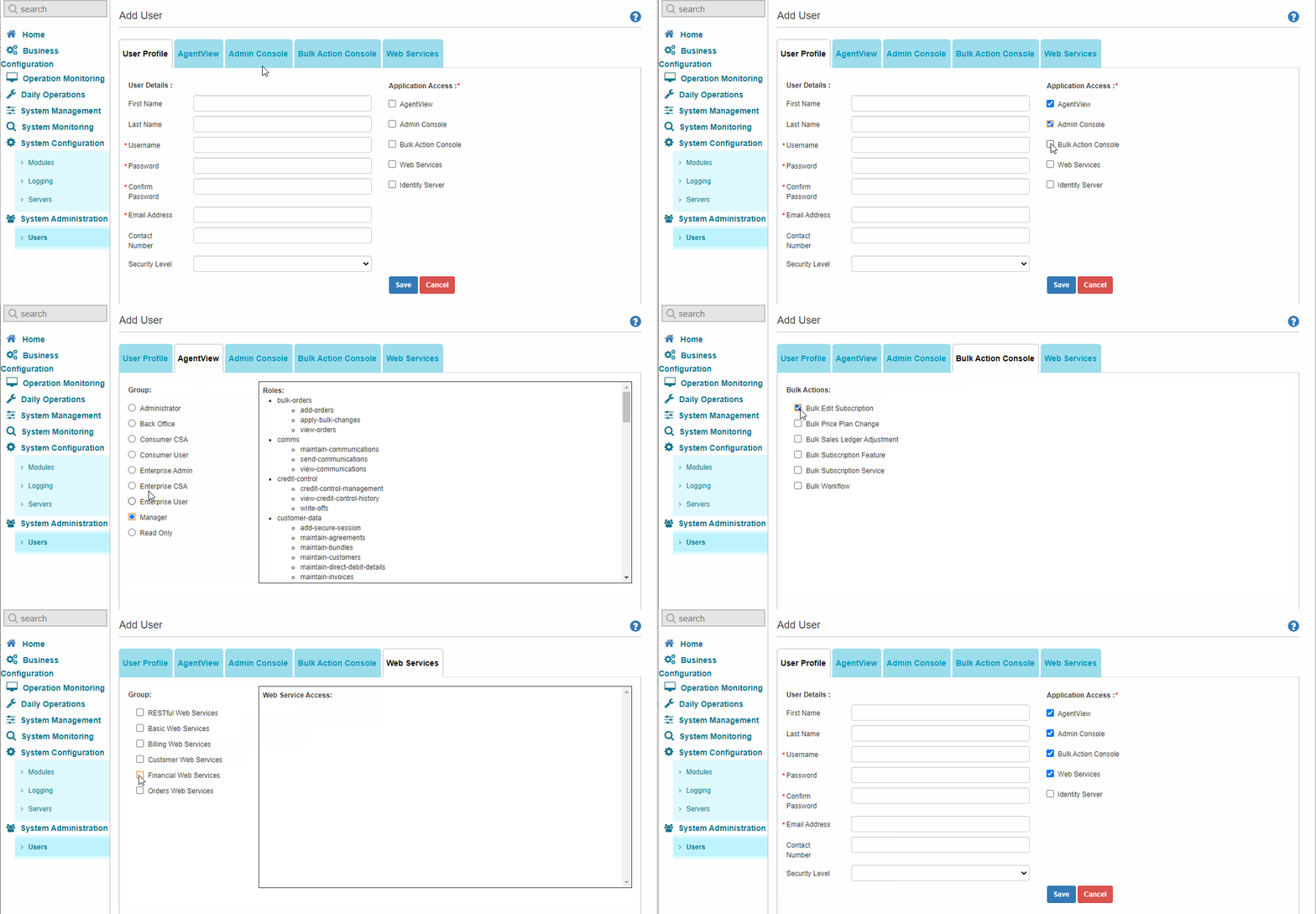
CMP 8.4 introduced the ability to create new users through the Administration Console rather than directly through the WSO2 Identity Server UI.
This provided the capability to only add new users with basic application access, so in CMP 8.5 it is now possible to select the group roles for each application, thus providing a next level of user access security.
2.2.6 - Web Services Changes
RESTful Web Services
In CMP 8.4 there was no SOAP or REST service to enable an external system to query saleperson details within CMP. In CMP 8.5 a new REST web services has been provided to retrieve details of an individual salesperson.
In addition both the POST and PATCH Payment web services have been enhanced to now generate a workflow event when recording either a successful or failed payment. This allows a notification to be sent to the customer informing them of success or otherwise of a one-off payment.
Other REST web service changes are detailed below.
SOAP Web Services
In CMP 8.4 there was no SOAP or REST service to enable an external system to create a saleperson within CMP. In CMP 8.5 the CreateAccount SOAP service has been enhanced to allow for the creation of a salesperson account.
In addition, the UpdateService and UpdateDiscount web services have been changed to prevent a package service or package discount respectively being ended without ending the containing package.
Other SOAP web service changes are detailed below.
3 - Impacts on CMP
The functional and non-functional changes highlighted in section 2 above have had an impact CMP in the following areas:
New and changed AgentView screens
Bulk Action changes
Admin Console changes
New and changed Business Configuration screens
SOAP web services changes
RESTful web services changes
Integration adapter changes
Openet-specific adapter changes
Lifecycle-specific adapter changes
UK-specific adapter changes.
3.1. AgentView
3.1.1. New Screens
Charge Card Popup Panel
If an active recurring purchase has been made using a credit card, then, if the recurring purchase has not expired, right clicking on the corresponding purchase record in the Purchases mini panel on the Account Summary screen provides a new shortcut option, Change Card, that allows the card associated with the purchase to be changed to another card registered against the account.
Change Card shortcut Option
Allowances Summary Panel
A new Billing swish menu option, Allowances, has been added to the Agreement Summary screen in CMP 8.5 to show the allowances associated with any shared package purchase. Allowances can be filtered between Effective and All.
Allowances Lower Panel
Administrator Lower Panel
CMP 8.5 introduces the concept of an agreement administrator mainly for enterprise customers who will typically have a person dedicated to handling the mobile subscriptions of all employees within the enterprise or a portion thereof.
Agreement Administrators are expected to be configured external to CMP and provisioned directly into the CMP database.
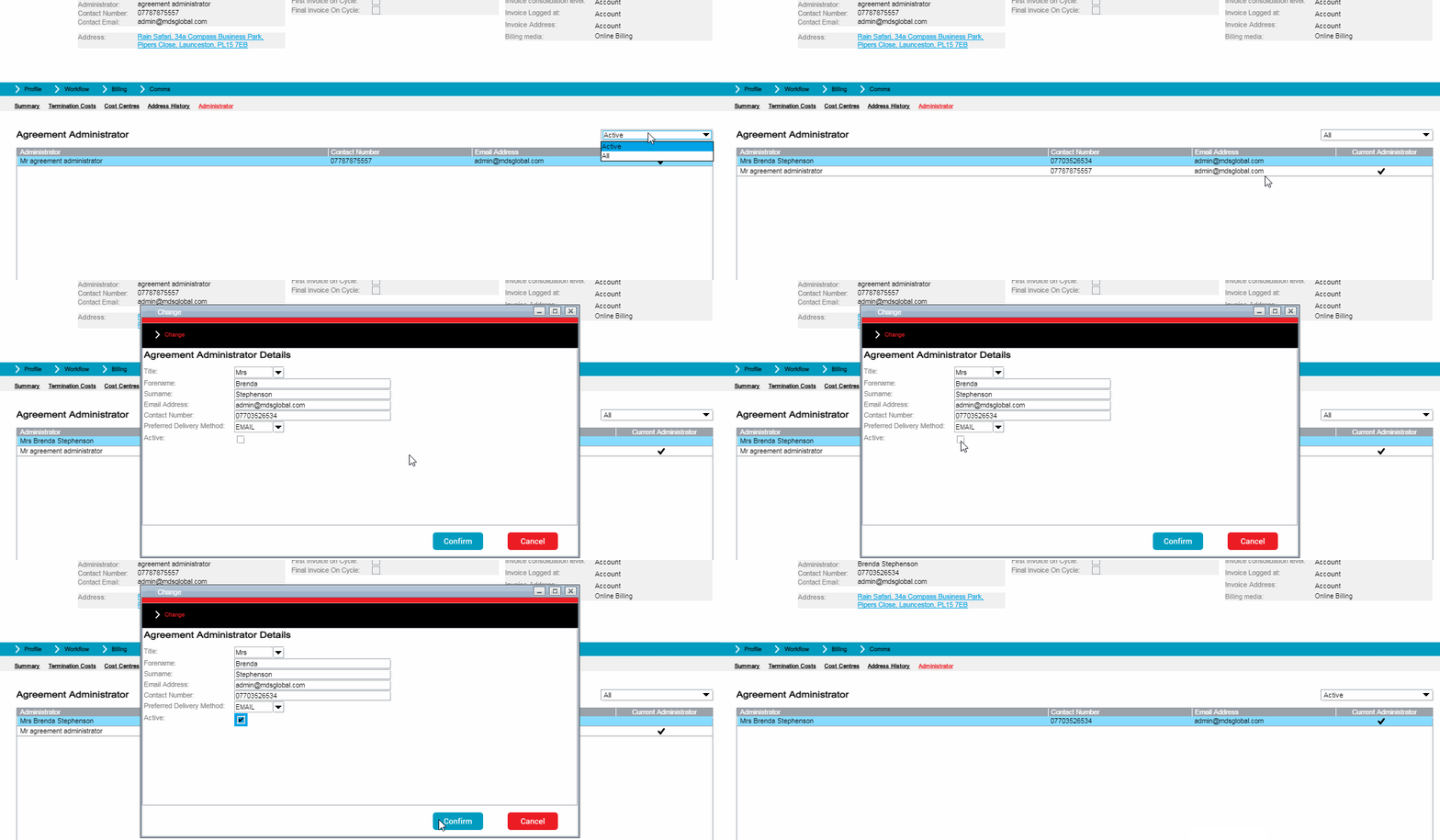
A new swish has been added to the Agreement Summary panel to display the administrator associated with the agreement. A filter on the lower panel allows all configured administrators or just the currently active one to be displayed.
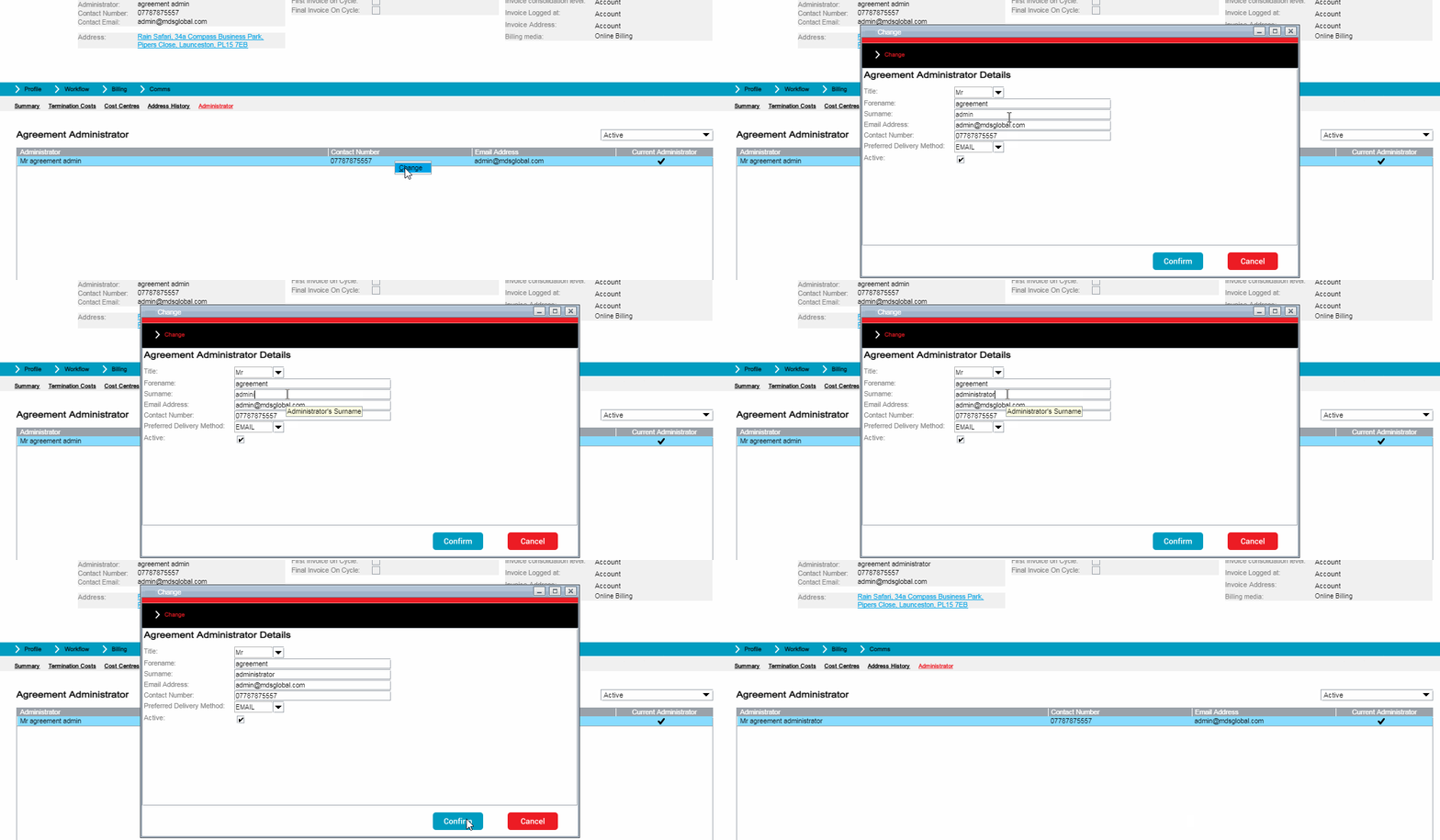
From the Agreement Administrator lower panel the user can right-click and select the Change shortcut option to change the administrator details.
The Change Agreement Administrator Details popup panel allows the contact details and preferred delivery method to be changed along with the active flag.
Change Administrator Shortcut Option (Update)
If the administrator is already marked as active, then deselecting the checkbox will make the administrator inactive i.e. they will no longer receive communications related to the entities linked to the agreement.
If the administrator is marked as inactive, then selecting the checkbox will make the administrator active. If there is another administrator assigned to the agreement who is already marked as active, then this administrator will be automatically deactivated.
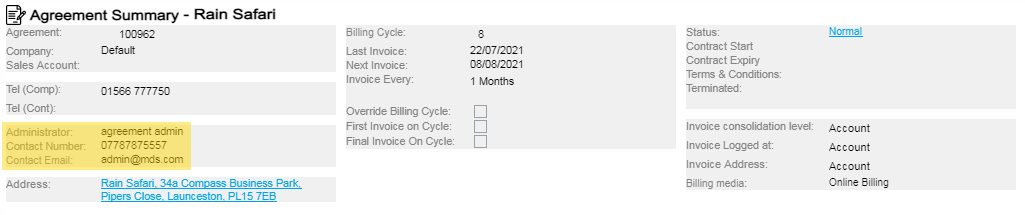
The Agreement Summary top panel has also been updated in CMP 8.5 to show the contact details of the currently active agreement administrator:
Agreement Summary Top Panel
3.1.2. Changed Screens
Payment Details Panel
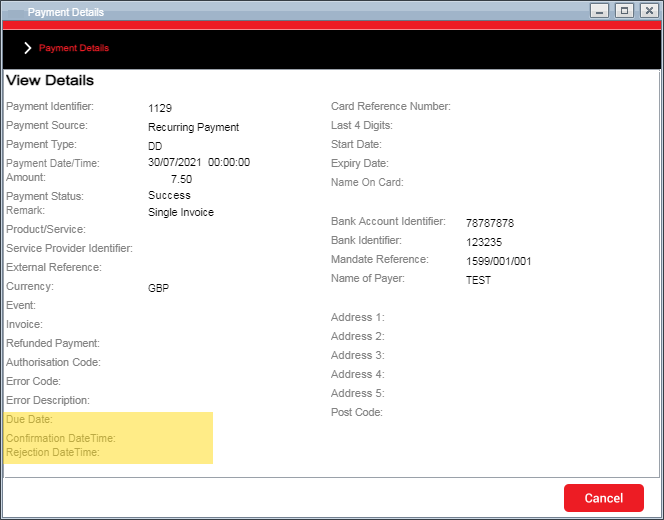
The Payment Details panel has been updated to include the additional payment dates stored against the payment.
Payment Details Popup Panel
The following new fields have been added to the bottom of the panel:
Due Date
Confirmation DateTime
Rejection DateTime.
Account Services Lower Panel
In CMP 8.4, selecting the Billing->Services menu option on the Account Summary panel presented the user with the Services lower panel that provided right-click options to Change, Delete or Add a new Account Service.
Now in CMP 8.5, if the account service was provisioned as part of a package purchase, then the Delete option will not be available for selection. In addition if the user selects to change an account service, then the expiry date is now display only.
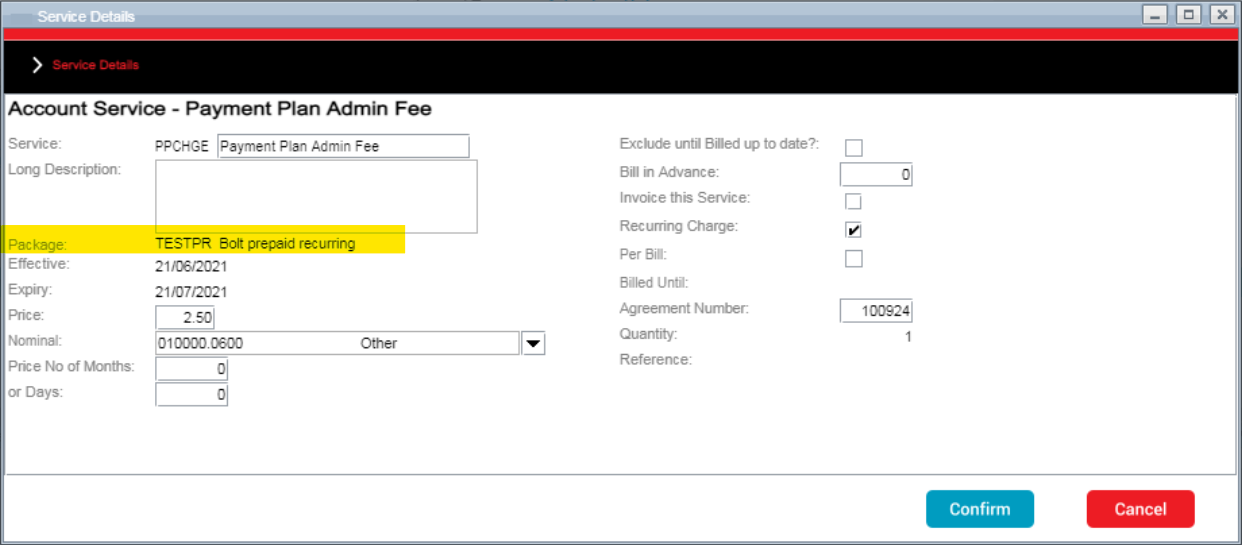
When 'Change' is selected, the Service Details maintenance popup panel now also shows the code and description of any associated package:
Maintain Account Service Popup Panel
Subscription Summary - Subscription Services Mini Panel
From the Active Services mini panel on the Subscription Summary screen it is no longer possible to delete a subscription service record that was provisioned as part of a package purchase.
If the right-click option to change the subscription service is selected, then it is no longer possible to set the expiry date if the subscription service was provisioned as part of a package purchase.
Subscription Services Lower Panel
From the Services lower panel on Subscription Summary screen (Billing->Services) it is no longer possible to delete a subscription service record that was provisioned as part of a package purchase.
If the right-click option to change the subscription service is selected, then it is no longer possible to set the expiry date if the subscription service was provisioned as part of a package purchase.
Subscription Discounts Lower Panel
From the Discounts lower panel on Subscription Summary screen (Billing->Discounts) it is no longer possible to delete a discount record that was provisioned as part of a package purchase.
If the right-click option to change the discount is selected, then it is no longer possible to set the expiry date if the discount was provisioned as part of a package purchase.
Account Summary - Purchases Mini Panel
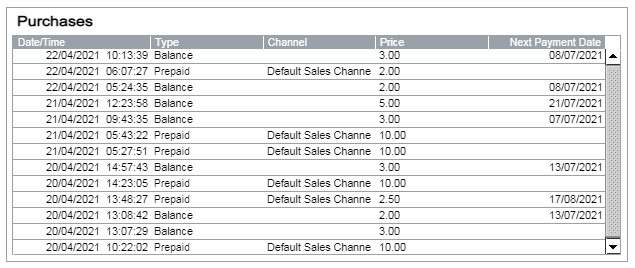
The Purchases mini panel on the Account Summary screen has had some minor enhancements as follows:
the 'Channel Description' column heading has been changed to 'Channel'
the 'Amount' column heading has been changed to 'Price'
an additional 'Next Payment Date' column has been added to the mini panel that is populated for recurring purchases that have not ended.
Purchases Mini Panel
Subscription Summary - Tariff/Price Plan History Popup Panel
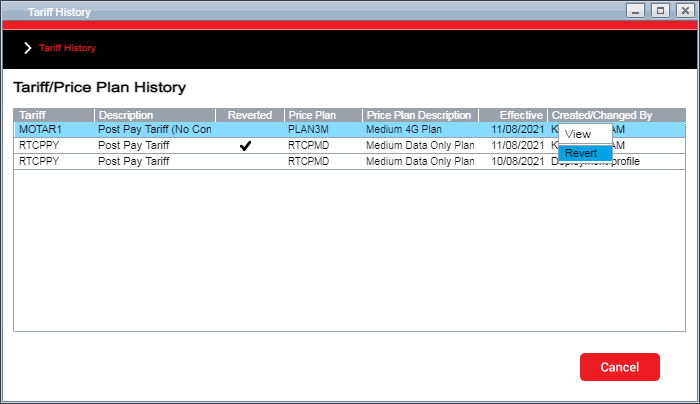
The Tariff and Price Plan hyperlinks on the Account Summary top panel give access to the Tariff/Price Plan popup showing the history of all Price Plan changes.
CMP 8.5 introduces the ability to revert a Price Plan change if the change occurred within the cooling off period configured for the subscriber's contract.
To enable this, a new right-click option 'Revert' has been added to the Subscription Tariff History panel.
Tariff History Popup Panel
The right-click option is only available for the current plan and is unavailable in the following scenarios:
the subscription is not connected
the subscription is disconnected
the subscription is terminated
the subscription is prepaid
a tariff change is already pending
the subscription is on an agreement price plan.
It is not possible to revert a previously reverted Price Plan change nor is it possible to revert if there is no previous Price Plan to revert to.
Comms Lower Panel
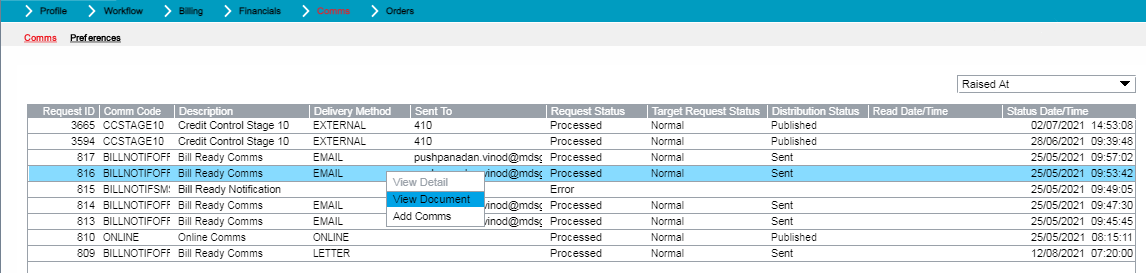
In CMP 8.4, the Event Summary screen provided a Comms mini panel that enabled an AgentView user to view a PDF document or add a new comms. However, this functionality was not available from the main Comms lower panel accessible from the Summary swish panel.
In CMP 8.5 the Comms lower panel now provides right-click shortcut menu options to 'View Document' and 'Add Comms':
Comms Lower Panel
Other Changes
The following additional changes have been made to AgentView screens in CMP 8.5:
The Comms mini panel in the AgentView Subscription Event Summary panel has been enhanced to prevent additional comms from being added to a resolved event.
If the workflow event is in a 'Resolved' state, then the right-click shortcut menu option, 'Add Comms', will be disabled.
The Purchase Details popup panel has been updated to make the Purchase Type consistent between the Purchases mini panel on the Account Summary screen and the popup. Previously an invoiced purchase was showing as 'Postpaid' in the popup panel.
The Payments lower panel, available from the Financials swish in the Account Summary screen, allows a one-off payment to be added against the account.
In CMP 8.4 the option was provided to use an existing registered card but this was restricted to showing only the active card on the account if one existed.
In CMP 8.5, the dropdown of available registered cards now shows both active and one-off cards. In addition a new right-click shortcut menu option has been added to allow a payment receipt to be viewed if one has been requested for the corresponding payment.
In line with the enhancement of the Payments lower panel above, the Purchase A Product popup panel has also been enhanced to show existing one-off cards as well as an active card that exists against the account.
In the Purchase A Product panel available from the Purchased Products mini panel on the Agreement Summary screen, the existing card dropdown only shows any active card and any one-off cards that are not associated with a specific subscription.
In the Purchase A Product panel available from the Purchased Products mini panel on the Subscription Summary screen, the existing card dropdown only shows any active card and any one-off cards that are associated with that specific subscription.
In addition the option to purchase a recurring bolt-on and pay for it via a new card has been disabled, as this capability is not currently supported.
3.2. Bulk Actions
3.2.1. New Bulk Actions
CMP 8.5 introduces a new bulk action, 'Maintain Subscription Service', to enable a subscription service to be added, ended or edited for multiple subscriptions.
The Excel spreadsheet template provided must be populated with an identifier to identify the subscriptions to which the bulk service change will apply. If a Corporate Code is provided for example, then the service and change specified in the bulk action wizard will be applied to all subscriptions under the corporate. Alternatively if an MSISDN or subscription number is provided, then only that subscription will be affected by the change.
Once the template spreadsheet has been populated with the entities to be affected by the change, then the Maintain Subscription Service bulk action wizard can be used to process the file. From here the type of change can be specified (Add or Change), the affected service and the effective date of the change. If the action is a service addition, then a salesperson can be added. If the action is a service change, then it is possibly to also specify an expiry date (service expiry) and a price (service price change).
3.2.2. Changed Bulk Actions
CMP 8.5 does not provide any enhancements to the existing Bulk Actions.
3.3. Admin Console
3.3.1. Daily Operations
New Jobs and Daemons
Wholesale Reconciliation
Wholesale reconciliation is the financial reconciliation of wholesale charges (from the enabling network operator) and retail charges (from the online charging system) for usage. CMP 8.5 provides a Wholessale Reconciliation extract that aggregates wholesale usage received from the underlying network operator and then reconciles the charges against those charged by the MVNO/MVNE to the end customers.
The Wholesale Reconciliation extract consists of two inbound daemons, two jobs and an outbound daemon to transfer the wholesale reconciliation extract to file storage:
Transformation Wholesale Usage from TAPIN/TAPOUT daemon - responsible for processing the inbound wholesale usage files and transforming them to a generic CSV format.
Load Wholesale Usage From Generic Format daemon - responsible for polling for remote CSV files generated by the transformation daemon and loading them as a batch into CMP.
Usage Aggregation Job - responsible for the aggregation of both retail and wholesale usage records uploaded into CMP. Usage records are grouped by usage date, type, origin and destination and totals for usage charges and usage units are calculated for each of these groups. A Usage Reconciliation record is created for each usage group. This job can be configured to trigger automatically when new wholesale usage records are loaded into CMP.
Usage Reconciliation Job - responsible for the reconciliation of retail and wholesale usage records. Aggregated usage records between the dates specified in the job parameters for both retail and wholesale usage are collected by the job. These usage records are then compared against each other and variances between usage charges, units and number of events are calculated. The results of the reconciliation are exported as a CSV file. This job can be configured to run using the previous month's usage or using specified start and end dates.
Transmission Usage Reconciliation To File Storage daemon - responsible for transmitting the Usage Reconciliation extracts to a specified location.
Changed Jobs
Advance Notification Job
In CMP 8.5 the Advance Notification job has been enhanced to provide greater flexibility for the introduction of new advanced notifications and to provide more out-of-the box dynamic fields that can be used to provide a more personalised end user experience.
The job has been enhanced to be completely based on job properties, meaning new advance notifications can be added without the need for job changes.
In addition, the job now also checks whether the end user has already received a specific notification and if so, will avoid sending another.
Additional attributes have been added that can be used in an advance notification comms to the end user as follows:
Contract Expiry - the contract expiry date for either the subscription or agreement contract
Card Expiry - the last four digits of the card and the expiry date
Next Payment Date - the payment amount to be taken and the date the payment is due
Recurring Prepayment against Balance - the service price and package description
Recurring Prepayment against Card - the service price and package description.
Rated Usage Job
To support the introduction of the Wholesale Reconciliation extract, the Rated Usage job has been modified to generate Usage Reconciliation records where the wholesale reconciliation extract is intended to be used. Generation of aggregated rated usage is controlled by a new module property, rated.usage.aggregation.enabled. After the rated usage batch has been processed, if the aggregation property is set, the wholesale reconciliation Usage Aggregation job will be triggered to aggregate the retail usage records.
Data Warehouse Extracts
CMP 8.5 introduces a new data warehouse extract for statements. The Statement Analytics job extracts statement details and writes the information extracted to a CSV file, which can then be encrypted based on the encryption requirements configured. As with other extracts, the job can run in both full mode and partial mode.
In full mode the job extracts all statement information up to the end of the previous day, whereas in partial mode the job extracts statement data from the previous date up to which the job extracted data.
As a result of the introduction of the Statement Analytics job, the Invoice Detail Analytics job has also been changed to add the statement number to the extract so that the information output in the statement extract can be linked to the information output in the Invoice Details extract.
The Invoice Details extract has been enhanced further to include the Service Category of the invoice detail line and a Sales Ledger Adjustment (SLA) indicator to indicate if the invoice detail line was as a result of an SLA being applied to the account.
The version of the extract has been updated from version 1.0 to version 1.1.
Comms Job
The introduction of administrator notifications in CMP 8.5 has required the following changes to the Comms job:
the comms preferences for agreement administrators are now taken into consideration when sending an administrator notification
the dates received in external notifications can now be defined as dates and formatted based on the configured comms date format in the Comms module properties (comms.monitor.date.format.withouttime).
Usage Archiving Job
The Usage Archiving job has been refactored to no longer detach the Rated Usage and Rated Usage Allowance partitions. Instead, the management of these partitions i.e. detach and drop, will be handled by a new Partition Management Job that will be available as part of the CMP 8.6 release.
3.3.2. System Configuration
Servers
The Servers submenu option of the System Configuration option provides a list of the hosts within the deployment. CMP 8.4 introduced a list of the applications that were installed on each host and provided the ability for a privileged user to restart specific applications.
CMP 8.5 has extended this functionality to also show the status of each application. The status of the application is displayed with a green indicator if the application is available and handling requests. A red indicator shows that there are problems with the application that need to be addressed.
Module Configuration
Wholesale Reconciliation
The new Wholesale Reconciliation extract has introduced three new modules:
sabre-usage-reconciliation - contains the Usage Aggregation and Usage Reconciliation jobs and the corresponding probes
sabre-wholesale-usage - contains the load wholesale usage daemon
sabre-wholesale-usage-adapter - contains the wholesale usage transformation adapter.
3.3.3. System Monitoring
New Probes
Four new probes have been introduced for the new wholesale reconciliation extract:
Usage Aggregation Verification Normal - returns the number of CMP configuration errors detected by the Usage Aggregation job today. If the probe detects a value above the configured threshold, then an alert will be issued to the recipients configured for the probe.
Usage Aggregation Verification Punctual - returns the number of minutes since the Usage Aggregation job processed a file. If the probe detects a value above the threshold, then an alert will be issued to the recipients configured for the probe.
Usage Reconciliation Verification Normal - returns the number of CMP configuration errors detected by the Usage Reconciliation job today. If the probe detects a value above the configured threshold, then an alert will be issued to the recipients configured for the probe.
Usage Reconciliation Verification Punctual - returns the number of minutes since the Usage Reconciliation job has processed a file. If the probe detects a value above the threshold, then an alert will be issued to the recipients configured for the probe.
Two new probes have been introduced for the new Statement Analytics job:
Statement Analytics Batch Completed - Alert probe which returns the number of times the Statement Analytics job has run today. If the probe identifies that the job has not run today, then an alert will be sent to the recipients configured against the probe.
Statement Analytics Extract Completed - SLA probe which returns the number of files produced by the Statement Analytics job today. If the probe identifies that the job has not produced any outbound files, then the SLA has been breached. Because this is an SLA probe, there is no email alert issued.
3.3.4. System Administration
Users Menu Option - Add User
CMP 8.4 introduced the ability to create CMP users through the Administration Console rather than through the WSO2 Identity Server. The user credentials could be defined and the users were created with default roles based on the selected application access.
In CMP 8.5, this has been enhanced to enable specific roles to be selected based on the application access selected for the user. The role breakdown is provided in the right hand panel as each group role is selected:
Add Users Menu Option
In addition it is also possible to add a security level to the user that is used to control access to certain configuration such as specific workflow events for example.
View User
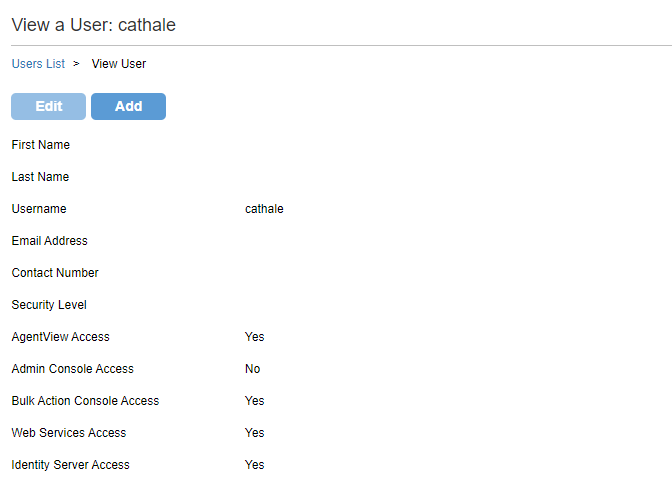
Once a new user has been added then the details of the user can be viewed by clicking the hyperlink of the username in the Users List screen.
View User Panel
Note
The Edit option is not supported in CMP 8.5.
3.4. Business Configuration
3.4.1. New Business Configuration Screens
No new Business Configuration screens have been introduced as part of the CMP 8.5 release.
3.4.2. Changed Business Configuration Screens
Communications Screens
The Add, Edit and View panels have been enhanced to support a new target of 'Agreement Administrator' to enable comms to be sent to the agreement administrator.
This option is only available when the available level is defined as 'Agreement' and can be selected as a target for 'Email', 'SMS' and 'Push' delivery methods.
In addition, a new field, 'Last Invoice Amount' has been added to the list of available fields for an account when selecting fields to be included in an end user communication.
Trigger Actions Screens
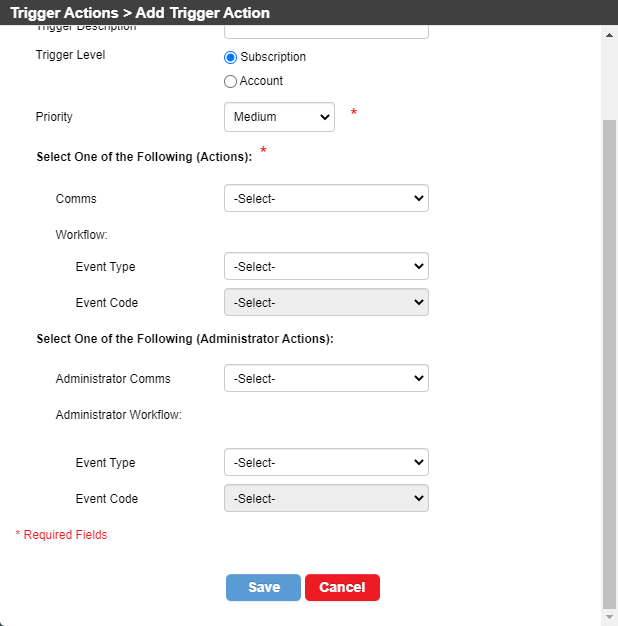
In line with the introduction of agreement administrators, the Add, Edit and View panels have been updated to support an additional communication to an agreement adminstrator when the trigger level is 'Subscription'.
If an agreement administrator is required for the trigger action, then either a comms code or a workflow event can be selected. The agreement comms is optional for a subscription trigger level action.
Add Trigger Action Panel
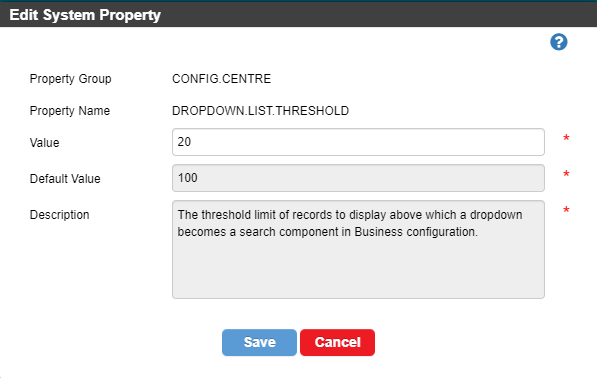
Edit System Property Screen
In CMP 8.5 the descriptions of the system properties can now viewed through the Edit option of the System Property option.
Edit System Property Panel
Other Changes
The long description field on the Network Features Add, Edit and View screens has been updated to allow 200 characters.
3.5. SOAP Web Services
3.5.1. New Web Services
No new SOAP web services have been introduced as part of the CMP 8.5 release.
3.5.2. Changed Web Services
The following changes have been made to existing SOAP web services in CMP 8.5:
The CreateAccount SOAP service has been enhanced to allow for the creation of a salesperson account and associated salesforce record.
When creating an account via SOAP, if a Personal Address is supplied with its ID Type set to 'SALESPERSN' then, after creating the account and delivery address records,
a salesperson record is created in the salesforce table with the salesperson account set to the account just created.
The UpdateService SOAP service has been enhanced to ensure that a request to update a subscription service's expiry date is rejected if the subscription service record is associated with a package rather than being a standalone service.
The UpdateDiscount SOAP service has been enhanced to ensure that a request to update a subscription discount's expiry date is rejected if the subscription discount record is associated with a package rather than being a standalone discount.
The response container for the QueryAccountService SOAP service has been modified to include the package code and package description.
The Package code was added to the Account Service table as a result of the CMP 8.4 refactoring of Shared Packages.
3.6. RESTful Web services
3.6.1. New Web Services
GET Salesperson Web Service
CMP 8.5 introduces a new RESTful web service to retrieve details of an individual Salesperson by supplying the saleperson id as part of the request URL.
The response contains the account identifier associated with the salesperson. The account id is used within the SOAP web services.
3.6.2. Changed Web Services
POST & PATCH Payment Web Service
In CMP 8.5 both the POST and PATCH Payment web services have been enhanced to now generate a workflow event when recording either a successful or failed payment.
The corresponding workflow events and comms need to be configured as highlighted below.
The PATCH Payment web service has been further enhanced to store card details (Start Date, End Date, Card Reference Number/token, Name on Card and Last 4 digits) in CMP.
This RESTful web service will be used in the redirect payment implementation to record a new registered card in CMP.
GET Invoice PDF Web Service
The GET Invoice PDF has been refactored in CMP 8.5 to include the account number as a mandatory attribute in the REST request to ensure that the requesting system has knowledge of both the account and invoice to avoid random interrogation of invoices by an external system.
GET Payments Web Service
In CMP 8.5, the GET Payments web service has been enhanced to return additional payment dates in the response that were added as part of CMP 8.4. The additional payment dates returned are:
Due Date
Confirmation Datetime
Rejection Datetime.
Business Configuration Web Services
The following changes have been made to the Business Configuration RESTful web services for CMP 8.5:
The query tariff package services method has been changed from POST to GET and the URL has been changed to include the tariff code and package code as path parameters rather than query parameters. The format of the response has changed to remove redundant attributes.
The GET tariff package service URL has been changed to include the tariff code, package code and service code as path parameters rather than query parameters. The format of the response has changed to remove redundant attributes.
The POST tariff package service URL has been changed to better align with the format of other endpoints. The format of the response has changed to provide details of the newly created tariff package service.
The GET package services URL has been changed to include the package code as a path parameter rather than query parameters. The format of the response has changed to remove redundant attributes.
A new GET package service web service has been added.
The POST package service URL has been changed to better align with the format of other endpoints. The format of the response has changed to remove redundant attributes.
3.7. Integration Adapters
No changes have been made to integration adapters in CMP 8.5.
3.8. Openet Adapter
The Openet-specific adapters are optional components of the CMP deployment that are based on the licence agreement with MDS Global.
No changes have been made to the Openet adapter as part of CMP 8.5.
3.9. Lifecycle Adapter
The Lifecycle-specific adapters are optional components of the CMP deployment that are based on the licence agreement with MDS Global.
No changes have been made to the Lifecycle adapter as part of CMP 8.5.
3.10. UK-specific Adapters
No changes have been made to UK-specific adapters in CMP 8.5.
4 - Product Fixes
In addition to functional and non-functional changes and improvements, the CMP 8.5 product also addresses a number of application support issues. This section provides a summary of the issues fixed in this release.
The following issues have been addressed within this release:
Reference
Area
Description
CMPIS-2087
Data Warehouse
Data Warehouse - Invoice Detail - Failure on Production
CMPIS-2076
Statement Production
An advance payment was being added to every invoice generated
CMPIS-2066
Agent View / Soap OCS Changes
Update of account details (SOAP & AgentView) was setting date fields to NULL in error
CMPIS-2049
Workflow Monitor Job
The update of subscription spend caps was not being performed if that record already existed
CMPIS-2047
OCS Integration
The document ID returned in the query subscriber response exceeded the field size, causing a query failure.
CMPIS-2043
AgentView
An internal system error was being thrown after submitting a tariff change or creating a new subcription
CMPIS-2042
Comms
It was not possible to include the invoice amount in billing notifications
CMPIS-2038
System
The probe version table has been updated to include probes changed in CMP 8.4.
CMPIS-2036
Data Warehouse
The Prepaid Usage data warehouse extract was not taking into account the time portion of the extract date
An error response was received when trying to set the language preferences at both account and subscription level through REST
CMPIS-2024
Data Warehouse
When selecting records from the Rated Usage table, only records matching the invoice run number should be included. This was not happening
CMPIS-2022
AgentView
Adding the soap-ws role to a user didn't give access to SOAP web services
CMPIS-2019
Business Config
It was possible to log into Business Configuration without the relevant role in WSO2
CMPIS-2017
Comms
When a push notification was sent to an agreement administrator, the account number was showing as the destination for the comms on the workflow event.
CMPIS-2014
AgentView
Subscription Creation now handles null values in the redundant contract fields.
CMPIS-2003
Comms
The account preference language was not being checked when sending out comms.
CMPIS-1994
AgentView
When a comms exclusion start time was specified, the system was adding one hour to the value specified.
CMPIS-1993
Comms
The alias value was not being populated correctly when sending SMS and push comms.
CMPIS-1992
Comms
It shouldn't have been possible to send an SMS or push notification to a disconnected subscription. This has now been fixed.
CMPIS-1974
Action Item Job
When Action Monitor was trying to confirm a bar action successfully, the job was failing with a constraint error
CMPIS-1973
Process Event
When a bar action was configured against a feature, Workflow Monitor was not creating the subscription feature and subscription feature history records.
CMPIS-1972
Process Event
It was possible to enable a network feature at account level as part of Credit Control.
CMPIS-1960
Comms
A push notification to the parent subscription was being sent to the wrong subscription.
CMPIS-1959
Comms
Delivery of an SMS notification to the parent subscription on the account was not working.
CMPIS-1953
Web Services
Adding a new card, using the AddRegisteredCard SOAP web service, to an account with a DD payment method was changing the payment method to card without canceling the direct debit.
CMPIS-1952
Comms
The currency symbol was not correctly populated in notifications containing a monetary amount.
CMPIS-1950
Web Services
When a user selected card details in one account and then accessed a second account, the card details of the first account were shown for the second.
CMPIS-1946
Openet Usage Adaptor
In aggregated usage mode, the retail charge was not applying the correct unit of measure to the charge.
CMPIS-1945
Openet Usage Adaptor
The UsageUnits fields in the CDR JSON were insufficient to handle volumes for accumulated data usage records.
CMPIS-1938
Recurring Prepayments
A date with milliseconds and only specific timezone formats were supported by the recurring prepayment card rejections load daemon.
CMPIS-1875
Recurring Prepayments
The '.done' folder wasn't created after running the Recurring Pre-Payments Card Extract job.
CMPIS-1863
Recurring Payments
The cut-off date was not being applied correctly for the Recurring Payments job.
CMPIS-1858
AgentView
A package with an unlimited allowance was showing as zero units rather than unlimited.
CMPIS-1828
Web Services
An incorrect error message was displayed when purchasing a post-paid bolt-on for a disconnected subscriber
CMPIS-1775
Bulk Actions
The reset option for the expiry date was not working correctly for the subscription service bulk action
CMPIS-1774
Bulk Actions
An incorrect error message was displayed on the top of the screen for the bulk subscription service change option
CMPIS-1773
Bulk Actions
The expiry date value was set to the value that was given for the effective date in the bulk subscription service wizard
CMPIS-1752
Process Event
If a workflow event is processed, then any configured comms was not sent. If the event was Resolved (without Processing), then the comms was sent. The comms should be sent in both cases.
CMPIS-1748
AgentView
The post-paid spend Cap drop down was showing empty for subscribers in AgentView
CMPIS-1679
Comms
When updating comms settings an error was thrown if the language preference was updated but the delivery method wasn't.
CMPIS-1653
Comms
It was not possible to view a PDF letter through the View Document menu option in AgentView.
CMPIS-1529
Admin Console
Schedules that were created with a future active date were starting immediately. This has now been fixed so they start when scheduled to do so.
CMPIS-1381
Action Item Job
When a subscription was being disconnected, the reason code entered was not being stored following disconnection.
CMPIS-1050
Invoice Production
Invoice Production was incorrectly populating both total duration and total units for all types of usage when creating the Invoice Detail record.
CMPIS-797
Web Services
In debug mode, the SOAP web services were logging additional information that could pose a security risk.
5 - Documentation
5.1 - Product Documentation
The product documentation is available online on the documentation portal.
This online portal requires authorised access, which can be obtained by contacting MDS Global support.
The documentation is also available as downloadable PDFs as follows:
Document
Version
Document Changes
Installation Guide
1.0
The content of the installation Guide has not changed for CMP 8.5.
Technical Architecture
1.0
There are no updates to the Technical Architecture as part of CMP 8.5.
CMP Overview
1.0
The CMP Overview has been updated to include the new Wholesale Reconciliation report.
Documentation Overview
1.0
There are no updates to the Documentation Overview as part of CMP 8.5.
System Administration Guide
1.0
The System Administration Guide has been updated to reference the ability to create users through the Administration Console.
Security Guide
1.0
There are no updates to the Security Guide as part of CMP 8.5.
Operational Overview
1.0
The Operational Overview has been updated for the new Wholesale Reconciliation and Statement Analytics jobs, their probes and daemons and user creation.
Business Configuration Overview
1.0
The Business Configuration Guide has been updated to cover support for a communications target of 'Agreement Administrator' for comms defined at agreement level and also agreement administrator notifications for trigger actions.
Communications Functionality and Configuration Guide
1.0
Changes have been made to the Communications Guide in line with the support for Agreement Administrator notifications and the viewing and raising of comms from the comms lower panel of the Agreement, Subscription and Account Summary screens.
Payments Functionality Guide
1.0
A short section has been added to cover the view receipt functionality intoduced into AgentView.
There are no updates to the Purge Guide as part of CMP 8.5.
Standard Reporting
1.0
The Standard Reporting Guide has been updated as part of CMP 8.5 to include details of the new Wholesale Reconciliation report.
Batch Jobs and JSON Schemas Guide
1.0
The Batch Jobs and JSON Schemas Guide has been updated to include the new wholesale usage reconciliation jobs and daemons, the refactoring of the Advance Notification job and refactoring of the Comms job to support agreement administrator notifications.
RESTFul Web Services API Guide
1.0
The REST web services guide has been updated in line with the changes described above.
SOAP Web Services Semantics Guide
1.0
The SOAP web services guide has been updated in line with the changes described above.
Business Configuration RESTFul Web Services API Guide
1.0
The GET Business Configuration REST Guide has been updated in line with the changes specified above.
5.2 - Online Documentation
Online help is available in AgentView, Business Configuration, the Administration Console and the Bulk Actions console.
The following table summarises the current versions of the online help and the changes since CMP 8.4:
Online Help
Version
Document Changes
AgentView
8.5.1.0
The following topics have been updated as a result of changes made to AgentView in CMP 8.5:
Agreement Summary Upper Panel, Agreement Sub menus, Edit Agreement Administrator Details, View Purchase Receipt, About Price Plan Changes, View Subscription Tariff/Price Plan Histories, Revert a Price Plan or Tariff Change, View Purchased Details, Event Summary Lower Panel, Comms Lower Panel, View Comms Details, Add a Comm, Purchasing a Bolt-on, View a Comms Document.
Business Configuration
1.11
The following changes have resulted in changes to Business Configuration online help:
Comms can be sent to Agreement Administrators
Trigger actions can be Agreement Administrator Comms or Workflow Events
The CMP 8.5 installer includes the capability to upgrade a CMP 8.4 installation without the loss of configuration or customer data provided that the software, file system and database structure of the installation in question are at no point manually modified.
The CMP 8.5 Installation Guide, and the details below, should be read before attempting the upgrade to CMP 8.5.
It is important that the following sections are read prior to performing the upgrade, specifically the Configuration Changes section, as it may be advisable to backup relevant configuration prior to performing the upgrade to ensure the configuration can be replicated, if necessary, post upgrade.
6.1. Upgrade Notes
From 8.5 release onwards, Usage Archiving will no longer detach Rated Usage and Rated Usage Allowance partitions. Instead these will be handled by a new Partition Management Job that will be available as part of CMP in 8.6.
If the Data Warehouse Billed Usage Extract is required to be run for an historical invoice run number i.e. one generated prior to 8.5, the following command will need to be run to attach the partition back onto the Rated Usage table:
ALTER TABLE ratedusage ATTACH PARTITION <partition_name> FOR VALUES IN (<invoice_number>);
To attach a list partition we have to mention a specific value or values and in this case the value should be invoice run number of the partition we’re trying to re-attach. To attach invoice run number 51 back to main table, the command is as follows:
ALTER TABLE ratedusage ATTACH PARTITION u000051p FOR VALUES IN (51);
6.2. Inventory Manager Changes
There are no changes to the Inventory Manager as part of the CMP 8.5 release.
6.3. Third party libraries
No third-party libraries will be updated as part of the installation/upgrade.
6.4. Database Changes
6.4.1. New Tables
The following tables have been added to the database schema with respect to CMP 8.4:
AdvanceNotification - records each advance notification that has been generated to prevent the same notification being issued to the same recipient within a defined period of time.
ApplicationGroup - holds information used to create new users in the identity server with access to the applications selected as part of the user creation process.
UsageReconciliation - allows for aggregation of wholesale and rated usage details and is populated by the Usage Aggregation job.
UsageReconciliationCrossReference - setup table used in the Usage Reconciliation job to find Wholesale Usage Origin and Destination for a Network Code/Usage Class Code.
WholesaleUsageBatchDetail - used to store the wholesale usage data records.
Note
The UsageReconciliationCrossReference table needs to be manually configured with the mapping of wholesale usage origin and destinations to CMP usage class codes. See section 6.5.2 below.
6.4.2. New Attributes
The following table attributes have been added in CMP 8.5:
Table SubscriptionTariff, attribute isRevert
Table TriggerAction, attributes administratorCommsCode, administratorEventType and administratorEventCode
6.4.3. Dropped Attributes
No table attributes have been dropped in CMP 8.5.
6.4.4. Modified Attributes
No table attributes have been modified in CMP 8.5.
6.5. Configuration Changes
6.5.1. Standard Data Population
As part of CMP 8.5, the standard data population scripts used to auto-populate a number of CMP configuration tables for a greenfield installation have been updated:
These updates should be taken into consideration when upgrading an existing CMP 8.4 environment.
Application Group Table
The Application Group table has been introduced to support the creation of CMP users highlighted above.
Application groups are used to group roles and are assigned to CMP users to enable access to specific applications, functions and AgentView screens.
The following table specifies the default set of application group table entries that are provided as part of a greenfield installation:
The application groups currently defined in WSO2 should be cross-checked against those defined in the table above to ensure that the correct application groups are configured.
Please contact Product Support if unsure of what to configure.
ID Type Table (CSQDREP)
The change to the AccountCreation SOAP web service to support creation of saleperson accounts and Salesforce records requires a record in the ID Type table with an ID Type Code of 'SALESPERSN'.
Comms Field Definition Table (commsFieldDefinition)
Comms Job
The support for date formatting of external notification date attributes highlighted above requires an update to the OCSCYCLEENDDATE comms field code to set the parameter value to triggerNotificationAttributeName=cycleEndDate,dataType=DateTime,field=triggerNotificationAttributeValue.
Advance Notification Job
Changes to the Advance Notification job have introduced additional fields related to workflow events that can be included in advance notification messages. As a result, the following records need to be added through the Default Fields option of Communications in Business Configuration:
Field Code
Description
Levels
Parameter
Explanation
Length
CARDEXPIRYDATE
Card Expiry Date
Account
field=dateAttribute1
The expiry date of the payment card that is due to expire.
10
CARDLAST4DIGITS
Card Last 4 Digits
Account
field=textAttribute1
The last 4 digits of the payment card that is due to expire.
4
CONTRACTEXPIRYDATE
Contract Expiry Date
Subscription, Agreement
field=dateAttribute1
The date when the contract is due to expire.
10
NEXTPAYMENTAMOUNT
Next Payment Amount Due
Account
field=monetaryAttribute1
The amount of the next payment that is due.
6
NEXTPAYMENTDATE
Next Payment Date
Account
field=dateAttribute1
The date when the next payment is due.
10
RECPREPAYMENTAMOUNT
Recurring Payment Amount
Subscription, Account
field=monetaryAttribute1
The amount of the recurring prepayment.
6
RECPREPAYMENTDATE
Recurring Payment Due Date
Subscription, Account
field=dateAttribute1
The date that the recurring prepayment is due.
10
RECPREPAYMENTLAST4DIGITS
Recurring Purchase Card Digits
Subscription, Account
field=textAttribute2
The last 4 digits of the card used for the recurring prepayment.
4
RECPREPAYMENTPRODUCT
Recurring Purchase Description
Subscription, Account
field=textAttribute1
The description of the purchased product.
30
In all cases the Category should be set to 'Financial', the Bean Id should be set to 'WORKFLOWEVENTATTRIBUTESBEAN' and the Data Source should be 'Internal'.
Note
The workflow event attributes bean (bean id 'WORKFLOWEVENTATTRIBUTESBEAN') has been introduced in CMP 8.5 as a result of changes to the Advanced Notification job and has been automatically added to the commsFieldBean table as part of the CMP upgrade.
System Properties Table (C7DFREP)
CMP 8.4 introduced a description field onto the systemProperties table to explain each of the system properties. In CMP 8.5, these properties are now exposed through the Business Configuration System Properties option. As a result, default descriptions have been added to all system properties as part of the CMP upgrade.
Note the following additional changes to system properties:
The INVOICE.REMOTE.STORAGE property group has been renamed to REMOTE.STORAGE to simplify the configuration of the remote storage of invoice and receipt PDFs.
All property names remain the same except STORAGE.FILE.SYSTEM.DOC.BASEPATH which has been split into two properties: INVOICE.STORAGE.FILE.SYSTEM.DOC.BASEPATH and RECEIPT.STORAGE.FILE.SYSTEM.DOC.BASEPATH to specify the directories on the file system where invoice and receipt PDFs are stored.
An additional property has been introduced to support control of the encryption of the PDF files. The Property Group is REMOTE.STORAGE and the Property Name is STORAGE.FILE.SYSTEM.ENCRYPTION. If property value is set to 'YES', this indicates the PDF is encrypted and must be decrypted during PDF retrieval. If the property value is set to 'NO' then this indicates the PDF is not encrypted and therefore no decryption is required during PDF retrieval.
The introduction of support for notifications for one-off payments requires new configuration to be added to the workflow event properties table (diaryEventProperties). The following new properties are required if one-payment notifications are to be supported:
Property Group
Property Name
Event Type
Event Code
PAYMENTS
oneoffpaymentreceivedsuccess.event
PAYS
RECV
PAYMENTS
oneoffpaymentreceivedfail.event
PAYS
FAIL
Note
A record also needs to be injected into the Workflow Event Code table (diaryEventCode) for 'PAYS' and 'FAIL' for a successful and failed payment respectively.
Both of these workflow events also need to be have a comms attached to them. The Comms should be configured with an available level of 'Account', Delivery Method of 'SMS' and 'Push' and a target of 'Parent Subscription on Account'.
In addition, new records have been created to support the refactoring of the Advanced Notification job. The following property names need to be added with a property group of 'ADVANCE_NOTIFICATION':
agreementContractExpire
cardexpire
nextPaymentDate
recurringPrepaymentBalance
recurringPrepaymentCard
subscriptionContractExpire
The Event Type and Event Code attributes need to be populated based on the existing Advance Notification Job module properties i.e. advancenotification.comms.mesage.<advance notification>.eventcode and advancenotification.comms.mesage.<advance notification>.eventtype.
Note
Separate workflow events need to be configured for Subscription and agreement contract expiry.
6.5.2. Manual Configuration
As mentioned above, the UsageReconciliationCrossReference table has been introduced in CMP 8.5 to support wholesale and retail usage reconciliation and contains a mapping of wholesale usage origin and destinations codes to CMP usage class codes. The following codes are supported by CMP:
Origin Codes
Code
Description
DOM
Usage originating from the home mobile network operator
NAT
Usage originating from a partner mobile network, or any other national mobile network (i.e. national roaming)