This document provides an overview of the CMP 8.8 release with specific focus on the additional functional and non-functional enhancements with respect to CMP 8.7.
1.2 Audience
This document is aimed at internal and external audiences familiar with CMP, to explain the key features of the release including any changes in how existing functions or processes are working.
2 - Overview of Changes
With respect to CMP 8.7, CMP 8.8 introduces new functionality as well as changes to existing functionality and non-functional improvements. These changes can be summarised as follows:
2.1 - New Functionality
2.1.1 - CMP with Offline Rating
The main focus of the CMP 8.8 release has been the integration of the offline rating functionality into the CMP 8 architecture to allow CMP to either be deployed as:
a pure offline solution handling post-event CDRs and applying usage against allowance allocations
a pure online solution integrating to a third-party OCS such as Openet
or as a combined offline and online solution providing both online charging for real-time control and offline rating for wholesale charging.
An offline-only CMP deployment provides the ability to process post-event CDRs received from the underlying core network components, rate them and apply the usage and charges to existing allowance and spend cap allocations.
The offline rating engine, SPaRC, can rate any type of usage and bundle usage against existing allowances or charge against an account balance.
Usage is either bundled against a subscription allowance or rated based on the tariff of the subscription's price plan and the associated pricing rules defined through the new Pricing Configuration options.
For chargeable usage, usage-based discounts can be applied based on any discount scheme allocated to the subscription.
Rated usage is also applied against any qualifying spend caps and both allowance and spend caps are monitored against configured notification thresholds.
When a threshold is breached, SPaRC will trigger a notification, if configured, to be sent to the end customer.
The thresholds configured against subscription allowances can be viewed from the allowance panels as described below.
Rating can be fixed rate (a fixed charge irrespective of the service usage duration),
flat rate (a rate per time period e.g. 10p per minute),
tiered rate (accumulated charge for each relevant tier based on the usage duration) or
threshold rate (the rate used is determined by the threshold level applicable to the usage duration) and usage can be differentially rated based on:
the subscription tariff
the usage type (Voice, Data, SMS)
the time of day and day of the week
whether the usage is mobile originating or terminating
where the usage originated within the home network or outside
the origin and destination zones
the specific destination address i.e. dialled digits.
Offline Rating performs duplicate usage checking before decrementing any bundle allocation or attempting any pricing.
2.1.2 - Usage Discounts
As specified in section 2.1.1 above, offline rating can support usage discounting based on the discount scheme associated with the subscription.
Usage discounts can be applied as a fixed amount or as a percentage of the usage charge.
The support for usage discounts for offline CMP has resulted in changes to the configuration of discounts as described in section 3.4 below.
2.1.2 - Re-rating
Offline Rating can also perform re-rating on incorrectly priced usage which may have occurred from incorrect pricing configuration.
A new Offline Re-rating job allows for unrated usage to be re-processed based on a from and to date selection period for a given usage class code.
If no date period is specified, any usage for the usage class code is considered.
Re-rating only involves the re-rating of priced usage, it does not re-bundle or have any impact on spend caps.
However it will re-apply any usage discount, if applicable, for the subscription.
2.1.3 - Allowance and Spend Caps Allocations
CMP 8.8 introduces two new jobs to handle allowance and spend caps when CMP is deployed as a pure offline solution.
The Allocation Monitor job is responsible for generating new allowance and spend cap allocations on subscription connection, Bolt-on package purchases and spend cap additions and updates.
The Allocation Renewal job is responsible for creating new allocations for recurring allowances and spend caps.
The job renews allocations that are due to expire on the current date, or a specific date.
2.2 - Changed Functionality
2.2.1 - Administration Console Changes
2.2.1.1. Daily Operations - Jobs
As well as the introduction of new jobs to support an offline CMP deployment, CMP 8.8 has also necessitated updates to the following jobs with an impact on the corresponding existing JSON schemas:
Bill Print - the schema has changed to support any discount applied to the usage records and also to indicate if the subscription is the parent subscription on the account.
The JSON schema version has been updated to version 1.6
Data Warehouse Extracts - the schema of the Billed and Unbilled Usage extracts has also changed to include any discount on the usage records.
The JSON schema version has been updated to version 1.2
2.2.1.2. System Monitoring
In CMP 8.8, ActiveMQ has been replaced by Artemis, the Red Hat supported version of ActiveMQ.
This has had an impact on the message queue interface available through the Message Queues menu option as described below.
2.2.2 - Web Services Changes
2.2.2.1. RESTful Web Services
The GET Usage RESTful web service has been updated to return addition information in the response.
The details of this change and other RESTful web service changes are detailed below.
3 - Impacts on CMP
The functional and non-functional changes highlighted in section 2 above have had an impact CMP in the following areas:
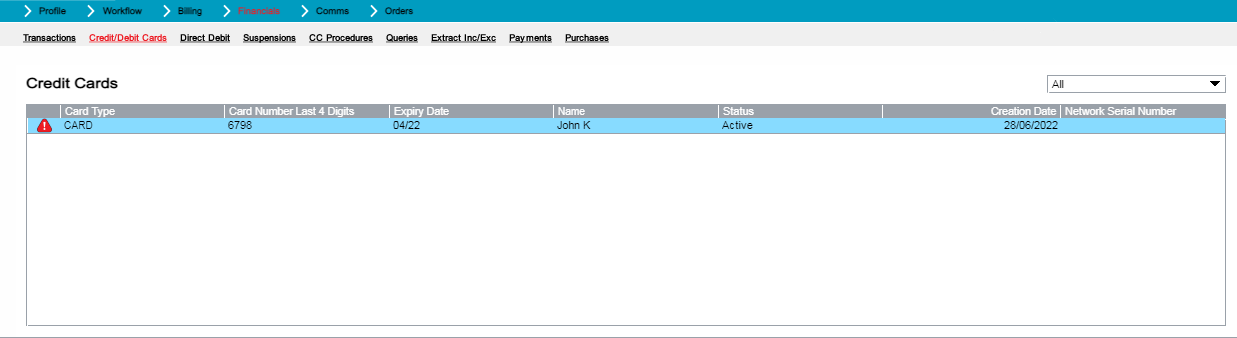
In CMP 8.7, if a card held against an account had expired i.e. the expiry date of the card had been passed, then the card was still shown within the list of active cards.
CMP 8.8 no longer displays expired cards within the active filter. These cards are now shown under the 'All' filter with a warning triangle to indicate the card has expired.
Credit/Debit Cards Lower Panel
3.1.2.2. CC/DC Details Popup
The CC/DC Details popup, available by clicking on the Payment Type hyperlink on the Account Summary top panel for a card payment type, has been enhanced in CMP 8.8 to align with the look and feel of the CC/DC Details popup available by right-clicking on a card in the 'Credit/Debit Cards' bottom panel.
In addition, the CC/DC Details popup now shows a warning notification if the card has expired.
CC/DC Details Popup
3.1.2.3. Payments Lower Panel
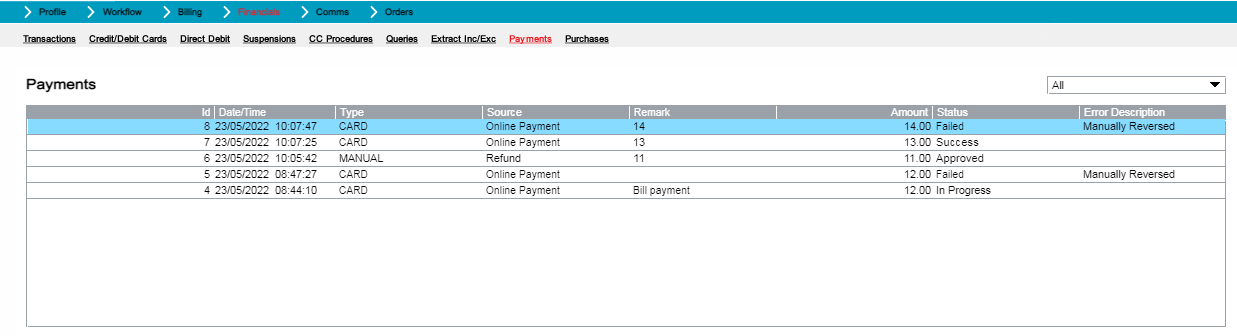
The Payments lower panel, available from the Financials menu option on the Account Summary screen, has been enhanced in CMP 8.8 to include the identifier of the payment.
In addition, the Date/Time column and Remarks column have been reordered.
Payments Lower Panel
3.1.2.4. Payment Details Popup
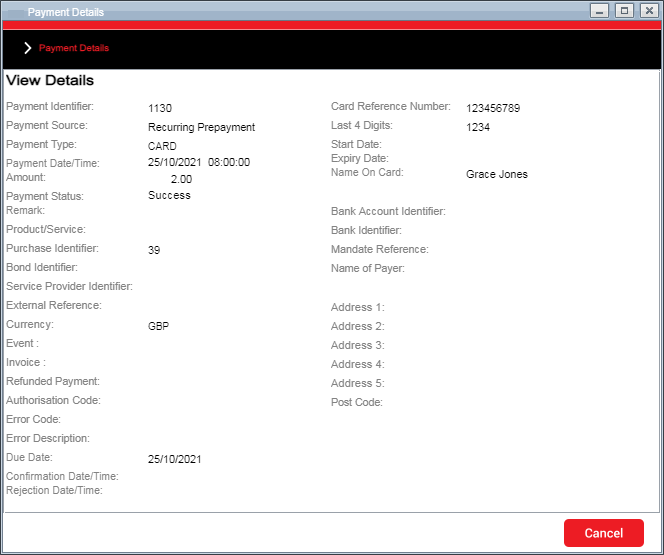
The Payment Details popup, available by right-clicking on a payment in the Payments lower panel, has been enhanced in CMP 8.8 to include the corresponding identifier if the payment was for a bond or a purchase.
The card start and expiry dates are now displayed in a MM/YY format.
Payment Details Popup
3.1.2.5. Usage Details Popup
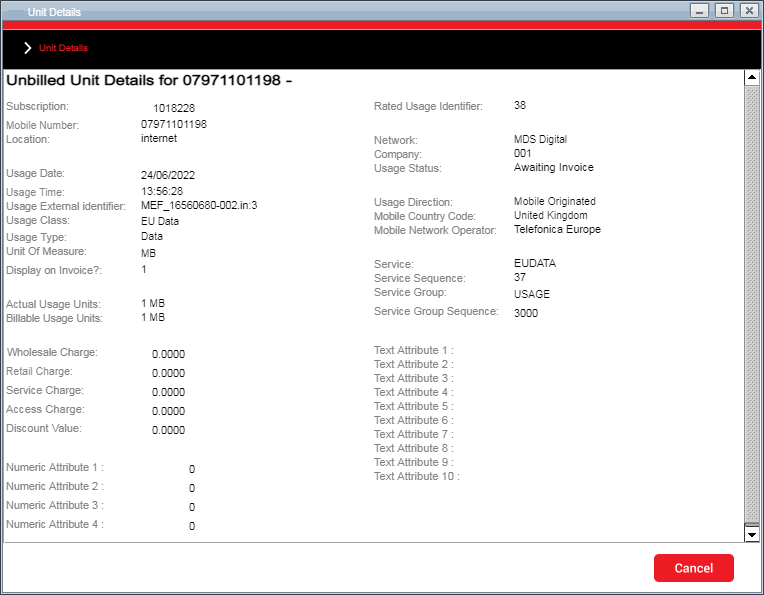
The usage details popup, that shows the details of a specific usage record, has been enhanced in CMP 8.8 to include any discount that has been applied to a priced usage record as well as the type of usage (mobile originating or mobile terminating) and the details of the mobile operator that handled the service usage.
The fields 'Prepaid Units', 'Prepaid Duration' and 'Prepaid Retail Price' have been removed from the panel as these were not used.
Unbilled Usage Details Popup
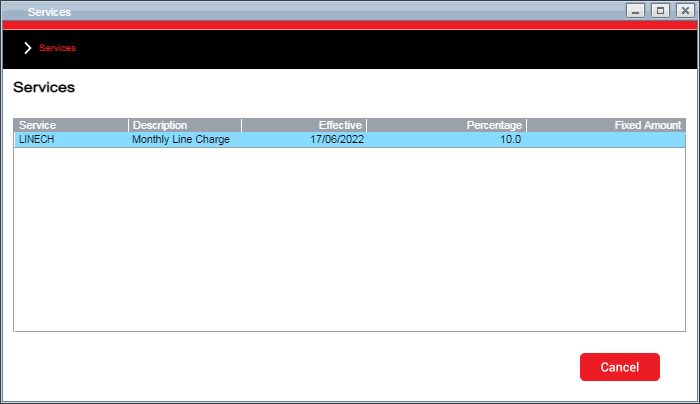
3.1.2.6. Service Discounts Popup
In CMP 8.7, from the Subscription Summary Billing->Discounts menu option, there was an existing right-click option 'Services' that was available for both normal and cross product type discounts.
This popup panel has been modified to show the discount applicable which can either be a percentage discount or fixed amount.
Service Discounts Popup
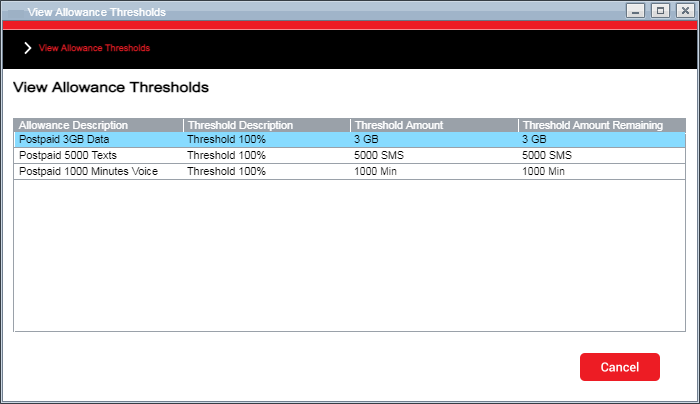
3.1.2.7. Allowance Thresholds Popup
When operating CMP in offline mode, it is possible to see the thresholds that have been configured against the specific allowances by right-clicking within either the Effective Allowances mini panel on the Subscription Summary screen, or within the Allowances bottom panel accessible from the Billing->Allowances menu option.
The popup panel shows the allowance thresholds that are configured for the specific allowances associated with the subscription, including the threshold amount and the remaining amount.
Allowance Thresholds Popup
3.2. Bulk Actions
3.2.1. New Bulk Actions
CMP 8.8 does not provide any new Bulk Actions.
3.2.2. Changed Bulk Actions
CMP 8.8 does not provide any enhancements to the existing Bulk Actions.
3.3. Admin Console
3.3.1. Daily Operations
3.3.1.1. New Jobs and Daemons
The introduction of support for the deployment of CMP in offline mode for CMP 8.8 has also introduced a number of new jobs and daemons as follows:
New Jobs
The following jobs have been introduced in CMP 8.8:
Allocation Monitor - This job is responsible for generating new allowance and spend cap allocations on subscription connection, Bolt-on package purchases and spend cap additions and updates.
Allocation Renewal - This job is responsible for creating new allocations for recurring allowances and spend caps.
The job renews allocations that are due to expire on the current date.
This job can also be run on an ad-hoc basis to renew allocations due to expire on a particular date.
Offline Rating - This job processes unrated usage batches and rates them to include the records in a detailed bill of a subscription.
This job is automatically triggered whenever a new unrated usage batch is received.
Offline Rerating - This job allows for unrated usage to be re-processed based on a from/to date selection period for a given usage class code.
If no date period is specified, any usage for the usage class code will be considered for re-processing.
New Daemons
The following daemon has been introduced in CMP 8.8:
Load Usage Processing From Generic Format - This daemon is responsible for the collection and decryption of generic CMP usage files and the creation of CMP batches which are available for processing into CMP by the offline rating batch job.
3.3.1.2. Changed Jobs
Bill Print
For the CMP 8.8 release, the bill print JSON has been enhanced to provide the following additional information:
A new element, discountValue, has been added, after the existing serviceCharge element in the usageDetails array, to output any discount applied to the usage record.
A new element, isParent, has been added, after the existing serviceId element in the subscriptions array, to indicate whether the subscription is the designated parent subscription for the account.
The Bill Print JSON schema has been updated to version 1.6.
Data Warehouse Extract Jobs
In CMP 8.8, a discountValue field has been added to the Rated Usage table that has now been included on the data warehouse extracts for both unbilled and billed usage.
The new field has been added before the data extract date.
The version of the extracts has been updated from version 1.1 to version 1.2.
3.3.2. System Management
No changes have been made to any of the options within the System Management menu option in CMP 8.8.
3.3.3. System Monitoring
3.3.3.1. Probes
The introduction of the new allocation monitor and renewal jobs has led to the introduction of the following new alert probes in CMP 8.8:
Allocation Monitor Verification Normal - returns the number of allocation monitor triggers that were set as 'In Progress' by the Job today, which means the job started to process the record, but got stuck in the 'In Progress' status.
Allocation Monitor Verification Punctual - returns the number of allocation monitor triggers that have yet to be processed by the Allocation Monitor Job.
Allocation Renewal Batch Completed - returns the number of records produced by the Allocations renewal job today. An alert will be triggered if this query returns a value of zero, indicating that no batch records were produced.
3.3.3.2. Message Queues Menu Option
In CMP 8.8, ActiveMQ has been replaced by Artemis, the Red Hat supported version of ActiveMQ.
This has had an impact on the message queue interface available through the System Monitoring menu option, Message Queues.
The Persistence column in the Messages tab has been removed as this is not supported in Artemis, as have the Enqueues, Dequeues, Dispatched and Dispatched Queue columns in the consumer table.
3.3.4. System Configuration
No changes have been made to any of the options within the System Configuration menu option in CMP 8.8 .
3.3.5. System Administration
No changes have been made to any of the options within the System Administrator menu option in CMP 8.8 .
3.4. Business Configuration
3.4.1. New Business Configuration Screens
3.4.1.1. Discount Services Tab
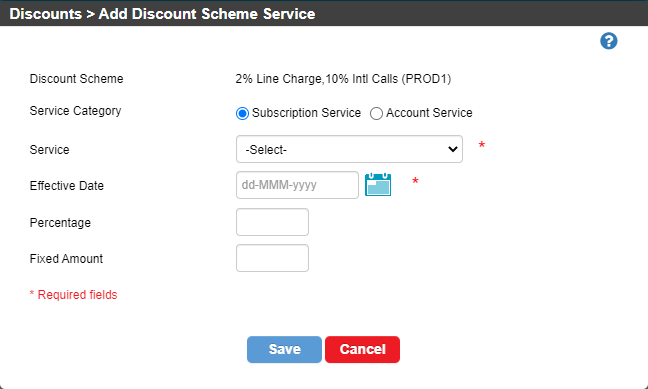
In CMP 8.7, the discount services tab, available from the Links button on the Discount List screen, had buttons to add, edit and delete services associated with a discount scheme, but were not fully implemented.
In CMP 8.8, the Add, Edit and Delete buttons are fully implemented allowing services to be associated with a discount scheme and a discount percentage or fixed amount defined, and maintained or deleted afterwards.
Add Discount Scheme Service Popup
3.4.1.2. Discount Usage Class Groups Tab
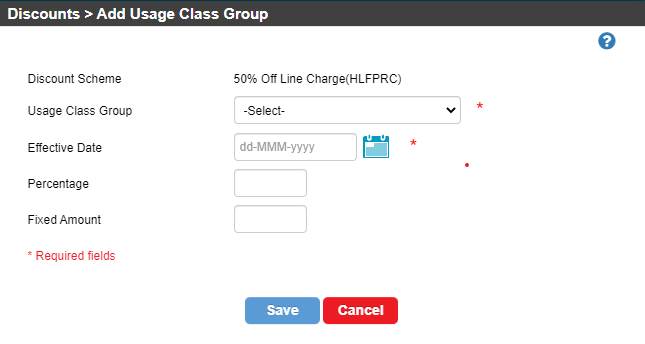
In CMP 8.7, the discount usage class groups tab, available from the Links button on the Discount List screen, had buttons to add, edit and delete services associated with a discount scheme, but were not fully implemented.
In CMP 8.8, the Add, Edit and Delete buttons are fully implemented allowing usage class groups to be associated with a discount scheme and a discount percentage or fixed amount defined to support usage-based discounts. Once defined, discount usage class groups can be maintained or deleted.
Add Discount Usage Class Group Popup
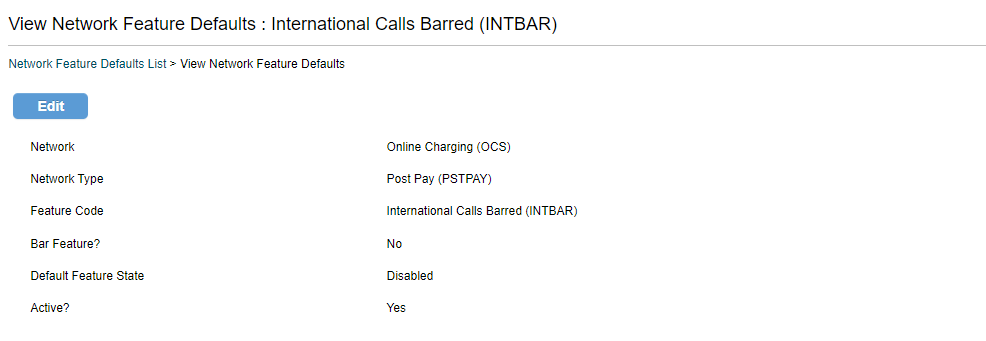
3.4.1.3. View Network Feature Default
CMP 8.8 introduces a new screen to view the details of a specific network feature default.
The view screen is available from a hyperlink on the network field of the feature in the list screen.
View Network Feature Defaults Screen
3.4.2. Changed Business Configuration Screens
3.4.2.1. Discounts Menu Option
The Add Discount Scheme screen has been changed to remove the table of services linked to the discount scheme as this is now a tab on the Discount Scheme Links screen.
The table of services on the Discount Services tab of the Discount Scheme Links screen has been updated to show the percentage or fixed amount of the discount service.
The Edit and View panels have also been aligned to the information on the add panel.
3.4.2.2. Spend Caps Menu Option
The Add Spend Caps screen has been modified to include a network dropdown to allow a spend cap to be linked to a specific network when deployed in a multi-network (offline and online) environment.
If only a single network is defined for the installation then the network field is display-only. In addition a Usage Class Group attribute has been added to the screen for entry for an offline network and for partial caps.
This allows Offline Rating to apply rated usage charges against a spend cap based on the usage class associated with the service usage.
The Edit and View panels have also been modified to include the network and usage class group associated with the spend cap.
3.4.2.3. Network Features Menu Option
The Add Network Feature screen has been modified to include a network dropdown to allow a network feature to be linked to a specific network when deployed in a multi-network (offline and online) environment.
If only a single network is defined for the installation then the network field is display-only. The Edit and View panels have also been modified to include the network associated with the feature.
The List view has also been enhanced to show the network within the list of available network features.
3.5. Pricing Configuration
3.5.1. New Pricing Configuration Screens
With the introduction of the capability to deploy CMP in offline mode in CMP 8.8 and hence, the inclusion of the SPaRC Engine for offline rating, a new set of configuration options have been provided to allow configuration of pricing rules for offline rating.
The new Pricing Configuration menu option in the Administration Console has a number of sub-menu options as follows:
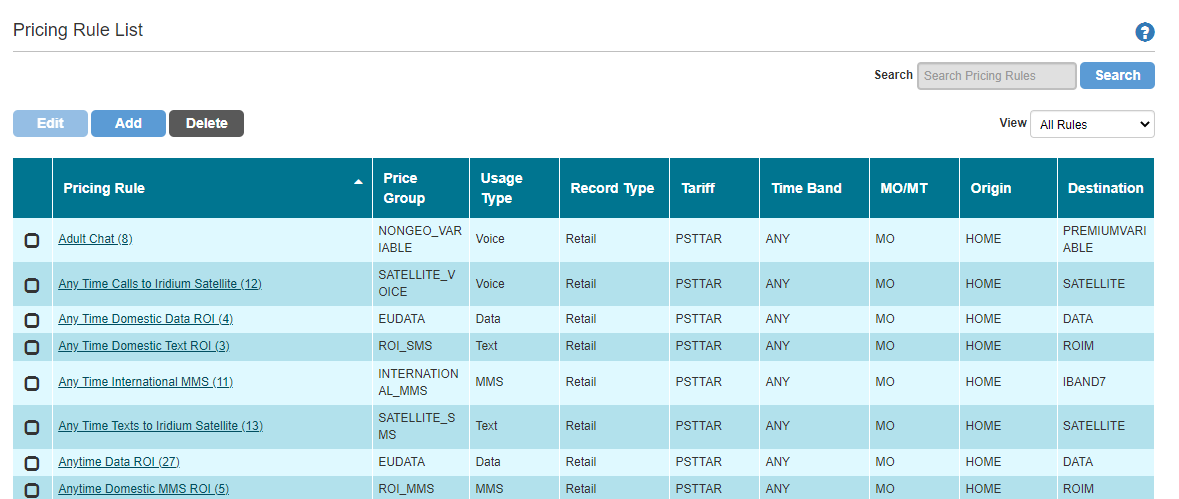
Pricing Rules are used by Offline Rating to rate service usage.
Pricing Rules define a number of pricing parameters such as whether the call is mobile originating or terminating, when the service usage occurred etc, and links these to a Price Group to determine the rate of the usage for the defined tariff.
Pricing Rules can be defined for both retail and wholesale usage.
From the list screen, options are available to add a new pricing rule, edit or delete an existing pricing rule.
Pricing Rule List Screen
3.5.1.2. Price Groups
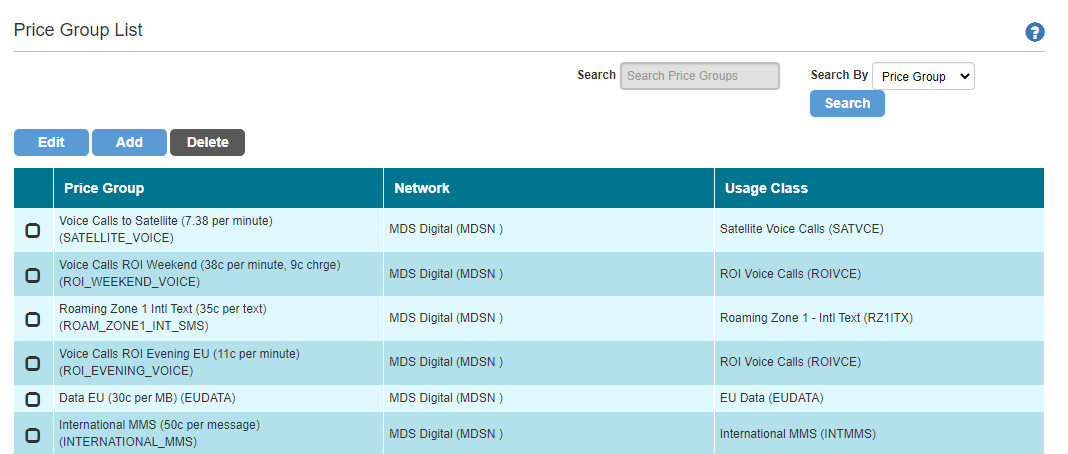
Price Groups allow pricing models to be linked to a specific network and usage class and then used within a Pricing Rule for Offline Rating to price a specific type of usage based on multiple usage parameters.
From the list screen, buttons are available to add, edit and delete a new price group.
Note
Although Edit and Delete buttons are provided on the screen, these have not yet implemented and will be supported in a later release of CMP.
Price Group List Screen
3.5.1.3. Pricing Models
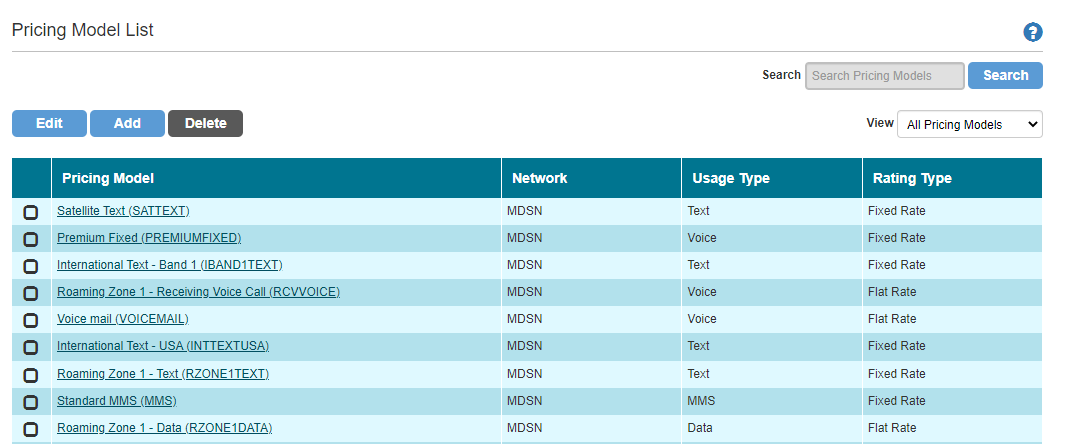
The Pricing Models menu option allows pricing models to be defined for Offline Rating to use to price usage.
A pricing model defines how a specific type of usage (voice, data and SMS) is to be rated by Offline Rating and defines the associated price for the specific rating type configured.
Rating Types can be defined as:
Fixed Rate - a single rate is used for the service usage irrespective of it's duration
Flat Rate - a single rate is used for the service usage but is dependent on it's duration
Tiered Rate - multiple rates are used for the service usage and are accumulated for each relevant tier based on the usage duration
Threshold Rate - multiple rates are used for the service usage and the rate used is determined by the threshold level applicable to the usage duration.
From the list screen, buttons are available to add, edit and delete a new pricing model.
Note
Although Edit and Delete buttons are provided on the screen, these have not yet implemented and will be supported in a later release of CMP.
Pricing Model List Screen
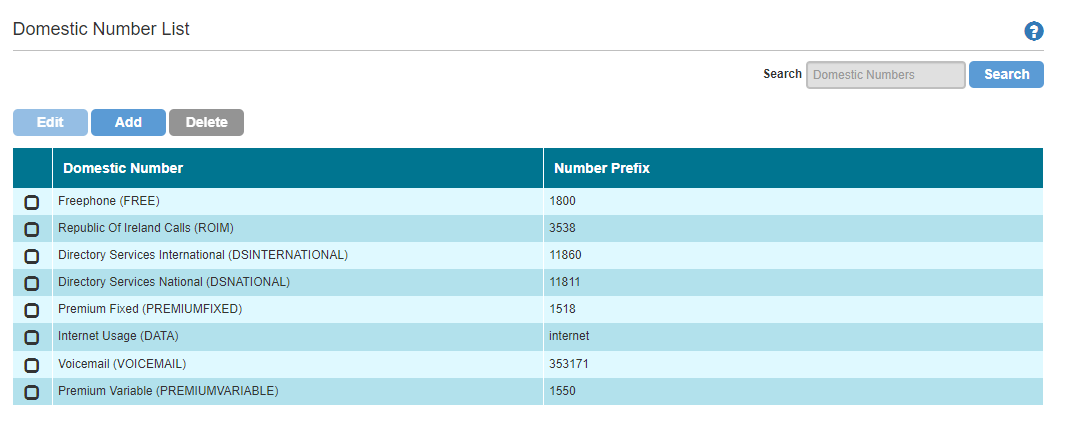
3.5.1.4. Domestic Numbers
The Domestic Numbers menu option allows special number prefixes to be defined such that calls or text messages to those numbers can be rated at specific rates by offline rating.
From the list screen, options are available to add a new domestic number, edit or delete an existing domestic number.
Domestic Number List Screen
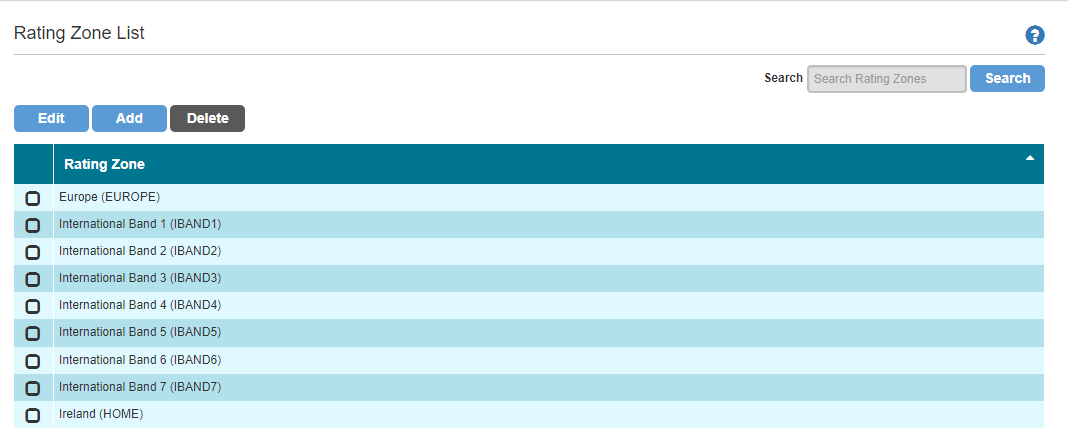
3.5.1.5. Rating Zones
The Rating Zones menu option allows zones to be defined that group related countries from a pricing perspective.
Zones can be defined as an 'International Band', 'Roaming Zone' or 'Home Zone'.
An 'International Band' is used by offline rating to rate international calls, a 'Roaming Zone' is used to rate usage made by roamers and a 'Home Zone' is used for in-country calls.
Multiple countries can be associated with international bands or roaming zones but only one country can be associated with the home zone.
From the list screen, options are available to add a new rating zone or edit an existing rating zone. The ability to delete a rating zone will be added in a subsequent CMP release.
Rating Zone List Screen
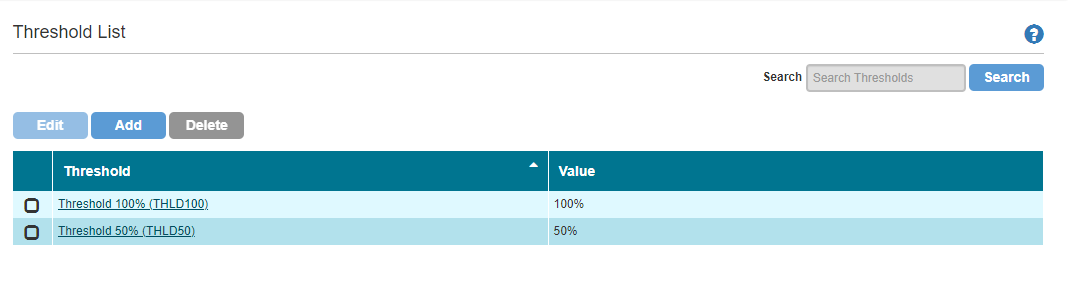
3.5.1.6. Thresholds
The Thresholds menu option allows thresholds to be defined for both allowance and spend caps that will trigger the configured workflow event when the threshold is hit as part of offline rating.
The workflow event can be linked to an end customer communication to notify of a low allowance balance or spend cap.
Thresholds can be defined as either a percentage of the total allowance or spend cap, or can be defined as a fixed amount of allowance or spend.
From the list screen, options are available to add new thresholds and link allowances and/or spend caps, edit the threshold details and associated attributes and/or spend caps as well as delete a threshold that is not currently associated with an allowance or spend cap.
By clicking on the threshold hyperlink, the details of the threshold can be viewed including any allowances and spend caps to which the threshold is associated.
Threshold List Screen
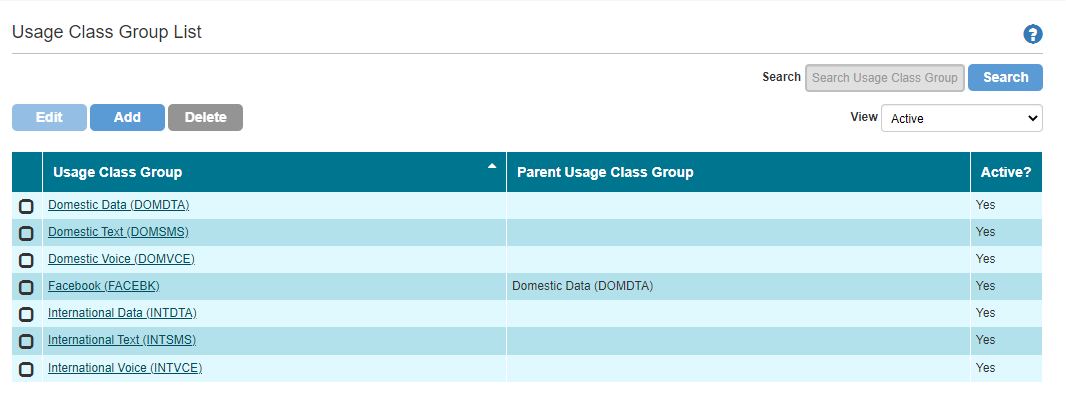
3.5.1.7. Usage Class Groups
The Usage Class Group menu options allow Usage Class Groups to be defined that group Usage Classes together for the Offline Rating job to use to price usage.
From the list screen, options are available to add a new Usage Class Group, edit the description and associated usage class members of the group as well as delete a group that is not currently being used withing the existing pricing configuration i.e. not linked to an allowance, a spend cap or a usage class group as a parent.
By clicking on the usage class group hyperlink, the details of the usage class group can be viewed including any usage classes associated.
Usage Class Group List Screen
3.5.2. Changed Pricing Configuration Screens
Pricing Configuration is new for the CMP 8.8 release.
3.6. SOAP Web Services
3.6.1. New Web Services
No new SOAP web services have been introduced as part of the CMP 8.8 release.
3.6.2. Changed Web Services
No SOAP web services have been changed as part of the CMP 8.8 release.
3.7. RESTful Web services
3.7.1. New Web Services
No new RESTful web services have been introduced as part of the CMP 8.8 release.
3.7.2. Changed CMP Web Services
3.7.2.1. GET Usage Web Service
The GET Usage REST web service response has been updated to return the following additional attributes that have been added to the rated usage table as part of CMP 8.8:
mobileCountryCode
mobileNetworkOperator
usageDirection
discountValue.
3.7.2.2. GET Price Plan Web Service
The following Business Configuration REST web service have been updated as part of the CMP 8.8 release:
GET Price Plan List - The response has been changed to additionally return price plan group details and the contract term
GET Price Plan - The response has been changed to remove unnecessary attributes and return contract details
GET Tariff List - The response has been changed to remove the contract length which is no longer a tariff attribute
GET Tariff - The response has been changed to to remove contract information which is no longer associated with the tariff.
3.8. Integration Adapters
No changes have been made to integration adapters in CMP 8.8.
3.9. Openet Adapter
The Openet-specific adapters are optional components of the CMP deployment that are based on the licence agreement with MDS Global.
No changes have been made to the Openet adapter as part of CMP 8.8.
3.10. Lifecycle Adapter
The Lifecycle-specific adapters are optional components of the CMP deployment that are based on the licence agreement with MDS Global.
No changes have been made to the Lifecycle adapter as part of CMP 8.8.
3.11. UK-specific Adapters
No changes have been made to UK-specific adapters in CMP 8.8.
4 - Product Fixes
In addition to functional and non-functional changes and improvements, the CMP 8.8 product also addresses a number of application support issues. This section provides a summary of the issues fixed in this release.
The following issues have been addressed within this release:
Reference
Area
Description
CMPIS-2352
Web Services
The SOAP QueryAccount web service was throwing a system error when requesting the CREDIT_DEBIT_CARDS dataset.
CMPIS-2351
Web Services
The GET Usage rest web service was not working due to changes made to the underlying ratedUsage table
CMPIS-2346
Data Fix
The Data Fix load daemon that is used to apply data fixes in production environments was observed to have issues relating to the data fix search path and permissions on the path for the data fix extract.
CMPIS-2337
AgentView
If a package was ended through AgentView, the expiryTimestamp was being set to the start of the expiry date e.g. 2022-05-10 00:00:00.000 rather than the end of expiry date i.e 23:59:59.
CMPIS-2334
Sabre Jobs
When a price plan change was carried out, the services relating to the old/existing package should have been expired but weren't.
CMPIS-2330
Comms
The right-click options available from the comms lower panel were not being displayed consistently with other right-click menu options.
CMPIS-2320
Comms
The comms dynamic attribute PAYMENTAMOUNT was not being populated correctly in comms.
CMPIS-2317
Web Services
The RESTful web service GET Serial Number service code filter was not working correctly.
CMPIS-2307
AgentView
If AgentView had an issue communicating with the Synchronous Allowance Management, the error message was not being interrogated correctly and a misleading generic error message was being returned.
CMPIS-2294
Invoice Print
The logic to output the usage allowance summary in the bill print json assumed that there was a base package in place. If this package was not present, the bill print extract daemon failed.
CMPIS-2275
AgentView
When setting the STORAGE.FILE.SYSTEM.ENCRYPTION property from the External Configuration module, checking or unchecking the property checkbox results in the value being stored in the database as either 'true' or 'false' rather than 'yes' and 'no'.
CMPIS-2256
Payments
Refunds did not inherit the external reference from the Payment
CMPIS-2249
Generic Payments Phase 2
The reason code was not being added to the workflow generated for a refund rejections.
CMPIS-2245
Business Configuration
When attempting to access a Package Service or a Tariff Package Service, the system showed an error with the message "Service is not linked to the package" or "Package Service is not linked to the tariff" respectively. This issue was related to the date format being used.
CMPIS-2211
AgentView
The AgentView audit capability was not logging information correctly for update actions.
CMPIS-2210
AgentView
The AgentView audit capability was not logging information for add actions.
CMPIS-2121
Web Services
The RESTful web service POST Serial Number isChargeable filter was not working correctly.
CMPIS-2116
AgentView
Purchasing a prepaid recurring shared Bolt-on package using a new card in AgentView was not being allowed.
CMPIS-2095
Web Services
The RESTful GET Subscription Spend Cap History web service was throwing any error when a valid subscription number and cap code were provided in the request.
CMPIS-1866
Comms
Comms requests were stuck in an 'Awaiting Distribution' state after a failed connection to the email server.
5 - Documentation
5.1 - Product Documentation
The product documentation is available online on the documentation portal.
This online portal requires authorised access, which can be obtained by contacting MDS Global support.
The documentation is also available as downloadable PDFs as follows:
Document
Version
Document Changes
Installation Guide
1.0
The installation Guide has been updated to include information on the deployment of both offline and online implementations, the deployment of Red Hat Artemis and the Java Development Kit.
Technical Architecture
1.0
There are no updates to the Technical Architecture document as part of CMP 8.8.
CMP Overview
1.0
The CMP Overview has been updated to include the offline rating capability.
Documentation Overview
1.0
The Documentation Overview has been updated to include the new Function Security Guide, released as part of CMP 8.8.
System Administration Guide
1.0
There are no updates to the System Administration Guide as part of CMP 8.8.
Security Guide
1.0
There are no updates to the Security Guide as part of CMP 8.8.
AgentView Function Security Guide
1.0
This is a new document for the CMP 8.8 release that explains how function and field security is implemented in AgentView to control agent access to specific functions and GUI panels.
Operational Overview
1.0
The Operational Overview has been updated for the changes to the jobs and probes highlighted in section 3.3 above.
Business Configuration Overview
1.0
The Business Configuration Guide has been updated to cover the changes specified above.
Billing Functionality Guide
1.0
The Billing Functionality Guide has been updated based on the new attributes added to the Bill Print JSON schema as part of CMP 8.8.
Communications Functionality and Configuration Guide
1.0
There are no updates to the Communications Guide as part of CMP 8.8.
Payments Functionality Guide
1.0
There are no updates to the Payments Functionality Guide as part of CMP 8.8.
Extracts Guide
1.0
The format of the Unbilled Usage and Billed Usage Analytics extracts has been updated to reflect the changes detailed above.
Purge Guide
1.0
There are no updates to the Purge Guide as part of CMP 8.8.
Standard Reporting
1.0
There are no updates to the Standard Reporting Guide as part of CMP 8.8.
Batch Jobs and JSON Schemas Guide
1.0
The Batch Jobs and JSON Schemas Guide has been updated to include the new jobs and changes to the Bill Print job.
RESTFul Web Services API Guide
1.0
The REST web services guide has been updated based on the additional parameters added to the GET Usage response as a result of the application issue CMPIS-2351.
SOAP Web Services Semantics Guide
1.0
There are no updates to the SOAP web services guide as part of CMP 8.8.
Business Configuration RESTFul Web Services API Guide
1.0
The Business Configuration REST Guide has been updated to include the changes specified in section 3.7.3 above.
5.2 - Online Documentation
Online help is available in AgentView, Business Configuration, the Administration Console and the Bulk Actions console.
The following table summarises the current versions of the online help and the changes since CMP 8.7:
Online Help
Version
Document Changes
AgentView
1.0
The following topics have been updated as a result of changes made to AgentView in CMP 8.8:
Payments and credit card details panels
Allowance Threshold panel available for an offline CMP installation
Additional attributes on the usage detail popup.
Business Configuration
1.14
The following changes have resulted in changes to Business Configuration online help:
Changes to the Discount Schemes options panels
Changes to the Network Features and Network Feature Defaults panel
Changes to the Spend Caps panels.
Administration Console
1.10
The admin Console help has been updated in line with the Message Queues menu option changes resulting from the upgrade of ActiveMQ to Artemis.
Bulk Action Console
1.4
No changes have been made to the Bulk Action help.
6 - Release Upgrade
The CMP 8.8 installer includes the capability to upgrade a CMP 8.7 installation without the loss of configuration or customer data provided that the software, file system and database structure of the installation in question are at no point manually modified.
Important
The CMP 8.8 Installation Guide, and the details below, should be read before attempting the upgrade to CMP 8.8.
It is important that the following sections are read prior to performing the upgrade, specifically the Configuration Changes section, as it may be advisable to backup relevant configuration prior to performing the upgrade to ensure the configuration can be replicated, if necessary, post upgrade.
6.1. Upgrade Notes
Important
It is important that the existing installation is left running before starting the upgrade.
There is no reason to shutdown any components however service may be affected whilst performing the upgrade.
The CMP 8.8 upgrade includes a move from ActiveMQ to the Red Hat version, Artemis. As a result, the following points should be noted:
Ensure there is more than 10% free disk space on the partition where the Artemis broker persistence directory is mounted before installation as Artemis requires at least 10% free disk space in the persistence directory to function correctly.
The Artemis broker persistence directory is defined within the Artemis section of the Installation Configuration Tool.
If upgrading from a previous instance of CMP, checking the 'Import from ActiveMQ?' checkbox at the top of the Artemis section of the Installation Configuration Tool ensures messages and message queues that previously existed on activemq will be exported and then imported into Artemis
The exported ActiveMQ data can be found in a file called 'exported-activemq-data.xml' in the specified Artemis broker persistence directory
The data export from ActiveMQ will not overwrite any existing file of the same name so if re-running the Artemis install for any reason, then it is advise to either move or remove existing copies of this file first
Any existing ActiveMQ data directories will be removed after a successful Artemis installation.
The exported data in the previously mentioned XML file is not removed so no data should be lost.
It will not be possible to repeat a deployment doing a data import after one has completed successfully however, due to the ActiveMQ data directories being removed.
Artemis does not provide any REST APIs so any SoapUI or Postman projects that depend upon the old ActiveMQ API set being available will no longer work.
In order to enable better profiling of CMP 8, the upgrade installs the Java JDK that provides a set of utilities, some of which are used for performance profiling.
The utilities of interest are describer Red Hat documentation here.
6.2. Inventory Configuration Tool Changes
6.2.1. ActiveMQ Section
As described in section 3.3.3.2 above, CMP 8.8 moves away from using ActiveMQ to using Artemis.
The Inventory Configuration Tool has been updated to allow the specification of a directory to be used to export existing Messages and queues for migration into Artemis.
6.2.2. Artemis Section
A new section has been added to the configuration tool to support the configuration of Artemis. This also supports the migration of existing ActiveMQ messages and queues.
6.2.3. SPaRC Engine Section
CMP 8.8 officially provides the option to deploy the CMP Offline Rating engine, SPaRC.
A new section has been added to the configuration tool to allow installation configuration if the SPaRC Engine is to be deployed.
6.3. Third party libraries
The following third-party libraries will be updated as part of the installation/upgrade:
Spring Framework will be upgraded to version 5.2.22
Spring Data will be upgraded to version 2.3.9
Spring Batch will be upgraded to version 4.2.8
Spring Security will be upgraded to version 5.4.10
CMP 8.8 will install Artemis version 7.8.6.11.
6.4. Database Changes
6.4.1. New Tables and Views
The following table has been added to the database schema with respect to CMP 8.7:
allocatedDiscountSchemeFavouriteNumber - this table has been added for future CMP functionality
allocatedDiscountSchemeInvoiceVolumeBand - this table has been added for future CMP functionality
discountSchemeFavouriteNumber - this table has been added for future CMP functionality
discountSchemeInvoiceVolumeBand - this table has been added for future CMP functionality
sharedLimitUpdateRequest - this table is used in an offline CMP implementation to hold the subscriber limits on shared allowances
tariffDiscountSchemeUsageClassGroup - this table holds the usage class group code associated with tariff discounts for use by offline rating
tariffPackageDiscountSchemeCallClassGroup - this table holds the usage class group code associated with tariff package discounts for use by offline rating.
No views have been added to the database schema with respect to CMP 8.7.
6.4.2. New Attributes
The following table attributes have been added in CMP 8.8:
Table usageClassGroup, attributes ParentUsageClassGroupCode, isActive and usageType
Table ratedUsage, attribute prepaidUnits, prepaidDuration and prepaidRetailPrice.
6.4.4. Modified Attributes
No table attributes have been modified in CMP 8.8.
6.5. Configuration Changes
6.5.1. Manual Configuration
As part of CMP 8.8, a number of changes specified above require additional configuration data to be added using the CMP Business Configuration.
These are summarised as follows:
The following entries need to be added to the default fields configuration within the Communications menu option in Business Configuration. All entries need to be defined with a data source of 'Internal':
Code
Description
Category
Level
Bean Id
Parameters
Length
THRESHOLDDESCRIPTION
Threshold Description
FINANCIAL
Subscription
THRESHOLDBEAN
field=thresholdDescription
30
THRESHOLDPRORATA
Threshold Pro Rata
FINANCIAL
Subscription
THRESHOLDBEAN
field=thresholdProRata
1
THRESHOLDAMOUNT
Threshold Amount
FINANCIAL
Subscription
THRESHOLDBEAN
field=thresholdAmount
8
ENDEDPACKAGEDESCRIPTION
Package Description
FINANCIAL
Subscription, Agreement
ENDEDPACKAGEBEAN
field=packageDescription
8
ENDEDPACKAGECLASSIFICATION
Package Classification
FINANCIAL
Subscription, Agreement
ENDEDPACKAGEBEAN
field=packageClassification
8
ENDEDPACKAGEPRICE
Package Price
FINANCIAL
Subscription, Agreement
ENDEDPACKAGEBEAN
field=price
8
ENDEDPACKAGEPURCHASETIMESTAMP
Package Purchase Date/time
FINANCIAL
Subscription, Agreement
ENDEDPACKAGEBEAN
field=purchaseTimestamp
8
PREVIOUSPRICEPLANCHARGE
Previous Price Plan Charge
SUBSCRIPTION
Subscription
PROPOSITIONBEAN
method=getPreviousPricePlanRecurringCharge
8
CURRENTPRICEPLANCHARGE
Current Price Plan Charge
SUBSCRIPTION
Subscription
PROPOSITIONBEAN
method=getCurrentPricePlanRecurringCharge
8
FUTUREPRICEPLANCHARGE
Future Price Plan Charge
SUBSCRIPTION
Subscription
PROPOSITIONBEAN
method=getFuturePricePlanRecurringCharge
8
LATESTPRICEPLANCHARGE
Latest Price Plan Charge
SUBSCRIPTION
Subscription
PROPOSITIONBEAN
method=getLatestPricePlanRecurringCharge
8
The introduction of support for threshold notifications for an offline implementation of CMP, defined above, requires new comms codes to be defined to support end user notifications.
The attributes available through the new THRESHOLDBEAN can be used within the notification to communicate specific information on the threshold reached.
In addition, new workflow events may be required to be configured through the Workflow -> Event Types and Event Codes Business Configuration option to support the raising of the threshold notification communication.
These workflow events can be linked to the threshold notification comms code(s).
The introduction of support for end package notifications in CMP 8.8 requires a new comms code to be defined to be linked to the workflow event that is configured to be raised when a recurring bolt-on package is ended (PROVISIONING/expire.package.event workflow event property).
The attributes available through the new ENDEDPACKAGEBEAN can be used within the notification to communicate specific information on the ended package.
6.5.1.2. Workflow Properties
CMP 8.8 has introduced functionality to support an offline deployment of CMP including the ability to end a package.
If an offline CMP installation is being used then the following new workflow event property will need to be configured through the System -> Workflow Properties Business Configuration option to allow a workflow event (and, if required, a end customer communication) to be generated:
Property Group
Property Name
PROVISIONING
expire.package.event.offline
6.5.1.3. Card Cancellation Reason Codes
When cancelling a card through AgentView the reason code dropdown is populated with reason codes that have a reason type of DCCAN.
Therefore, to assign a reason code to card cancellations, it is necessary to define a new reason type and reason category of DCCAN through the Reason Types and Reason Categories Business Configuration option available through the Customer Management menu option and then create new reason codes with the DCCAN reason category through the Customer Management -> Reason Codes menu option.
6.5.2. Standard Data Population
As part of CMP 8.8, the standard data population scripts used to auto-populate a number of CMP configuration tables for a greenfield installation have been updated. For existing installations, the configuration specified in this section will be automatically injected into the appropriate database table and therefore will not need to be manually configured:
The following updates have been made to the commsFieldBean table as a result of the changes to allow for threshold notifications for an offline CMP installation and also for ended recurring bolt-on package details to be included in a comms message:
In addition to the new beans above, the PROPOSITIONBEAN has been enhanced to support 4 additional parameters namely the recurring charge for a subscriber's previous price plan (if the subscriber has had a price plan change), current price plan, latest and future (if the subscriber has a pending price plan change) price plans.
These can be used in any comms configured to be sent out with price plan charge information.
6.5.2.2. Interface Job Control
The following updates have been made to the interfaceJobControl table as a result of changes to the jobs mentioned in section 3.3.1 above: