1. Introduction Last updated: October 18th 2024

1.1. Scope

This document provides an overview of the CMP 8.16 and 8.16.1 releases with specific focus on the additional functional and non-functional enhancements with respect to CMP 8.15.

1.2. Audience

This document is aimed at internal and external audiences familiar with CMP, to explain the key features of the release including any changes in how existing functions or processes are working.

2. Overview of Changes

With respect to CMP 8.15, CMP 8.16 and CMP 8.16.1 introduce new functionality as well as changes to existing functionality and non-functional improvements. These changes can be summarised as follows:

2.1. New Functionality

2.1.1. Bill Reprint

A new Bill Reprint function has been introduced in CMP 8.16, giving agents the option to request a reprint of an invoice on behalf of a customer.


2.1.2. Price Plan Type

CMP 8.16 introduces the option to add a price plan type to a price plan that indicates what the price plan is used for, for example, Hardware, SIM only or Data only plan.


2.1.3. Recontract

It is now possible for an agent to change the price plan on a subscription without creating a new contract. Recontracting is the function used in CMP when a price plan for a postpaid subscription is either changed or upgraded within an existing contract term, or the contract term has ended and a new contract started.

Any recontracting performed within contract may result in termination fees charged for the remaining charges of the old contract.


2.1.4. Closed User Groups

A new Closed User Groups (CUGs) function has been introduced in CMP 8.16.1 were CMP is integrated with a NetEngage Online Charging System (OCS). Subscribers that are part of a closed user group can have a specific pricing structure applied by the OCS, where calls made between numbers within the same group are rated differently from normal calls.

2.2. Changed Functionality

2.2.1. Data Usage Aggregation

Data usage is received from the Online Charging System and uploaded into the CMP database where it is visible to Customer Service Agents. The amount of usage records uploaded is dependent on whether data aggregation is enabled or not in CMP. When itemised billing is used for a specific bill, data usage records are detailed in the itemised usage section. Each data record received is output on the bill. When data aggregation is not configured then the data usage detail on the bill can be extensive leading to multiple pages of data usage.

CMP 8.16 now supports the ability to aggregate usage on the bill so even if data usage aggregation is not enabled for usage record collection, records can be aggregated on the bill providing a single data usage record per day.


2.2.2. Price Plan

In CMP 8.16, the following changes have been made to the Price Plans option of Propositions within Business Configuration:

  • A Price Plan Type drop-down field has been added to the Add and Edit panels. The Price Plan Type has also been added to the View panel
  • The Rank field on the Add, Edit and View panels has been updated to include a rank number up to 999999
  • The Type column on the List view has been renamed to 'Billing Type'.


2.2.3. Price Plan Group

In CMP 8.16, it is now possible to optionally associate a price plan group with one or more sales channels so that specific groups of Price Plans can be limited to specific sales channels. The ability to link a Price Plan Group to one or more Sales Channels has been added to the Price Plan Group option of Propositions within Business Configuration.


2.2.4. Web Services Changes

2.2.4.1. RESTful Web Services

The following web services have been modified in CMP 8.16:

  • the Get Subscription Price Plans web service request has been enhanced to include a new pricePlanType attribute that is used to further categorise Price Plans
  • the Get Compatible Price Plans web service request has been enhanced to provide additional filters to restrict the number of compatible price plans returned in the response
  • the Get Accounts web service request has been modified to include an additional idType/idNumber filter to return all accounts for a specific customer identity
  • the Change Subscription Price Plan web service request has been updated to include a new recontract attribute that is used to indicate whether a recontract is required as part of a Price Plan change. The response object has been enhanced to show any early termination fees that result from the recontract
  • the Create Order web service request has been enhanced to include a new recontract attribute that is used to indicate whether a recontract is required as part of an upgrade order. The response object has been enhanced to show any early termination fees that result from the recontract.

The following web services have been introduced in CMP 8.16.1:

  • the Get List Closed User Groups web service returns all active closed user groups for a specific hierarchical entity
  • the Get List Closed User Group Subscriptions web service returns all subscriptions within a specific closed user group
  • the Get List Subscription Services web service returns all active CUG or subscription services.

The following web services have been modified in CMP 8.16.1:

  • the Add a Subscription Service web service request has been enhanced to cater for the creation of a CUG service
  • the Update a Service web service request has been modified to include the effective date of the subscription service to be expired if the subscription has more than one matching service that is eligible for expiry
  • the Get Subscriptions web service response has been modified to return an additional element in the metadata to explicitly indicate if the identity is currently blacklisted or not
  • the Create a Purchase web service has been enhanced to support top-ups with any monetary value.

2.2.5. Other Changes

2.2.5.1. Default Security Level

In CMP 8.15, when creating a user directly in WSO2 a default security level of '1' was automatically assigned to the user which is the highest level of security. This meant that, in many cases, the user details needed to be edited afterwards in the Admin Console to set the security level to something more appropriate to the user.

In CMP 8.16, the default security level assigned has been changed from '1' to '9'.

2.2.5.2. Dynamic Top-ups

Where CMP is integrated to a NetEngage OCS it is now possible for an external system to top-up a prepaid balance with any monetary amount using the REST Create Purchase web service. If a top-up package is configured with a zero amount for the cash allowance then the payment amount provided in the REST purchase request will be used to credit the balance. The amount supplied must still be between the configured maximum and minimum charges on the service.

3. Impacts on CMP

The functional and non-functional changes highlighted in section 2 above have had an impact CMP in the following areas:

3.1. AgentView

3.1.1. New Screens

3.1.1.1. Request Bill Reprint

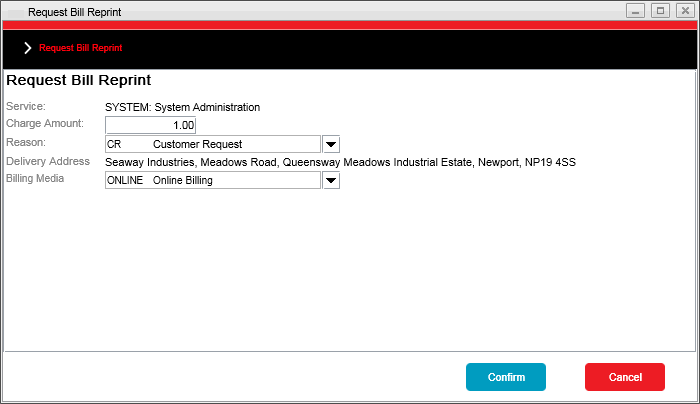
The Request Bill Reprint screen has been introduced as part of CMP 8.16, allowing Agents to request a reprint of a bill from within AgentView.

The Request Bill Reprint dialog is displayed from where an agent can request a reprint of a bill on the customer’s behalf to which a charge can be applied. The reprinted bill can be sent in a different billing media format to that of the original invoice.

This screen appears when the right-click Bill Reprint option is selected on an open invoice from the Financials > Transactions lower panel.

Bill Reprint Popup Panel

The following screens have been introduced as part of CMP 8.16.1, allowing Agents to view and maintain Closed User Groups (CUGs) from within AgentView.

3.1.1.2. Hierarchy Closed User Groups

You create a CUG by assigning a CUG service to a subscription. The first subscription assigned a specific CUG service within the customer structure automatically creates the CUG, to which other subscriptions can be added.

Once a CUG has been created, the CUG can be viewed on the Hierarchy Closed User Groups screen which is accessible from the Rating > Closed User Groups menu option. An agent can view all CUGs associated to the account, corporate, or group.

Hierarchy Closed User Groups Lower Panel

3.1.1.3. Closed User Group Details

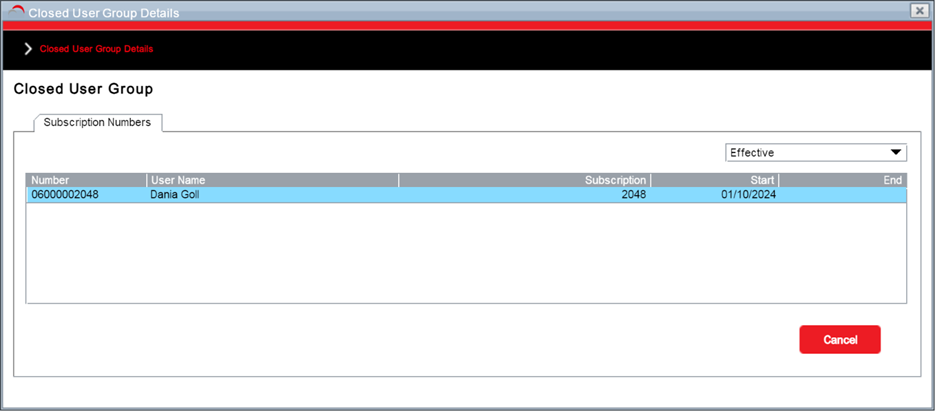
The Closed User Group Details dialog allows an agent to view all subscriptions that are a part of a CUG.

This screen appears when the right-click View option is selected on a CUG from the Rating > Closed User Groups lower panel.

Closed User Group Details Popup Panel

The screen is also accessible by right-clicking on the CUG service, in the Active Services mini panel on the Subscription Summary screen or the Services lower panel, and selecting Closed User Group Details.


3.1.2. Changed Screens

3.1.2.1. Subscription Summary

The right hand side of the upper panel of the Subscription Summary screen has been changed to add the description of the price plan type after the name of the price plan assigned to the subscription.

3.1.2.2. Plan/Tariff Change Wizard

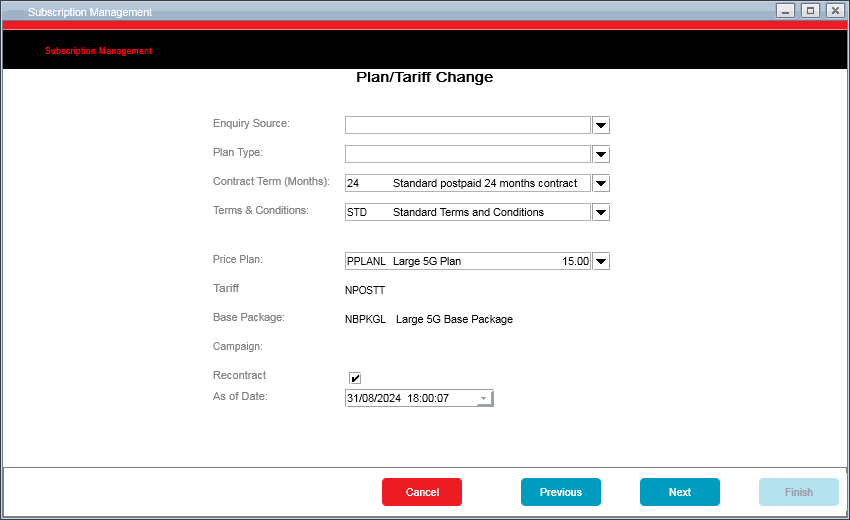
The Plan Change wizard screen has been enhanced in CMP 8.16 to allow an agent to restrict available price plans a subscriber can move to based on plan type, contract term and terms and condition filters. The dropdown of price plans now also shows the recurring charge associated with the plan.

In addition, a 'Recontract' checkbox has been added to the wizard panel and, if ticked, indicates the price plan has been recontracted. A price plan can be recontracted from within AgentView when the price plan for a postpaid subscription is either changed or upgraded within an existing contract term, or the contract term has ended and a new contract started.

Plan/Tariff Change Wizard

3.1.2.3. Tariff/Price Plan History

A new Recontract column has been added to the Tariff/Price Plan History panel to indicate if the plan change includes a recontract or not. This enables an agent to see if a plan change includes a recontract or not - a tick appears in the column if a plan includes a recontract.

3.1.2.4. Add Subscription Service

In CMP 8.16.1, when adding a subscription service through the Add Subscription Service pop-up panel, if the service is a global service then the service price is now displayed when a service is selected and before it is added to the subscription.

3.1.2.5. Structure View

The structure view has been enhanced in CMP 8.16.1 to prevent a subscription that is part of a CUG being moved to another structure (cut and paste). The CUG service needs to be ended on the subscription before it can be moved.

3.2. Bulk Actions

3.2.1. New Bulk Actions

No new bulk actions have been introduced as part of CMP 8.16.


3.2.2. Changed Bulk Actions

3.2.2.1. Change Price Plan/Tariff

There was a requirement to amend the Change Price Plan/Tariff bulk action to allow a time value to be entered in the 'As of Date' field.

A time from which the changes made by the bulk action can be added along with the date. Either enter the date and time (hours and minutes) manually or use the date picker. If no time value is entered, the system will default to midnight.

3.3. Admin Console

3.3.1. Daily Operations

3.3.1.1. New Jobs and Daemons

No new jobs and daemons have been introduced as part of the CMP 8.16 release.

3.3.1.2. Changed Jobs and Daemons

Bill Print Job

The bill Print job has been enhanced in CMP 8.16 to support data usage aggregation on the itemised bill. This is controlled by a new job property, bill.print.extract.dataAggregationPerDay.enabled.

Usage Archiving Job

The Usage Archiving job has been enhanced to now populate the transaction description field on batch audit details with the name of the partition(s) that was detached as part of the job execution.

NetEngage Provisioning

The Outbound Provisioning daemon, the associated Outbound Provisioning JSON schema and the NetEngage provisioning adaptor have been enhanced in CMP 8.16.1 to support closed user groups with a new ClosedUserGroup element being added to the Outbound Provisioning JSON schema.


3.3.2. System Management

No changes have been made to any of the options within the System Management menu option in CMP 8.16.


3.3.3. System Monitoring

No changes have been made to any of the options within the System Monitoring menu option in CMP 8.16.


3.3.4. System Configuration

No changes have been made to any of the options within the System Configuration menu option in CMP 8.16.


3.3.5. System Administration

No changes have been made to any of the options within the System Administrator menu option in CMP 8.16.

3.4. Business Configuration

3.4.1. New Business Configuration Screens

3.4.1.1. Link Sales Channels

A Link Sales Channels screen has been added to associate sales channels with a particular price plan group. This pop-up panel, accessible from the Edit Price Plan Group screen from the Link to Sales Channels button, allows a user to add or remove sales channels from a price plan group.

The screen displays available sales channels on the left-hand side, and linked sales channels on the right-hand side of the screen. These sales channels can be added or removed using the bidirectional arrows available on the screen.

3.4.1.2. Products List

A new sub-menu option, Products, and a new Products List panel has been introduced to the Propositions menu option to show the available products that can be ordered through AgentView or via the Orders RESTful web services. This panel will be enhanced in future releases of CMP.


3.4.2. Changed Business Configuration Screens

3.4.2.1. Add/Edit/View Price Plan

A Price Plan Type drop-down field has been added to the Add and Edit Price Plan screens. The Price Plan Type has also been added to the View panel.

3.4.2.2. Edit Price Plan Group

A price plan group can be associated with one or more sales channels. These associations are now displayed on the Edit Price Plan Group screen.

A Link to Sales Channels button has been introduced in CMP 8.16, from where sales channels can be added to or removed from the price plan group.

3.4.2.3. Add Service

The Service Category drop-down field on the Add Service dialog has been enhanced in 8.16.1 to include a new Closed User Group service category for use in the creation of a CUG.

3.4.2.3. Currency Symbol

In 8.15, the currency symbol was displayed inconsistently in several Business Configuration screens. In CMP 8.16.1, the following screens have been change to address this:

  • Price Plan List panel
  • Tariff Service List and View panels
  • Tariff Spend Cap List and View panels
  • Package List panel
  • Package Service List and View panels
  • Service List and View panels
  • Spend Cap List and View panels.

3.5. Pricing Configuration

3.5.1. New Pricing Configuration Screens

There are no new Pricing Configuration screens that have been introduced as part of CMP 8.16.


3.5.2. Changed Pricing Configuration Screens

No Pricing Configuration screens have been changed as part of CMP 8.16.

3.6. SOAP Web Services

3.6.1. New Web Services

No new SOAP web services have been introduced as part of the CMP 8.16 release.


3.6.2. Changed Web Services

3.6.2.1. CreateSubscription Web Service

In CMP 8.15, changes were made to check the number of subscriptions associated with a customer's identification, and if the maximum number of subscriptions allowed is exceeded, prevent the subscription from being created.

In CMP 8.16, the optional boolean element overrideMaxSubscriptions has been moved from the Address container to the SubscriptionData Request Container. If the CreateSubscription request does not contain an Address element, the delivery address used for the subscription record will be the same as the address on the account the subscription is being attached to. If it does include an Address, the ID included in that Address will be checked.

3.7. RESTful Web services

3.7.1. New CMP Web Services

The following web services have been introduced for CMP 8.16.1:

3.7.1.1. GET List Closed User Groups Web Service

The GET List Closed User Groups web service request has been created to return all active closed user groups for a specific hierarchical entity.

3.7.1.2. GET List Closed User Group Subscriptions Web Service

The GET List Closed User Group Subscriptions web service request has been created to return all subscriptions within a specific closed user group.

3.7.1.3. GET List Subscription Services Web Service

The GET List Subscription Services web service request has been created to return all active CUG or subscription services.


3.7.2. Changed CMP Web Services

The following web services have been enhanced for CMP 8.16:

3.7.2.1. GET Subscription Price Plans Web Service

The GET Subscription Price Plans web service request has been enhanced to include a new pricePlanType attribute that is used to further categorise Price Plans.

3.7.2.2. GET Compatible Price Plans Web Service

The GET Compatible Price Plans web service request has been enhanced to provide additional filters to restrict the number of compatible price plans returned in the response.

3.7.2.3. GET Accounts Web Service

The GET Accounts web service request has been modified to include an additional idType/idNumber filter to return all accounts for a specific customer identity.

3.7.2.4. Change Subscription Price Plan Web Service

The Change Subscription Price Plan web service request has been updated to include a new recontract attribute that is used to indicate whether a recontract is required as part of a Price Plan change. The response object has been enhanced to show any early termination fees that result from the recontract.

3.7.2.5. Create Order Web Service

The Create Order web service request has been enhanced to include a new recontract attribute that is used to indicate whether a recontract is required as part of an upgrade order. The response object has been enhanced to show any early termination fees that result from the recontract.

The following web services have been enhanced for CMP 8.16.1:

3.7.2.6. Add a Subscription Service Web Service

The POST Subscription Service web service request has been enhanced to cater for the creation of a CUG service.

3.7.2.7. Update a Service Web Service

The PATCH a Service web service request has been modified to include the effective date of the subscription service to be expired if the subscription has more than one matching service that is eligible for expiry.

3.7.2.8. GET Subscriptions Web Service

In CMP 8.15, the GET Subscriptions web service request returns two dates in the 'identification' object, disallowedDateTime and allowedDateTime, that indicate if an identity is blacklisted or not. For 8.16.1, an additional element has been added to the metadata, isBlacklisted, to explicitly indicate if the identity is currently blacklisted or not rather than having to interpret the dates within the identification object.

3.7.2.9. Create Purchase Web Service

The POST Purchase web service has been enhanced to support dynamic top-ups. Where the underlying top-up package is defined with a cash allowance of zero, the payment amount within the purchase request will be used to top up the prepaid balance.


3.7.3. New Business Configuration Web Services

No new Business Configuration RESTful web services have been introduced in CMP 8.16.


3.7.4. Changed Business Configuration Web Services

No RESTful web services have been updated as part of the CMP 8.16 release.


3.7.5. New TM Forum Open APIs

No additional TMF APIs have been provided as part of the CMP 8.16 release.

3.8. Integration Adapters

No changes have been made to integration adapters in CMP 8.16.

3.9. NetEngage Adapters

The NetEngage-specific adapters are optional components of the CMP deployment that are based on the licence agreement with MDS Global.

The NetEngage adapter has been changed as part of CMP 8.16.1 to support the provisioning of a CUG group and the allocation and removal of a subscription to/from a CUG.

3.10. Openet Adapters

The Openet-specific adapters are optional components of the CMP deployment that are based on the licence agreement with MDS Global.

No changes have been made to the Openet adapter as part of CMP 8.16.

3.11. Lifecycle Adapters

The Lifecycle-specific adapters are optional components of the CMP deployment that are based on the licence agreement with MDS Global.

No changes have been made to the Lifecycle adapter as part of CMP 8.16.

3.12. UK-specific Adapters

No changes have been made to UK-specific adapters in CMP 8.16.

4. Product Fixes

In addition to functional and non-functional changes and improvements, the CMP 8.16 and 8.16.1 product versions also addresses a number of application support issues. This section provides a summary of the issues fixed in this release.

The following issues have been addressed within this release:

Reference Area Description
CMPIS-3198Workflow MonitorProvisioning was observed to fail when more that one subscription service record was stamped with the same workflow event number.
CMPIS-3188Action MonitorWhen connection actions were being confirmed, services effective before the connection date were failing to be recreated.
CMPIS-3184NetEngage ProvisioningIn some cases it was observed that an incorrect serial number was being sent to the OCS rather than the MSISDN.
CMPIS-3180ProvisioningNetwork Actions were failing with an "Unknown failure occcurred." error.
CMPIS-3179ProvisioningWhen provisioning a subscription to the OCS, some subscription allowance provisioning actions were observed to be stuck in a 'Sent to network' due to an attempt to insert a duplicate record into the Network Request Log History table.
CMPIS-3141Process EventIt was observed that in some cases tax was being added twice when generating termination fees for tax exclusive services.
CMPIS-3127Invoice ProductionNon-subscription Invoice Production job was failing when bulk adjustments were being made.
CMPIS-3123RESTful Web ServicesIf a card was registered in CMP without a name on the card and then cancelled via the REST Cancel Registered Card API, if an attempt is made to reactivate the cancelled card, again without a nameOnCard, using the REST Add Registered Card API, a null pointer exception was seen.
CMPIS-3122SOAP Web ServicesReactivating a cancelled card through SOAP was causing a subsequent REST Cancel Registered Card to fail.
CMPIS-3121Action MonitorEvents were observed to get stuck with a Pending Auto Confirmation status due to records being already present on the Subscription Serial Number and Subscription PIN Number tables.
CMPIS-3119Admin ConsoleWhen attempting to add web service permissions to a new or existing CMP user through the User Management option in the Administration Console, a 400-Bad request error was observed.
CMPIS-3116RESTful Web ServicesAn issue was observed with the GET Compatible Packages API such that it was always returning an illegal argument exception.
CMPIS-3109RESTful Web ServicesA constraint error on the Terms & Conditions Group Code was observed when trying to create a subscription through REST.
CMPIS-3106RESTful Web ServicesAn issue was observed in production where, in specific circumstances, the REST Change Price Plan API was failing with a null pointer exception.
CMPIS-3105SOAP Web ServicesWhen a Create Workflow SOAP request was being submitted with an attribute set to process the workflow immediately, this was being ignored.
CMPIS-3103Bulk ActionIn was observed in bulk plan change that the timezone for the bulk action console was defaulting to UTC rather than the local timezone.
CMPIS-3102Sabre ServerWhenever a probe is triggered, an entry in the recipient table was not being created successfully such that alert recipients did not receive corresponding alerts.
CMPIS-3101Action MonitorMultiple jobs were observed failing due to a database connection pool issue.
CMPIS-3096RESTful Web ServicesCMP 8.15 only supports a username of 10 characters but an 18 character username was being used for REST calls. The actual username used for REST was ignored up until 8.14 and a generic profile was used. When this was fixed in 8.14 to use the actual profile used instead of a generic profile, this caused an issue logging the username when creating a workflow for the REST request.
CMPIS-3095Invoice PrintBill Print - Missing Statement Data
CMPIS-3084Action MonitorUnder certain conditions, Action Monitor was observed to hang and not process actions. This was observed whilst creating subscriptions in bulk.
CMPIS-3083Network IntegrationWhen shared allowances are purchased, the Agreement Number was incorrectly being processed as a Subscription Number.
CMPIS-3082Identity ServerThe standard WSO2 login page supports the display of multiple authentication methods when configured on the requested service provider. The CMP 8 branded custom login page was not aligned so has been updated accordingly.
CMPIS-3078AgentViewWhen performing a plan change in AgentView, the plan change 'As of Date' was being defaulted to the current date/time. As plan changes in CMP are no longer allowed to be processed on the same day as they are requested, the 'As of Date' now defaults to tomorrow at midnight.
CMPIS-3073RESTful Web ServicesWhen adding a purchase for a recurring package to a subscription, it was possible to specify a one-off card that was registered on the account but assigned to a different subscription.
CMPIS-3072Action MonitorIt was observed that the subscription features table was not being updated when a bar was being applied to a subscription and therefore not showing that the bar had been applied. When a request to remove the bar was raised it failed as the bar was not showing as having had been applied.
CMPIS-3070Sabre ServerWithin the Administration Console, displaying a long list of users was taking several minutes to return information. Performance was observed to deteriorate as the number of users increased.
CMPIS-3067Recurring Pre-payments A number of recurring purchases were not billed after the first purchase date. This issue was caused by recurring purchases not always being created correctly in the autopayment table.
CMPIS-3046Recurring PaymentsThe account balance was incorrectly updated when a recurring payment rejection occurred for multiple invoices where the payment date and the rejection date were different.
CMPIS-3043RESTful Web ServicesThe timestamp being returned to the GET Subscription Package RESTful web service response was returning timestamps in UNIX format rather than in an ISO 8601 Date as specified in the documentation.
CMPIS-3040Bulk ActionAn 'Invalid Type Id Exception' error was observed in several of the bulk action jobs.
CMPIS-3038AgentViewWhen creating a subscription through AgentView, if a tariff was selected without selecting a price plan, AgentView incorrectly allowed the installation to proceed.
CMPIS-3023Credit ControlWhen the Credit Control job raised workflow events as part of credit control steps, it was observed that the workflows were processed immediately irrespective of the resolution required by date/time set on the workflow.
CMPIS-3016ProvisioningIt has been observed that a number of non-network actions were not being processed and were being left in a 'Pending Auto Confirmation' state.
CMPIS-3011Write Off & Charge Suspension It was observed that where service charges had been suspended and the subscription was disconnected, the suspended service was then incorrectly billed.
CMPIS-2985AgentViewAn issue was observed with the termination fee calculation after a price plan change.
CMPIS-2956Pentaho ReportsThe Unbilled Usage Summary Report was not executing correctly as a result of fields being removed from the rated usage table.
CMPIS-2682PurgingThe forename and surname fields on the delivery address were not being obfuscated on the consumer purge job.

5. Documentation

5.1. Product Documentation

The product documentation is available online on the documentation portal. This online portal requires authorised access, which can be obtained by contacting MDS Global support. The documentation is also available as downloadable PDFs as follows:

  • Installation Guide
  • Technical Architecture
  • CMP Overview
  • Documentation Overview
  • System Administration Guide
  • Security Guide
  • AgentView Function Security Guide
  • Operational Overview
  • Business Configuration Overview
  • Billing Functionality Guide
  • Communications Functionality and Configuration Guide
  • Propositions Functionality and Configuration Guide
  • Payments Functionality Guide
  • Extracts Guide
  • Purge Guide
  • Standard Reporting
  • Batch Jobs and JSON Schemas Guide
  • RESTful Web Services API Guide
  • SOAP Web Services Semantics Guide
  • Business Configuration RESTful Web Services API Guide
  • Glossary.
Document Version Document Changes
AgentView Function Security Guide 1.1 The Request Bill Reprint function has been added for CMP 8.16 and the Rating Swish, and Closed User Group function have been added for CMP 8.16.1.
Batch Jobs and JSON Schemas Guide 1.1 The Batch Jobs and JSON Schemas Guide has been updated to include the changes to the jobs and daemons highlighted above for both CMP 8.16 and CMP 8.16.1.
Billing Functionality Guide 1.0 The new Bill Reprint function has been added in Bill Print.
Business Configuration Overview 1.0 The price plan type has been added to the bullet list of what can be configured on a price plan. Recontracting has been added to the Contracts topic.
Business Configuration RESTful Web Services API Guide 1.0 There are no updates to the Business Configuration RESTful web services guide as part of CMP 8.16.
CMP Overview 1.0 There are no updates to the CMP Overview as part of CMP 8.16.
Communications Functionality and Configuration Guide 1.0 The new Comms Default fields have been added and missing fields have been updated.
Documentation Overview 1.0 There are no updates to the Documentation Overview as part of CMP 8.16.
Extracts Guide 1.0 There are no updates to the Extracts Guide as part of CMP 8.16.
Glossary 1.0 There are no updates to the Glossary as part of CMP 8.16.
Installation Guide 1.0 A topic has been added on integrating Azure Active Directory with WSO2 as a SAML Federated Identity Provider, and a missing parameter for the command line to update the SSL Certificates installed in the various backend systems. The version of postgreSQL has been updated.
Operational Overview 1.0 The Users topic has been updated to include mention of the new Edit function.
Payments Functionality Guide 1.0 There are no updates to the Payments Functionality Guide as part of CMP 8.16.
Propositions Functionality and Configuration Guide 1.0 Recontracting has been added to the Contracts and Price Plans in AgentView topics. The price plan screens used in AgentView have been updated.
Purge Guide 1.0 There are no updates to the Purge Guide as part of CMP 8.16.
RESTful Web Services API Guide 1.1 The REST web services guide has been updated based on the changes highlighted in section 3.7.1 above.
Security Guide 1.0 Username specifications when creating a user in WSO2 Identity Server have been added.
SOAP Web Services Semantics Guide 1.0 The OverrideMaxSubscriptions element has been moved out of the Address container into the SubscriptionData Request Container.
Standard Reporting 1.0 There are no updates to the Standard Reporting Guide as part of CMP 8.16.
System Administration Guide 1.0 The postgreSQL version has been updated.
Technical Architecture 1.0 The postgreSQL version has been updated for CMP 8.16 and the Webswing version has been updated for CMP 8.16.1.

5.2. Online Documentation

Online help is available in AgentView, Business Configuration, the Administration Console and the Bulk Actions console. The following table summarises the current versions of the online help and the changes since CMP 8.15:

Online Help Version Document Changes
AgentView 1.6 The following topics have been added or updated as a result of changes made to AgentView in CMP 8.16:
  • Added new rows (add plan type, contract term months, terms conditions, recontract row) to Upgrade a Tariff/Price Plan page to cater for the new Price Plan Type and Recontract function.
  • Added that the price plan type is shown to the right of the Price Plan in Subscription Summary Upper Panel page.
  • Added a Recontract column to View Subscription Tariff/Price Plan Histories page.
  • A new topic, Request Bill Reprint, has been added covering the Bill Reprint function.
1.7 The following topics have been added as a result of changes made to AgentView in CMP 8.16.1:
  • Closed User Group
  • Create a Closed User Group
  • Edit a Closed User Group
  • View a Closed User Group.
Business Configuration 1.20 The following changes have resulted in changes to Business Configuration online help for CMP 8.16:
  • The Price Plan Type has been added to the Add, Edit, View Price Plans page, and the Rank field text updated to include a rank number up to 999999.
  • The Type column has been renamed to Billing Type in Price Plan List page.
  • A Link to Sales Channels section has been added to the Edit a Price Plan Group page.
1.21 The Service Categories topic has been updated for CMP 8.16.1 to include the Closed User Group service drop-down option.
Administration Console 1.18 The following changes have resulted in changes to Administration Console online help:
  • Added username specifications when creating a user in the WSO2 Identity Server.
Bulk Action Console 1.10 The following topics have been added in the Bulk Action Console help in CMP 8.16:
  • The introduction sentence for the Create Subscription page has been updated.
  • The time has been added to the 'As of date' row in the Tariff page, and the UI Element has been changed to include time.

6. Release Upgrade

The CMP 8.16 installer includes the capability to upgrade a CMP 8.15 installation without the loss of configuration or customer data provided that the software, file system and database structure of the installation in question are at no point manually modified.

Important

The CMP 8.16 Installation Guide, and the details below, should be read before attempting the upgrade to CMP 8.16.1.

It is important that the following sections are read prior to performing the upgrade, specifically the Configuration Changes section, as it may be advisable to backup relevant configuration prior to performing the upgrade to ensure the configuration can be replicated, if necessary, post upgrade.

The CMP 8.16.1 release also provides a direct upgrade from CMP 8.13 to CMP 8.16.1 without the need to upgrade to CMP 8.15 or CMP 8.16 first. This will be automatically handled by the installer based on the current version of CMP already installed.

6.1. Upgrade Notes

6.1.1. PostgreSQL Upgrade

For CMP 8.16, the supported version of PostgreSQL is being upgraded from version 13.12 to version 16.3. The database upgrade is not part of the standard CMP upgrade procedure and therefore will need to be performed manually as part of the upgrade to CMP 8.16.

Important

It is important to note that the PostgreSQL upgrade creates a copy of the existing database as part of the upgrade and therefore requires additional disk space to do this. Prior to the upgrade, it should be verified that AT LEAST as much free space shall be available as that already used by the existing PostgreSQL installation.

6.1.2. CMP Users

For CMP 8.16, the supported length of a CMP user has been increased from 10 to 100 characters. The increased in attribute length for all username and audit fields will be automatically handled by the upgrade however it should be noted that no existing usernames will be changed and will remain as 10 characters.

Note

WSO2 allows for case sensitivity to be controlled via a wso2 property. By default this property is set so that usernames are not case sensitive. CMP does not currently support username case sensitivity.

6.2. Installation Configuration Tool Changes

There are no updates to the Installation Configuration Tool as part of CMP 8.16.

6.3. Third party libraries

The version of Webswing, used for AgentView, has been updated to version 23.2.12. It should be noted that the Webswing Administration module is now deployed as a separate application in version 23.2 and can now be accessed through the /webswing-admin context root.

6.4. Database Changes

6.4.1. New Tables and Views

The following tables have been added in CMP 8.16:

  • billReprintRequest - Table that holds requests for a reprint of an existing bill
  • pricePlanSalesChannel - Tables that holds the valid sales channels through which a price plan is available.

The following tables have been added in CMP 8.16.1:

  • closedUserGroup - Table that holds the Closed User Groups associated with accounts, group and corporates
  • subscriptionClosedUserGroup - Table that holds the subscriptions that are associated with specific Closed User Groups.

No new views have been added in CMP 8.16 or CMP 8.16.1.


6.4.2. New Attributes

The following table attributes have been added in CMP 8.16:

  • Table usageAllowanceBatchDetail, attribute OSCAllowanceInstanceId
  • Table C1BMREP (networkExtension), attribute onlineBillCycleChangeControl
  • Table subscriptionTariff, attribute isRecontract
  • Table pricePlan attributes descriptiveTitleGroup and descriptiveTitleCode.

6.4.3. Dropped Tables and Views

The following tables or views have been dropped in CMP 8.16:

  • View subscriptionTariffHist and underlyng table C4AJREP
  • View tariffUpgradeSubAttr and underlyng table C4BMCPP
  • Table cmpUserMapping.

6.4.4. Dropped Attributes

No table attributes have been dropped in CMP 8.16.


6.4.5. Modified Attributes

As part of CMP 8.16, the length of the username has been increased to 100 characters which has had an impact on the audit fields of the majority of CMP tables. In addition to these changes, the following table attributes have been modified in CMP 8.16:

  • Table networkExtension (C1BMREP), attribute CPPNetwork has been changed to isOnlineNetwork
  • Table pricePlan, attribute rankNumber has been changed from numeric(3) to numeric(6).

6.5. Configuration Changes

6.5.1. Module Configuration Updates

6.5.1.1. Bill Print Module

A new module property has been added to the Bill Print module, bill.print.extract.dataAggregationPerDay.enabled that controls whether data usage is aggregated on the bill or not. The property value must be set to 'true' is data usage aggregation is required. This module property is set to 'false' by default.


6.5.2. Manual Configuration

6.5.2.1. Service Properties

The introduction of the bill reprint functionality in CMP 8.16 necessitates the addition of a new service property that is used for any charge to be associated with reprinting the bill to send to the customer again. In addition, the recontract functionality necessitates a new service property to apply any charge for an early upgrade. As a result, the following records need to be manually added to the serviceProperties table:

Property GroupProperty NameCompany NumberService Code
BILLREPRINTbill.reprint.fee001Service Code to be used
EARLY_UPGRADE_FEEbill.reprint.fee001Service Code to be used

6.5.2.2. Network Configuration

As detailed in section 6.4.2 above, a new attribute, onlineBillCycleChangeControl, has been added to the network Extension table (C1BMREP). This needs to be manually set based on the type of network being interfaced to as follows:

  • Set the value to '0' if there is no integration to an OCS
  • Set the value to '1' if CMP is integrated to the NetEngage OCS
  • Set the value to '2' if CMP is integrated to the Openet OCS.

6.5.2.3. Function Security

The introduction of the additional function security around being able to request a copy of bill previously sent to a customer, requires manual addition of the following records into the database:

  • Insert a record into roleDiseFunctionName (diseFunctionName='REPRTBILL', role='send-communications')

Note

Any user with a profile that includes the 'send-communications' role will be automatically given access to request a bill copy to be sent.

6.5.2.3. Closed User Groups

CMP 8.16.1 introduces Closed User Group functionality when CMP is integrated to a NetEngage OCS. Closed User Groups (CUGs) allow calls and texts between users within the same CUG to be charged at a reduced rate.

A subscriber can be added to a CUG by adding a corresponding CUG service (see section 3.4.2.3) with an optional charge. Ending the service charge will automatically remove the subscription from the CUG. A CUG is only associated with a single customer structure meaning that any subscription in the customer structure can be assigned to any CUG in the hierarchy. A subscription can only be part of one CUG at any point in time but multiple CUGs can be associated with the customer structure. Any CUGs within the hierarchy are held at the highest level of the structure (Group, Corporate or Account) and these can be viewed through AgentView (see section 3.1.1.2).

In order to use the CUG functionality, additional configuration is required in CMP as follows:

  1. Network Commands (Business Configuration Option: Network->Network Commands)
    • A network command shall be added to create a CUG with a Network Action Type of other
    • A network command shall be added to add a subscription to a CUG with a Network Action Type of Network Service
    • A network command shall be added to remove a subscription from a CUG with a Network Action Type of Network Service
  2. Network Commands (Business Configuration Option: Network->Network Command Groups)
    • The network commands set up in [1] shall be added to the NetEngage command group.
  3. Workflow Events (Business Configuration Option: Workflow)
    • New workflow events must be defined to create a CUG, add a CUG to a subscription and remove a CUG from a subscription.
    • For each workflow code, the Event Status When Raised shall be set to Pending Auto Processing and the Status After Confirmation shall be set to Resolved
    • The events shall all be raised at subscription level
    • The event code created to remove a subscription from a CUG should be configured with an 'Absolute' Resolution Required time (e.g.23:59) so that the delete event is processed at the end of the day.
    • Each event shall have one action:
      • The Action Type must be a Network Action action type
      • The Network Action for the action code should be other for the Create CUG action code and Network Service for the add and remove CUG action codes
      • The Network Command should be set to the corresponding command created in [1] above (the Network Action Type of the network command should match the Network Action of the action code)
      • The Processing Mode should be set to Batch
      • The Send to Network? checkbox shall be enabled.
  4. CUG Service (Business Configuration Option: Propositions->Services)
    • A CUG service needs to be defined for each CUG that will be required.
    • The service needs to be defined with a category of Closed User Group and the service MUST be defined as a Global Service.
    • The workflow events to add a subscription to a CUG and delete a subscription from a CUG should be linked to the Network Information part of the service configuration.
  5. Workflow Property (Business Configuration Option: System->Workflow Properties)
    • A Workflow property must be created as follows:
      Property GroupProperty NameEvent TypeEvent Code
      PROVISIONINGcreate.closed.user.groupWorkflow Event Type of the Create CUG workflowWorkflow Event Code of the Create CUG workflow